
Vandaag of morgen in huis

Kwaliteit gegarandeerd

Welkomstaanbiedingen ontgrendelen: GRATIS bezorging | Tot 80% korting | Gratis 30 dagen JoyPlus-proefperiode
Download de app
A wireless gaming headset gives you more freedom of movement than a cable, but not every model works with every console. For example, a headset might support Bluetooth but not connect directly to a PS5. Likewise, terms like “7.1 surround sound” or “noise cancellation” don’t automatically mean better communication or gameplay for you.
As Joybuy Product Recommendation Officer, I’ve filtered the most important product specifications and potential purchasing pitfalls. This way, you can compare models based on verifiable information, rather than just marketing jargon.
Bluetooth is handy for a smartphone, tablet or laptop. For competitive gaming, however, the latency can be noticeable. A 2.4 GHz gaming headset with a USB receiver is usually designed for a direct wireless connection to a PC or console.
Also pay attention to specific compatibility. On some models, Bluetooth doesn’t work directly with PlayStation. The Razer Barracuda X, for example, uses a USB-C dongle for 2.4 GHz and Bluetooth 5.2 for compatible mobile devices. So always check which connection method suits your platform.
A stated battery life depends on the connection mode, volume and any lighting. With the Razer Barracuda X Chroma, the specified usage time is up to 70 hours with the lighting off. With RGB lighting, the actual usage time can be lower.
So don’t just look at the highest number, but also at:
Gaming headset with surround sound often refers to virtual audio processing. The result depends on software, game support and personal preference. Some players find stereo clearer for music or competitive games.
Therefore, check whether surround sound is only available on PC. The Corsair HS65 Wireless, for instance, mentions Dolby Audio 7.1 Virtual Surround for PC and Mac, while stereo is used on PS4. A surround feature isn’t always available on every platform.
For PC and console sessions, 2.4 GHz via a USB dongle is often practical because of the direct connection. Bluetooth is mainly useful for phones, tablets and everyday use. A model with both options is interesting if you want one multi-platform gaming headset for gaming and mobile listening.
Pay attention to the included adapter. A USB-C dongle doesn’t fit every device without an extra adapter. Some headsets therefore also include a USB-A adapter.
A gaming headset with microphone shouldn’t just have a microphone, but also practical placement and controls. Check:
Brands may talk about “clear” communication or noise cancellation based on their own research or product information. Treat that as a product claim and also compare the factual specifications, such as microphone type, frequency range and controls.
An over-ear gaming headset encloses the ear and can partially block out ambient noise. Pay attention to the weight, the shape of the ear cushions and the adjustability of the headband. According to the product specification, the Razer Barracuda X weighs around 250 grams. The Corsair VOID RGB V2 Wireless comes in at approximately 303 grams.
A lower weight isn’t automatically more comfortable. The fit, pressure on the ears and the material of the cushions also determine how pleasant a headset feels during long sessions.
Make a short list before you buy:
Then check the connection for each platform. A 3.5mm cable can be a handy backup, but not every wireless headset comes with one. With a gaming headset for PS5, it’s also important whether the USB receiver works directly and whether features like surround sound are available.

Why this fits the profile: This model combines wireless and wired connections and, according to the product specification, is suitable for PC and smartphone/tablet. That makes the switch to wireless straightforward.
The specifications mention 2.4 GHz, Bluetooth and a 3.5mm connection. So you’re not solely reliant on Bluetooth.
50mm drivers, up to 22 hours battery life, detachable microphone and virtual 7.1 audio according to the product information.
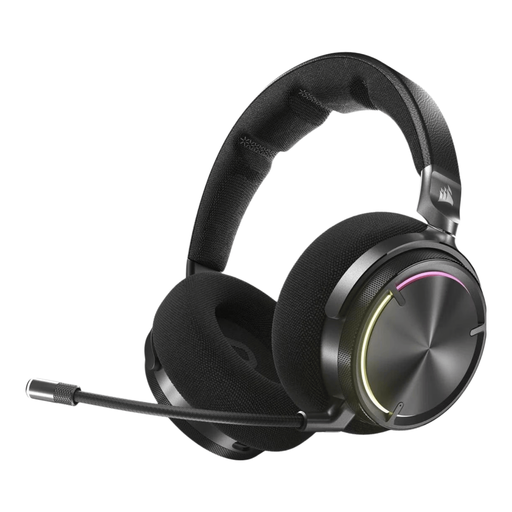
Why this fits the profile: The combination of RF wireless, Bluetooth, active noise cancellation and Dolby Atmos is aimed at users who want plenty of customisation options.
The connection isn’t limited to Bluetooth: the product information mentions RF for PC, PS4 and PS5. Do check the desired features per platform beforehand.
50mm drivers, specified frequency range of 20–40,000 Hz, active noise cancellation and up to 30 hours battery life.

Why this fits the profile: This model is designed for long gaming sessions and users who frequently switch between PC, console and mobile devices.
The stated battery life is specified per mode: up to 120 hours via 2.4 GHz and up to 200 hours via Bluetooth. That gives a more realistic comparison point than a single general maximum.
53mm drivers, detachable microphone, USB-A and USB-C connections and compatibility with PC, PS5, PS4, Switch and mobile devices according to the product information.
We’ve put together a full, up-to-date list of products that fully meet these strict selection criteria and comply with current European safety regulations.
Not always. Many PS5 models use a USB dongle for 2.4 GHz. Bluetooth may be intended for smartphones or tablets and can’t work with the PS5 without an extra adapter. So check the platform specification and the included receiver.
That varies by model and usage. In the product specifications of the models mentioned, the stated battery life ranges from 22 to 120 hours in the relevant wireless mode. Volume, RGB lighting and connection method all affect the actual result.
The electricity costs for USB-C charging are generally low. The main practical costs are more likely a possible replacement after wear and tear on the battery or ear cushions. So choose a model with a wired backup, sturdy construction and suitable warranty. In the European Union, these products are covered by at least the statutory conformity protection; additional rights may vary by product and situation.
