
Vandaag of morgen in huis

Kwaliteit gegarandeerd

Welkomstaanbiedingen ontgrendelen: GRATIS bezorging | Tot 80% korting | Gratis 30 dagen JoyPlus-proefperiode
Download de app
A wireless gaming headset gives you more freedom of movement while gaming, but not every wireless gaming headset works in the same way. For example, a headset may support Bluetooth but not connect directly to a PS5. A long battery life also does not automatically mean better sound quality or comfort.
The Joybuy Product Recommendation Officer helps you filter the most important specifications. This allows you to compare models based on practical features and avoid paying solely for marketing terms.
Bluetooth is convenient for a smartphone, tablet or laptop. However, competitive games may experience more latency than with a dedicated 2.4 GHz gaming headset with a USB receiver. Check whether the model supports both connection types and which devices work with each mode.
With some headsets, Bluetooth does not connect directly to a PS5 or Xbox. A USB dongle or cable may then be required. So do not just look for “wireless”; check the complete compatibility list.
A headset with “7.1 surround sound” or “3D audio” usually uses software processing through virtual channels. The number of speakers in the earcups is generally still two. Spatial audio can help you distinguish directions, but the result depends on the game, software and your personal preference.
According to the manufacturer’s product information, some models support technologies such as Dolby Atmos, DTS Headphone:X or Windows Sonic. Check whether these features are available on your platform and whether additional software is required.
A stated battery life, such as “up to 70 hours”, is generally measured under certain conditions. RGB lighting, a higher volume, active features and using 2.4 GHz can affect battery life. Therefore, also compare the charging method, any fast-charging function and whether you can continue playing while connected by cable.
For PC gaming, PlayStation and Xbox, a USB receiver via 2.4 GHz is often practical. This connection is designed to minimise the delay between picture and sound. Bluetooth 5.x is particularly useful for mobile devices and everyday use.
Pay attention to the dongle connection:
A gaming headset for PC can often be adjusted using software. With a gaming headset for PS5 or Xbox, it is more important to check whether the USB receiver and chat functions are actually supported.
A gaming headset with microphone should not only include a microphone, but also be practical to operate. A flip-to-mute microphone switches off when you flip it up. A detachable microphone is useful if you also use the headset on the go.
Also look out for:
“Noise cancelling” on the product page may refer to the microphone or to the sound you hear. These are different functions.
For long gaming sessions, memory foam ear cushions, an adjustable headband and a suitable weight are important. A lightweight headset does not automatically feel comfortable: pressure on your ears, clamping force and heat build-up also matter.
As a guide, look for:
Use the volume at a comfortable level and take breaks. Manufacturers warn that prolonged listening at high volume can cause hearing damage.

Why it suits this profile: This headset combines 2.4 GHz, Bluetooth and a 3.5mm connection. That makes it suitable for PC, PlayStation 4/5 and mobile devices.
The product information lists several connection options, so you are not reliant on Bluetooth alone. The microphone is detachable.
50mm drivers, a stated battery life of up to 22 hours and a weight of 290 grams.
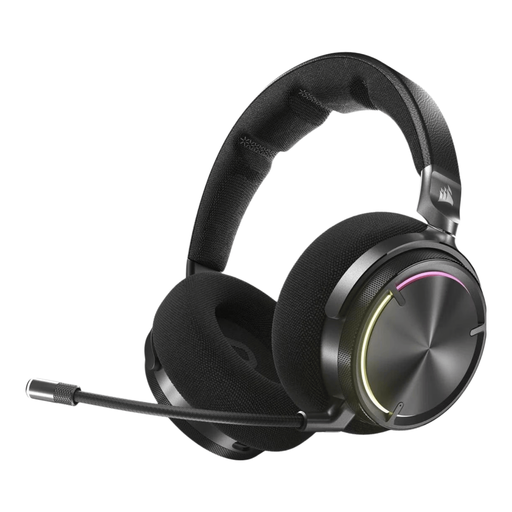
Why it suits this profile: This model is aimed at users who want to customise settings and spatial audio extensively on PC and PlayStation.
The specifications list both RF and Bluetooth. The manufacturer mentions active noise cancellation and Dolby Atmos support; check which software and devices are required.
50mm drivers, customisable audio via SoundID and a stated battery life of up to 30 hours.
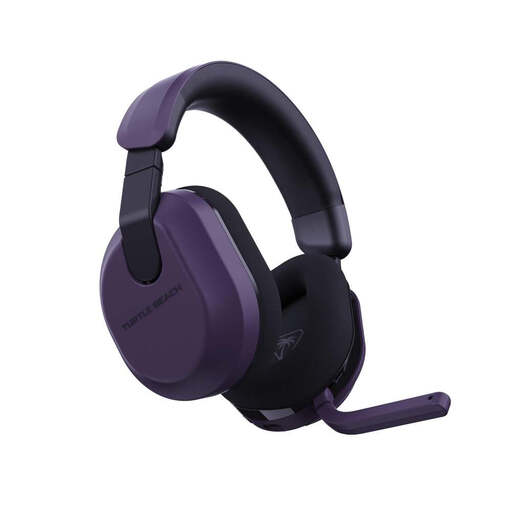
Why it suits this profile: The listed compatibility includes Xbox, PlayStation, PC, Switch, Steam Deck and mobile devices via Bluetooth.
The headset uses 2.4 GHz and Bluetooth 5.2 with a QuickSwitch button. According to the product information, this allows you to switch between sources without pairing again each time.
50mm speakers, a flip-to-mute microphone and a stated battery life of up to 80 hours.

Why it suits this profile: The combination of 2.4 GHz, Bluetooth, memory foam ear cushions and a detachable microphone is well suited to intensive use on PC, console and mobile devices.
The product information lists separate usage times for both modes: up to 120 hours via 2.4 GHz and up to 200 hours via Bluetooth. However, check which features and volume levels apply to these figures.
53mm drivers, DTS Spatial Audio for compatible PC configurations, plus USB-A and USB-C connections.
We have put together a complete, up-to-date list of products that fully meet these strict selection criteria and the applicable European safety regulations.
It depends on the model. Check whether the headset has a USB dongle compatible with PS5. The PS5’s Bluetooth connection cannot be used directly with every headset. With some models, connecting a cable through the controller is an alternative.
For games where low latency is important, 2.4 GHz via a USB receiver is usually the practical choice. Bluetooth is more flexible for smartphones, tablets and music. A headset with both options gives you greater versatility.
The stated usage time varies considerably, from around 22 to 120 hours among the models mentioned. Actual battery life depends on volume, lighting, connection type and software features. So also look for USB-C charging, fast charging and the option to play while connected by cable.
