
Vandaag of morgen in huis

Kwaliteit gegarandeerd

Welkomstaanbiedingen ontgrendelen: GRATIS bezorging | Tot 80% korting | Gratis 30 dagen JoyPlus-proefperiode
Download de app
A wireless gaming headset gives you more freedom of movement than a wired model, but not every headset is suitable for your PC, console or gaming style. A low price may seem appealing, only for you to encounter limited compatibility, a mediocre microphone or rapidly declining battery life later on.
As a Joybuy Product Recommendation Officer, I filter the most important product specifications and marketing claims so you can compare products with confidence. Pay particular attention to these three common pitfalls.
A Bluetooth gaming headset does not automatically work directly with a PS4 or PS5. Some models use Bluetooth only for smartphones, tablets and laptops. Consoles often require a 2.4GHz USB receiver. Check the following for each product:
For example, the ONIKUMA GT806 product information states that Bluetooth does not work directly with PS4, PS5 or PC. For these devices, 2.4GHz mode or a Type-C cable is recommended.
A brand may describe a product as a 7.1 surround sound headset, but the feature may depend on software, platform or a specific connection mode. According to the product information, DTS Headphone:X on the Logitech G432 is linked to use with Logitech G HUB. With other headsets, virtual surround sound may be controlled through the console settings.
A claim such as “less than 30 ms latency” is also a product specification provided by the brand, not a guarantee that every user will have the same experience. Lag can also depend on the connection, dongle position, software and device.
A wireless headset with long battery life will not always achieve the stated play time with RGB lighting, high volume and an active microphone. According to the ONIKUMA GT806 product description, the stated battery life is up to 40 hours in 2.4GHz gaming mode and up to 60 hours for music and video without lighting. The manufacturer also states that RGB lighting increases energy consumption.
So look at battery life by mode, rather than focusing only on the highest figure in the title.
For competitive games, a 2.4GHz wireless headset is often practical because it connects via a USB receiver. Bluetooth is useful for music, phone calls and mobile gaming, but may offer limited functionality on consoles. A triple-mode gaming headset generally combines 2.4GHz, Bluetooth and wired use.
A wired headset does not need a battery and can be a straightforward choice for players who mainly game on one console. Do check that your controller or PC has a 3.5mm socket.
A gaming headset with a microphone should not just include a microphone; it should also be comfortable to position. A detachable microphone is useful if you also want to use the headset for music. A flip-to-mute feature or mute button makes it easy to turn off the microphone during a conversation.
According to the product description, the ONIKUMA GT806 uses an omnidirectional microphone with a noise-reduction function. As this is a brand claim, it is best to assess its performance alongside user reviews and the available settings.
An over-ear gaming headset should fully enclose your ears without pressing firmly against them. Look out for:
RGB lighting is primarily a design choice. It does not change the fit or sound quality and can reduce battery life on wireless models.
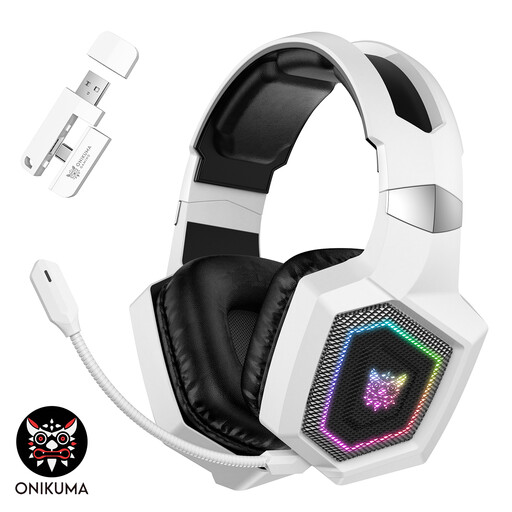
Why it suits this profile: According to the product description, the headset combines 2.4GHz, Bluetooth and wired use with RGB lighting and an over-ear design. This makes it suitable for anyone who wants to use it with multiple devices.
The product information distinguishes between Bluetooth and 2.4GHz use and mentions limited Bluetooth compatibility with PS4 and PS5.
50mm drivers, a detachable microphone, RGB lighting and a brand-stated battery life of up to 40 hours in 2.4GHz mode.

Why it suits this profile: This model is aimed at users who frequently switch between PC, console, mobile and Bluetooth devices, and who value memory foam and a detachable microphone.
The specifications list separate battery life figures for 2.4GHz and Bluetooth, making it easier to match the battery claim to your usage.
According to HyperX, up to 120 hours via 2.4GHz and up to 200 hours via Bluetooth; it also features 53mm drivers, DTS Spatial Audio on PC, and USB-A and USB-C connections.

Why it suits this profile: The combination of 2.4GHz, Bluetooth and wired connectivity suits gamers who listen on a PC or console as well as on a smartphone.
The connection types and stated battery life are listed separately. This makes it clear that 2.4GHz and Bluetooth do not necessarily offer the same battery life.
According to the product information, up to 22 hours of play time, 50mm drivers, a detachable microphone and a 3.5mm audio cable alongside wireless connections.
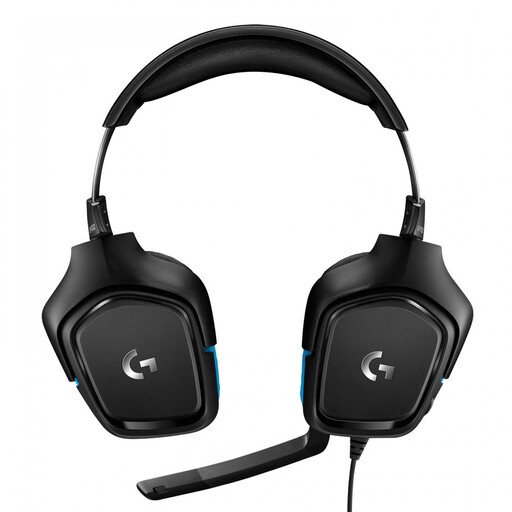
Why it suits this profile: If you do not want to charge a battery and mainly play on PC or PlayStation 4, this wired headset connects directly via USB DAC or a 3.5mm socket.
There is no battery whose capacity declines over time. However, according to the product information, the 7.1 function requires Logitech G HUB software.
50mm drivers, a flip-to-mute microphone, USB DAC, a 3.5mm socket and a stated weight of 259 grams.
We have put together a complete, up-to-date list of products that fully meet these strict selection criteria and the applicable European safety regulations.
Not always. Check whether the model states that it offers direct Bluetooth support for PS5. Many headsets require a 2.4GHz USB dongle. A wired connection via the controller is an alternative if the headset has a 3.5mm socket.
That varies by model and usage mode. RGB lighting, higher volume and an active microphone can reduce battery life. So compare the stated battery life for 2.4GHz, Bluetooth and use with lighting separately.
No. Stereo can be sufficient for chat, music and many games. Virtual 7.1 audio can create a greater sense of space, but check whether the feature works on your platform and whether software is required. Use the headset at a moderate volume and take regular breaks. A headset with a lithium battery should also be disposed of as electronic waste and a battery in accordance with local regulations, not with general waste.
