
Vandaag of morgen in huis

Kwaliteit gegarandeerd

Welkomstaanbiedingen ontgrendelen: GRATIS bezorging | Tot 80% korting | Gratis 30 dagen JoyPlus-proefperiode
Download de app
A wireless gaming headset gives you more freedom of movement while gaming, but not every model works equally well with every console or PC. For example, a headset may support Bluetooth but not connect directly to a PlayStation. A long battery life also means little if the microphone disappoints or the ear cushions become uncomfortable after an hour.
The Joybuy Product Recommendation Officer filters the most important product specifications and lists the most common pitfalls. This helps you compare a wireless gaming headset based on practical features, rather than just RGB lighting, surround sound or marketing claims.
Bluetooth is useful for a phone, tablet or laptop. For competitive games, a 2.4GHz gaming headset with USB receiver is often the more logical choice, as this connection is specifically designed for wireless audio. However, make sure the receiver is compatible with your device. A USB-A or USB-C dongle can be decisive when using a PC, PS5 or Nintendo Switch.
On some models, Bluetooth does not work directly with PlayStation. For example, the ONIKUMA GT806 product information states that Bluetooth is not compatible with PS4 and PS5; you will need to use 2.4GHz mode or a cable instead.
A gaming headset with surround sound can provide virtual spatial audio. How well it works often depends on the software, platform and game. According to the specifications, Dolby Audio 7.1 on the Corsair HS55 Wireless is available on PC and Mac. PS5 supports Tempest 3D AudioTech, but this is not the same as a universal 7.1 function.
So look out for the terms virtual, software required and platform limitation. A stereo headset may also be better suited to voice chat and music than a model where surround sound only works through a computer programme.
RGB lighting, 2.4GHz mode and high volume levels can affect power consumption. According to the ONIKUMA GT806 product description, the battery lasts up to 40 hours in gaming mode and up to 60 hours for music and video without lighting. The same description states that the lighting uses additional power.
So do not compare only the highest figure. Also consider the usage mode, charging port, fast-charging function and whether you can use the headset with a cable when the battery is empty.
A wireless gaming headset can connect in several ways:
Check the official compatibility list before buying. For a headset for PC and PlayStation, PS4 and PS5 are not automatically the same. Xbox may require its own wireless protocol. Nintendo Switch compatibility can also vary between docked and handheld modes.
A gaming headset with microphone should not only deliver sound, but also provide clear voice chat. Look out for:
Noise-cancellation claims come from the brand’s product information. Treat them as a product specification rather than a guarantee of the same experience in every room. A mechanical mute function, such as a flip-up microphone, is easy to check.
An over-ear gaming headset surrounds the ear and can partially block out ambient noise. Check the weight and materials. According to the specifications, the Corsair HS55 Wireless weighs 266 grams, the Razer Barracuda X approximately 250 grams and the Trust GXT 491 Fayzo 290 grams.
Memory foam, an adjustable headband and swivelling earcups can improve the fit, but comfort is still a personal matter. Glasses, a larger head or a warm gaming space can affect your experience. Choose a model with plenty of adjustment options and check the returns policy before placing your order.
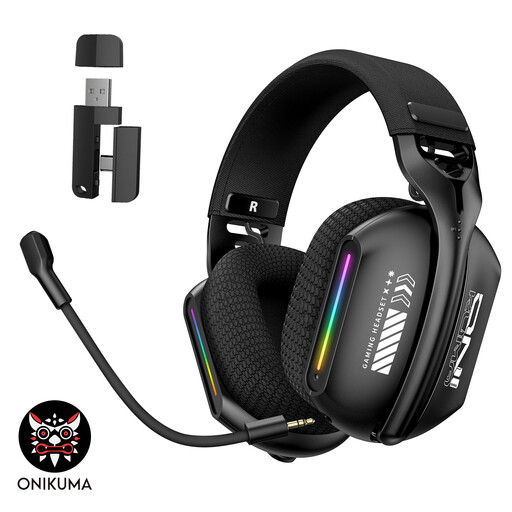
Why it suits this profile: The combination of 2.4GHz, Bluetooth 5.3 and a wired mode offers flexibility for PC, laptop and music use.
The three connection modes make it clear that Bluetooth is not the only option. The 360° adjustable microphone and physical controls are practical features that can be checked easily.
Over-ear design, soft memory foam cushions, adjustable headband and RGB lighting.
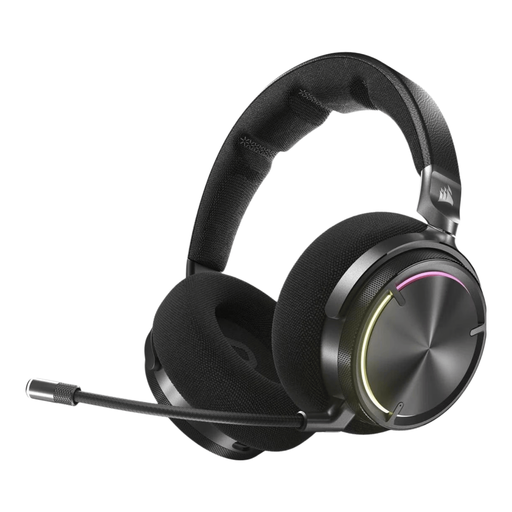
Why it suits this profile: Designed for users who value extensive audio features, dual wireless connectivity and personalisation.
The specifications list both RF wireless and Bluetooth, as well as up to 30 hours of battery life. However, check whether Dolby Atmos and SoundID are available on your device.
50mm graphene drivers, active noise cancellation, virtual surround audio and a built-in microphone.

Why it suits this profile: A good choice for long gaming sessions and users who regularly switch between 2.4GHz, Bluetooth and different devices.
The quoted battery life is broken down by connection: up to 120 hours via 2.4GHz and up to 200 hours via Bluetooth. This makes it clear which figure applies to each mode.
53mm drivers, detachable microphone, memory foam cushions and support for PC, PlayStation, Switch and mobile devices.

Why it suits this profile: For PC and PlayStation users who want to combine 2.4GHz, Bluetooth and a wired connection.
The stated 22-hour battery life is clearly listed, along with the USB receiver, Bluetooth and 3.5mm connection. The microphone is detachable.
50mm drivers, virtual 7.1 surround sound, adjustable headband and swivelling earcups.
We have compiled a complete, up-to-date list of products that fully meet these strict selection criteria and the applicable European safety regulations.
It depends on the model. A USB receiver via 2.4GHz often works with PC and certain PlayStation consoles. Bluetooth does not always work directly with PS4 or PS5. Check compatibility for each connection and use the supplied dongle if necessary.
The stated battery life varies considerably between models and connection modes. The range includes models offering approximately 22 to 30 hours, as well as headsets whose specifications state up to 50, 70, 120 or 200 hours. RGB lighting, volume and connection type can affect actual usage.
No. Virtual surround sound can provide spatial audio, but it is not essential for every game or user. Stereo may be sufficient for voice chat, music and general gaming. Above all, check whether the surround function is available on your PC, console and software.
