
Vandaag of morgen in huis

Kwaliteit gegarandeerd

Welkomstaanbiedingen ontgrendelen: GRATIS bezorging | Tot 80% korting | Gratis 30 dagen JoyPlus-proefperiode
Download de app
A wireless gaming headset gives you more freedom to move than a wired model. However, not every headset is suitable for every console or a long gaming session. A connection can introduce lag, a microphone can pick up background noise, and a comfortable fit can start to feel less comfortable after an hour.
So don’t focus only on RGB lighting, surround sound or a high battery capacity. Check the connections, comfort and how the manufacturer presents the specifications.
Bluetooth is handy for a smartphone, tablet or laptop, but it’s not automatically suitable for gaming. The lag can be noticeable in fast-paced games. A low-latency headset often uses a 2.4GHz USB receiver instead. Be sure to check that the receiver is compatible with your device.
For example, the ONIKUMA GT806 listing says that Bluetooth doesn’t work directly with PS4, PS5 or PC. According to the product information, you need a separate Bluetooth adapter, which isn’t included. For these devices, the 2.4GHz mode is the recommended connection.
A gaming headset with 7.1 surround sound usually uses virtual audio channels. This can help you judge direction and distance in games, but performance also depends on the software, game audio and platform you’re using. Check whether the surround sound is virtual and whether the feature is available on your PC or console.
Brands usually state battery life for a particular connection mode, and sometimes with the lighting switched off. According to ONIKUMA’s product information, the GT806 lasts up to 60 hours for music and video with the lighting off, and up to 40 hours when gaming over 2.4GHz. RGB lighting uses extra power. So don’t compare only the highest figure; check the conditions it applies to as well.
A multi-platform gaming headset may offer several connection options:
Check whether wireless mode is actually supported on each platform. For example, a wireless headset for PS5 may need a USB receiver. For Xbox, pay particular attention to Xbox compatibility; not every PC headset works directly with an Xbox console.
If you often play with others, a clear gaming headset with a microphone is more useful than flashy lighting. Check:
Phrases such as “noise-cancelling microphone” come from the brand’s product description. According to the manufacturer, this can reduce background noise, but how clearly you’re heard also depends on the room, software and microphone position.
An over-ear gaming headset usually covers your ears and can help reduce background noise. Check the size of the ear cups, the weight and the cushion materials. An adjustable headband and swivelling ear cups can help the headset fit different head shapes.
For long sessions, it’s a good idea to take regular breaks and keep the volume at a moderate level. The safety information supplied with the products mentioned here warns that listening at high volume for long periods can damage your hearing.
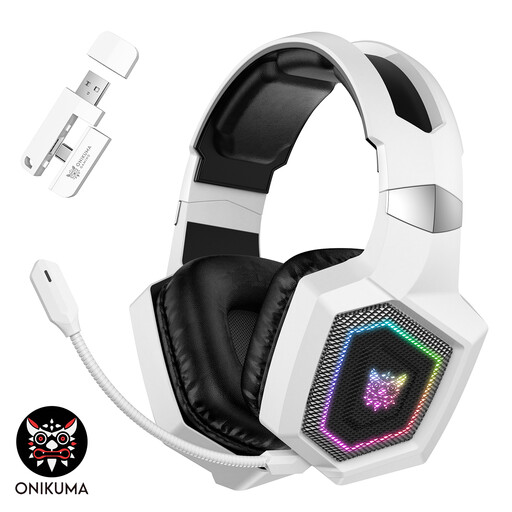
Why it suits this profile: This over-ear headset offers three modes: 2.4GHz, Bluetooth and wired. That makes it suitable for gaming and everyday listening, as long as you choose the right connection for each device.
The product information clearly states that Bluetooth doesn’t work directly with PS5, PS4 or PC. The 2.4GHz receiver is intended for these devices.
50mm drivers, a detachable microphone, RGB lighting and, according to the product description, up to 40 hours of battery life in 2.4GHz gaming mode.
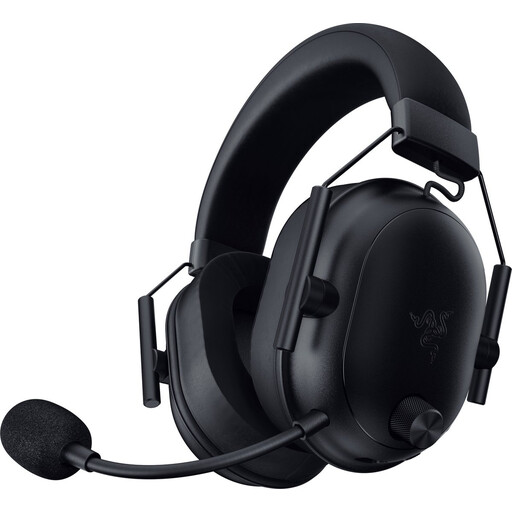
Why it suits this profile: For PC and multi-platform gamers looking for a lightweight model with wireless flexibility and a detachable microphone.
The specifications say the headset supports both 2.4GHz and Bluetooth 5.2. The USB-C dongle included is designed for wireless connection to compatible devices.
The stated weight is 280 grams, with 50mm drivers and a quoted battery life of up to 70 hours.
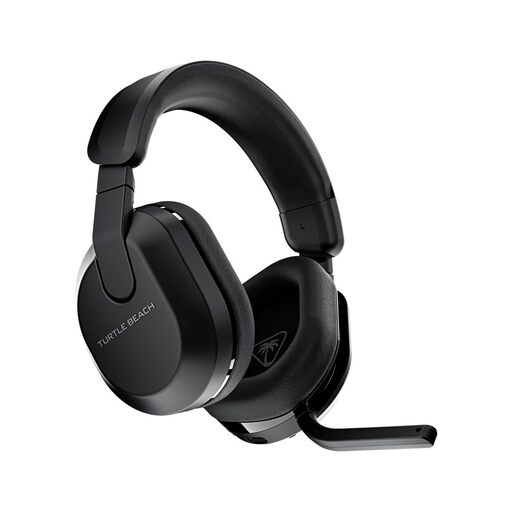
Why it suits this profile: A good choice for gamers who switch between Xbox, PlayStation, PC, Steam Deck and mobile devices, and want a gaming headset with long battery life.
The compatibility list names each platform separately. This lets you check in advance whether your console and connection method are supported.
2.4GHz and Bluetooth 5.2, QuickSwitch, a flip-to-mute microphone and, according to the specifications, up to 80 hours of battery life.
We’ve put together a complete, up-to-date list of products that meet these strict selection criteria and the applicable European safety regulations.
It depends on the model. A wireless headset for PS5 often uses a USB dongle or a platform-specific connection. Bluetooth doesn’t work directly with PS5 for every model. So check the compatibility list and the included receiver before ordering.
It depends on the connection, lighting, volume and how much you use the microphone. Manufacturers often quote a maximum battery life. Use this figure as a guide and check whether the test conditions match how you plan to use the headset. A wired back-up mode can be handy if you want to keep listening while gaming when the battery runs out.
Bluetooth can work well for casual games, music and calls. For fast-paced competitive games, 2.4GHz is often more practical because of its lower latency. Also check whether your PC supports Bluetooth or whether you’ll need an adapter. That way, you won’t have to buy an extra accessory after your headset arrives.
