
Vandaag of morgen in huis

Kwaliteit gegarandeerd

Welkomstaanbiedingen ontgrendelen: GRATIS bezorging | Tot 80% korting | Gratis 30 dagen JoyPlus-proefperiode
Download de app
A wireless gaming headset gives you freedom of movement while gaming, but not every model suits every player. A headset that works well on PC may connect differently to Xbox. Terms such as “surround sound”, “low latency” and “noise reduction” also do not automatically mean the experience will be the same for everyone.
The most common pitfalls are:
A wireless gaming headset with 2.4 GHz usually uses a USB dongle. This connection is designed for a direct wireless link with a PC or console. However, check that your device has the correct USB port and that the receiver is included.
Bluetooth is practical for a phone, tablet or laptop. Some headsets support simultaneous use of, or quick switching between, 2.4 GHz and Bluetooth. This is useful if you want to hear notifications or calls from your smartphone while gaming. Please note that not every console supports Bluetooth audio directly.
A headset with a 3.5mm connection can be a useful back-up. You can carry on playing when the battery runs out, provided your device has a suitable audio input.
Look at the stated battery life, as well as the conditions under which it applies. Lighting, Bluetooth, volume and spatial audio can affect battery life. A gaming headset with long battery life is particularly practical if you play for several hours a week or often forget to charge it.
You must not open or replace a built-in lithium battery yourself. Charge the headset with a certified cable and do not leave it connected to the charger for extended periods in a damp or hot place. EU statutory warranty rights continue to apply in accordance with the seller’s terms and the applicable regulations.
An over-ear gaming headset surrounds your ears and can partially block out ambient noise. Pay attention to the shape of the ear cushions, the adjustability of the headband and the weight. For comparison, the models available range from approximately 250 grams to more than 300 grams.
With a gaming headset with microphone, a tilting, detachable or flip-to-mute microphone can be a practical feature. Also check whether microphone settings are only available through a PC app. A product description may, for example, mention noise reduction; present this as a brand claim. According to the manufacturer’s own product information, a particular microphone may reduce background noise, but clarity also depends on the room, the distance from the microphone and the software settings.

Why it suits this profile: An accessible over-ear gaming headset for PC and PlayStation users who want to play both wirelessly and with a cable.
The specifications list 2.4 GHz, Bluetooth, a 3.5mm cable and battery life of up to 22 hours. This means you are not entirely dependent on wireless use.
50mm drivers, detachable microphone, USB-C charging and a weight of approximately 290 grams.
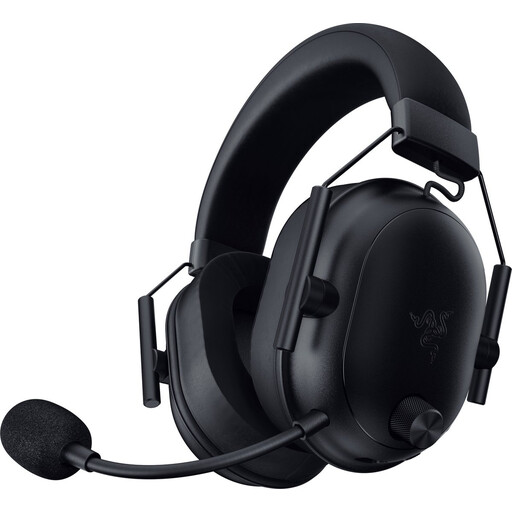
Why it suits this profile: Designed for players looking for a lightweight model with multiple wireless options, a detachable microphone and broad compatibility.
The stated compatibility includes several consoles, PCs and mobile devices. However, check for each platform whether the supplied dongle is required.
Weight of approximately 280 grams, Bluetooth 5.2, 50mm drivers and stated battery life of up to 70 hours.
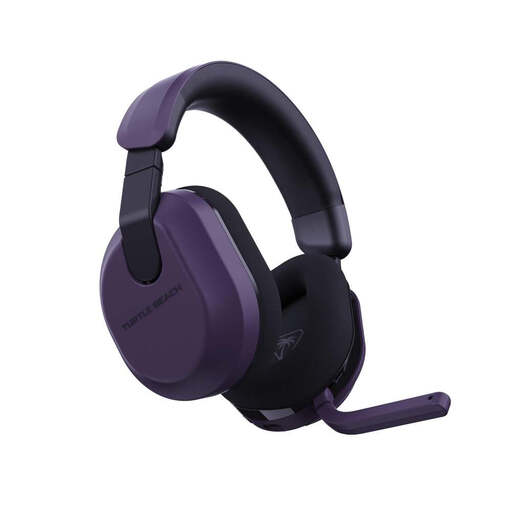
Why it suits this profile: Suitable for players who frequently switch between Xbox, PlayStation, PC, Steam Deck and mobile devices.
The product information lists 2.4 GHz, Bluetooth 5.2 and a QuickSwitch function. This makes switching between sources easier, but check the console variant in advance.
Battery life of up to 80 hours, 50mm speakers, memory foam ear cushions and a flip-to-mute microphone.

Why it suits this profile: For users who rarely want to charge their headset and are looking for one with both 2.4 GHz and Bluetooth.
The stated battery life varies by connection: up to 120 hours via 2.4 GHz and up to 200 hours via Bluetooth. This clearly shows the difference between the two modes.
53mm drivers, detachable microphone, USB-A and USB-C connections and compatibility with multiple devices.
We have put together a complete, up-to-date list of products that fully meet these strict selection criteria and the applicable European safety regulations.
No. Check that the model is suitable for your specific console and whether a USB receiver is required. Bluetooth does not work directly with every console. A headset with a 3.5mm cable can sometimes be used as an alternative through the controller.
2.4 GHz via a dongle is designed for a direct connection with low latency. Bluetooth is mainly useful for smartphones, tablets and laptops. For a multi-platform gaming headset, support for both connections is practical, provided your devices are compatible.
Its lifespan depends on the hinges, ear cushions, battery use and daily care. Store the headset somewhere dry, do not pull on the cable and charge it according to the instructions. Before buying, check whether the ear cushions, cables or microphones can be replaced. Also keep the volume at a comfortable level and take regular breaks.
