
Vandaag of morgen in huis

Kwaliteit gegarandeerd

Welkomstaanbiedingen ontgrendelen: GRATIS bezorging | Tot 80% korting | Gratis 30 dagen JoyPlus-proefperiode
Download de app
A wireless gaming headset gives you freedom to move while gaming, but not every model will suit every player. For example, a connection described as wireless may only work via Bluetooth, when competitive games call for a low-latency USB receiver. A heavy headband, mediocre microphone or limited compatibility may also only become apparent after a few gaming sessions.
This buying guide helps you turn marketing claims into specifications you can check. It also shows you how to compare a gaming headset with a microphone for PC, a wireless headset for PS5 or a multi-platform gaming headset based on practical features.
Bluetooth is handy for smartphones, tablets and music. However, you may notice a delay when gaming. Check whether the headset also supports a 2.4 GHz gaming connection via a USB dongle. This connection is usually designed to provide more stable audio transmission with low latency.
Be aware of exceptions, too. According to its product information, the ONIKUMA GT806 supports 2.4 GHz, Bluetooth and wired use. However, Bluetooth does not work directly with PS4, PS5 or PC; you’ll need a separate Bluetooth adapter. The 2.4G mode is recommended for these devices.
Many gaming headsets with 7.1 surround sound use virtual processing rather than eight separate speakers. The result depends on the software, the game and your personal preference. So check:
According to its product specifications, Dolby Audio 7.1 is supported on PC and Mac with the Corsair HS55 Wireless. Tempest 3D AudioTech support is listed for PS5. This doesn’t automatically mean every surround feature will work in the same way on every device.
A headset with long battery life may have different running times depending on the connection method, lighting and volume. RGB lighting uses extra power. For example, the ONIKUMA GT806 is listed as offering up to 60 hours for music and video without lighting, and up to 40 hours of gaming via 2.4 GHz. If you use an RGB gaming headset, check the battery life with the lighting switched on.
First, make a list of the devices you want to use the headset with:
A multi-platform gaming headset with 2.4 GHz, Bluetooth and a 3.5 mm cable gives you more options, but always check which accessories are included and which platforms are specifically listed.
Low latency is important for fast-paced shooters, racing games and rhythm games. A manufacturer may list a delay of less than 30 ms, but this is a stated product specification, not a guarantee that every user will have exactly the same experience. According to their product information, the ONIKUMA GT806 and Sony INZONE Buds both offer a connection with less than 30 ms latency.
Also check the driver diameter. Models with 40 mm, 50 mm or 53 mm drivers are common. A larger driver doesn’t determine sound quality on its own, but it does give you an indication of the headset’s design. Check the frequency range and software equaliser, too, as well as whether you can switch between stereo sound and spatial audio.
A good gaming headset with a microphone needs to do more than sound loud: it should also make team conversations easy to understand. Check whether the microphone:
Weight, ear cushions and adjustability are important for long sessions. The Razer BlackShark V2 is listed at 280 grams, the Corsair HS55 Wireless at 266 grams and the Razer Barracuda X at approximately 250 grams. These are specifications you can check, but fit is still a matter of personal preference. An over-ear gaming headset may block out more background noise, while some players prefer a lighter in-ear model.
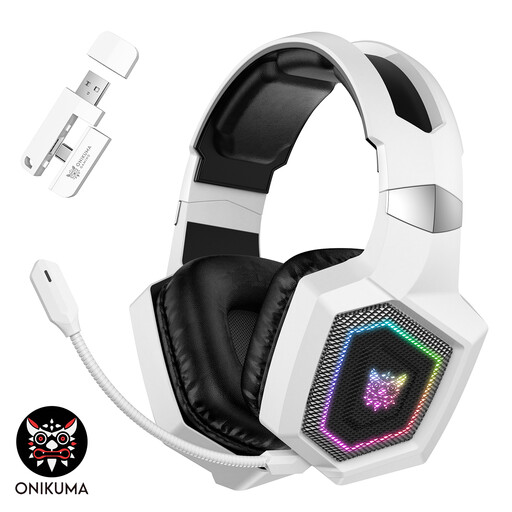
Why it suits this profile: This headset offers three ways to connect: 2.4 GHz, Bluetooth and wired via USB-C. That makes it a good choice if you use several devices and don’t need to spend a premium.
The product information clearly states that Bluetooth doesn’t work directly with PS4, PS5 and PC. The 2.4G receiver is the recommended option for these devices.
50 mm drivers, stated latency of under 30 ms and up to 40 hours of gaming via 2.4 GHz, according to the product description.
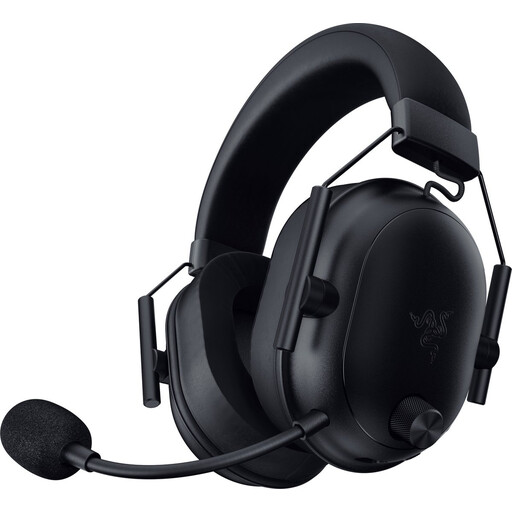
Why it suits this profile: This model is designed for players who value a lightweight build, a detachable microphone and both Bluetooth and 2.4 GHz connectivity.
As well as Bluetooth, the headset uses Razer HyperSpeed Wireless, so you don’t have to rely solely on a Bluetooth connection for gaming.
Weighs 280 grams, with 50 mm TriForce drivers, a detachable microphone and a stated battery life of up to 70 hours.

Why it suits this profile: For players who game often and for long sessions, the combination of 2.4 GHz, Bluetooth, memory foam ear cushions and a detachable microphone is practical.
The stated battery life is listed separately for 2.4 GHz and Bluetooth, making it easier to judge how the claim applies to the way you use the headset.
Up to 120 hours via 2.4 GHz and up to 200 hours via Bluetooth, according to the product specifications, plus compatibility with PC, PS5, PS4, Switch and mobile devices.
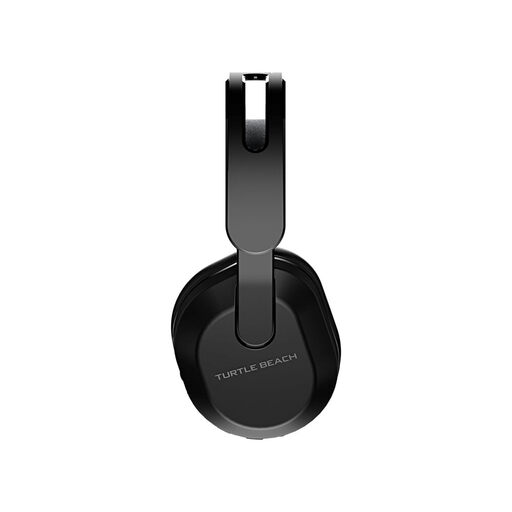
Why it suits this profile: This model is designed specifically for Xbox Series X|S and Xbox One, with Bluetooth for devices including PC, Nintendo Switch and mobile devices.
Platform support and connection methods are listed separately. This helps you avoid buying a standard Bluetooth headset for Xbox.
2.4 GHz for Xbox, Bluetooth 5.2, a flip-to-mute microphone and a stated battery life of up to 40 hours.
We’ve put together a complete, up-to-date list of products that meet these strict selection criteria and the current European safety regulations.
It depends on the model. PS5 headsets often use a supplied USB receiver for 2.4 GHz. Direct Bluetooth audio isn’t supported by every headset or console combination. So always check that PS5 is listed as compatible and see whether a dongle is included.
For gaming, 2.4 GHz is often more practical when low latency matters. Bluetooth is still useful for smartphones, tablets and music. A model with both connection types gives you more flexibility, but check that both modes work with your device.
Battery life ranges from around 22 hours to much longer, depending on the model and connection mode. Volume, RGB lighting and features such as active noise cancellation can affect how long it lasts. So don’t just look at the maximum number of hours; check the conditions under which it was measured, too.
