
Vandaag of morgen in huis

Kwaliteit gegarandeerd

Welkomstaanbiedingen ontgrendelen: GRATIS bezorging | Tot 80% korting | Gratis 30 dagen JoyPlus-proefperiode
Download de app
A wireless gaming headset gives you more freedom of movement while gaming, making calls and streaming. However, a long list of features does not automatically mean that a model is right for your situation. For example, a headset may support Bluetooth but not connect directly to a PlayStation. RGB lighting and virtual surround sound can also affect battery life or compatibility.
Joybuy Product Recommendation Officer helps you separate the most important information from marketing claims. Below, you’ll find what to look for in a gaming headset with microphone for PC, PlayStation, Nintendo Switch or mobile use.
Bluetooth is useful for a smartphone, tablet or laptop. For competitive gaming, many models also use a 2.4GHz gaming connection via a USB dongle. According to manufacturers, this connection is designed to provide a direct connection with low latency.
However, always check the platform specifications. A Bluetooth gaming headset will not automatically connect directly to every PlayStation. Sometimes you’ll need the included dongle. For example, the ONIKUMA GT806 states that Bluetooth does not connect directly to PS4, PS5 or PC; you’ll need to use 2.4GHz mode or an additional adapter instead.
A gaming headset with surround sound often uses virtual audio processing. This is different from having multiple physical speakers in each earcup. Performance also depends on the software, platform and game.
For example, Corsair lists virtual Dolby Audio 7.1 for PC and Mac with the HS65 Wireless. On PS5, Sony Tempest 3D Audio is mentioned, while PS4 uses stereo. So don’t just look for the word “surround”; also check which device and software the feature is available with.
A gaming headset with long battery life may show different figures for Bluetooth, 2.4GHz and RGB use. The Razer Barracuda X Chroma offers up to 70 hours with the lighting switched off. The Corsair VOID RGB V2 claims up to 70 hours in 2.4GHz mode. RGB lighting, volume, microphone use and wireless mode can all affect the result.
Also check the charging port, fast-charging function and whether you can use the headset with a cable when the battery is empty.
For PC gaming, a 2.4GHz USB dongle is often practical. Bluetooth is useful for mobile devices and everyday entertainment. A model with both options, such as the Razer Barracuda series, can switch between different use cases.
Pay attention to the following:
A gaming headset with microphone should not just include a microphone; it should also be easy to use. A detachable microphone is useful if you plan to wear the headset outside gaming. A flip-to-mute microphone can mute automatically, but check whether this function works on your chosen platform.
Specifications such as a microphone range of 100 Hz to 10 kHz provide technical information, but they do not fully predict how your voice will sound in a busy room. So pay attention to the microphone’s position, a mute button and any software for noise reduction. Claims about voice clarity or noise reduction should be treated as information from the brand, not as a universal guarantee.
A comfortable over-ear headset should fit securely without pressing too tightly. Weight is a useful starting point that can be checked: various models in the range weigh approximately 250 to 303 grams. The HyperX Cloud III S is listed at 340 grams, but features memory foam ear cushions and an adjustable headband.
Also check:
Do not use a headset at high volume for extended periods. The manufacturers’ included safety information warns that prolonged exposure to high sound levels can damage your hearing.

Why it suits this profile: This wired model is suitable for anyone who does not want to charge a battery and mainly plays on a PC, laptop, Mac, phone or compatible console.
The 3.5mm connection keeps things simple. However, according to the product information, the USB connection is intended for the LED lighting only.
Flexible microphone, over-ear design and volume control with mute function. RGB works via USB.
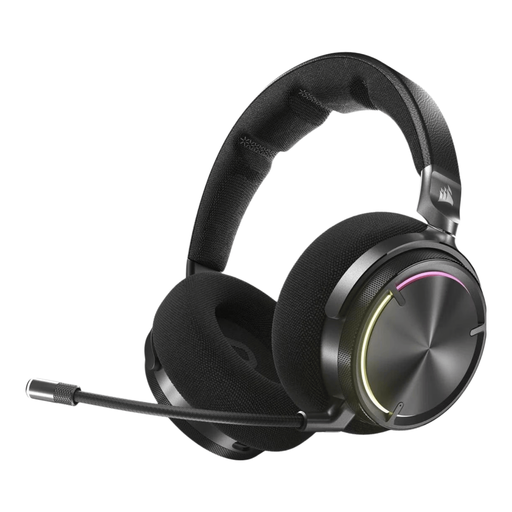
Why it suits this profile: This model combines RF wireless connectivity with Bluetooth and, according to the product specifications, is designed for PC, PS4 and PS5.
The connection options are clearly separated: RF for gaming and Bluetooth for compatible devices. Check in advance that your platform is supported.
50mm drivers, active noise cancellation, virtual Dolby Atmos support and a stated battery life of up to 30 hours.

Why it suits this profile: Suitable for long sessions and multiple devices thanks to 2.4GHz, Bluetooth, memory foam ear cushions and a detachable microphone.
The stated battery life varies by mode: up to 120 hours via 2.4GHz and up to 200 hours via Bluetooth. This makes it clear which usage mode each claim refers to.
53mm drivers, USB-A and USB-C connectivity, DTS Spatial Audio according to the product information, and compatibility with PC, PS5, PS4, Switch and mobile devices.
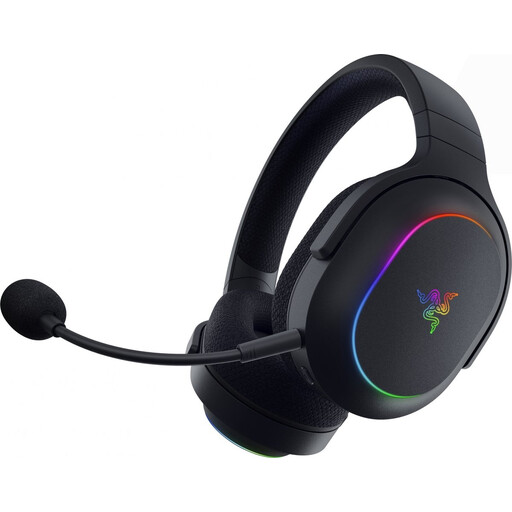
Why it suits this profile: The SmartSwitch function is designed for users who switch between PC, PlayStation, Nintendo Switch and mobile devices.
The product information lists 2.4GHz radio and Bluetooth 5.2 separately. The lighting can be switched off when battery life is more important.
285 grams, 40mm drivers, detachable cardioid microphone and a stated battery life of up to 70 hours with the lighting switched off.
We’ve put together a complete, up-to-date list of products that fully meet these strict selection criteria and the applicable European safety regulations.
No. Always check the platform list and connection method. A USB dongle often works with PC and PlayStation, while Bluetooth support on consoles may be limited. With Nintendo Switch, support may vary between handheld and docked modes.
This depends on the wireless mode, volume and features such as RGB. In the product specifications for the models mentioned, the stated battery life ranges from 24 to 120 hours in certain usage modes. Treat these figures as manufacturer specifications and check which settings they relate to.
Not necessarily. 2.4GHz is particularly practical for gaming via a dongle, while Bluetooth is suitable for smartphones, tablets and everyday listening. If you need both, you can choose a model with dual wireless connectivity. Make sure it supports switching between the modes and the devices you want to use.
