
Vandaag of morgen in huis

Kwaliteit gegarandeerd

Welkomstaanbiedingen ontgrendelen: GRATIS bezorging | Tot 80% korting | Gratis 30 dagen JoyPlus-proefperiode
Download de app
A tangled mess of cables around your chair, accidentally pulling your controller off the table, or being restricted in your freedom of movement. These are common frustrations for many gamers. A wireless gaming headset offers the solution: complete freedom and a clutter-free desk. But the market is flooded with options, each with its own specifications and promises.
This guide is designed to help you make an informed decision. We highlight the most important features and present a selection of popular models based on their specifications and intended use. This way, you can find a headset that perfectly suits your playstyle.
Before you make a choice, it's helpful to understand a few technical aspects. These determine how the headset performs in practice.
Wireless headsets connect using two primary technologies:
Some headsets offer both options, allowing you to seamlessly switch between your console and your phone.
Most games are designed with positional audio in mind. A surround sound headset can offer an advantage here. This technology simulates a 3D soundscape, allowing you to hear exactly where footsteps or gunshots are coming from. While standard stereo can also provide a great experience, virtual surround sound, such as DTS Headphone:X or 7.1, often gives you a tactical advantage.
Long gaming sessions demand a comfortable headset. Pay attention to the weight, the material of the ear cushions (leather, fabric), and the adjustability of the headband. A good headset with a microphone is just as important. A detachable microphone with noise cancellation ensures your teammates hear you loud and clear, without distracting background noise.
Below is a selection of models that stand out for their specifications and features.
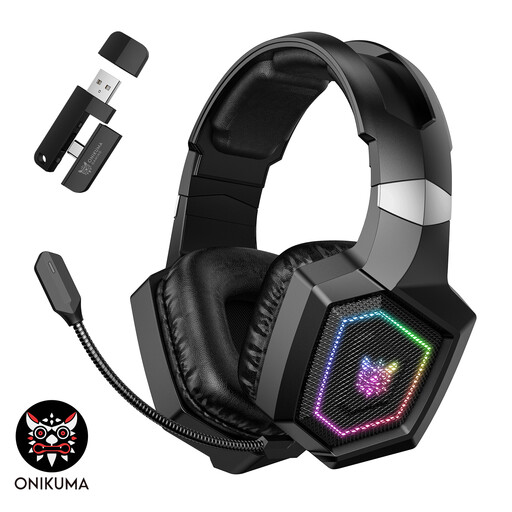
Why it stands out: The ONIKUMA GT806 combines versatility with a striking design. With its triple-mode connectivity (2.4G, Bluetooth, and wired), this headset is suitable for almost any platform.
Pros:
Who is it for?: The gamer looking for a flexible and affordable headset for use across multiple devices, who sees the RGB lighting as a nice bonus.
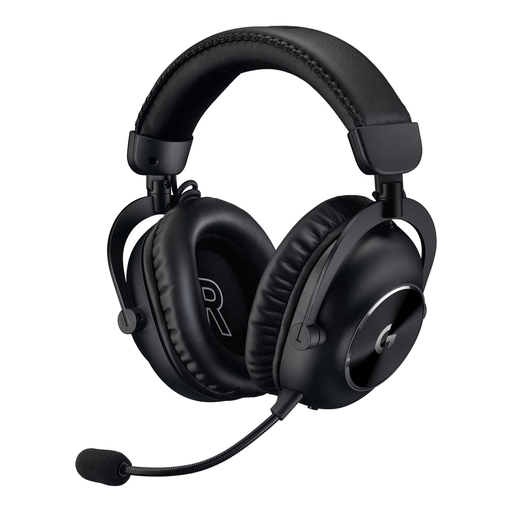
Why it stands out: This model was designed in collaboration with professional gamers. The focus is on performance, featuring 50 mm graphene drivers for clear and accurate audio and the reliable Lightspeed wireless technology.
Pros:
Who is it for?: The competitive gamer seeking a headset built for performance and reliability, especially for PC and PlayStation.
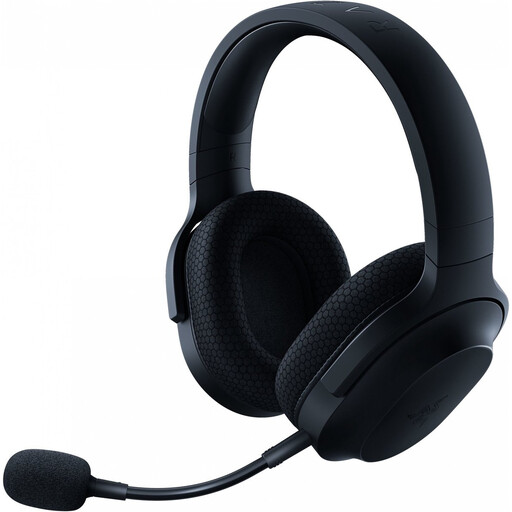
Why it stands out: The Razer Barracuda X is a true all-rounder. Weighing only 250 grams and featuring SmartSwitch technology, it's ideal for both gaming at home and use on the go.
Pros:
Who is it for?: The user who wants one headset for everything: gaming on different platforms, listening to music, and taking calls with a smartphone.

Why it stands out: The HyperX Cloud series is renowned for its comfort, and the Cloud III S Wireless is no exception. The exceptionally long battery life makes this model an endurance champion.
Pros:
Who is it for?: The gamer for whom comfort during extremely long sessions and a battery that almost never needs charging are the highest priorities.
A good headset is a major step toward a better gaming experience, but a stable setup requires more. For a reliable connection to your console or PC and the right ports, high-quality cables are essential.
Check out our range of gaming console cables to optimize your gear.
A 2.4GHz connection uses a USB dongle and provides a very fast, stable connection with minimal delay, which is ideal for gaming. Bluetooth is more universal and connects to more devices (like smartphones) without a dongle, but it can have a noticeable lag that can be distracting in fast-paced games.
No, not automatically. Most headsets with a 2.4GHz USB dongle work flawlessly with a PS5 headset port. However, direct Bluetooth audio connections are not natively supported by the PS5. Always check the product page to see if the headset is explicitly compatible with the PS5.
For competitive shooters like Call of Duty or Valorant, a surround sound headset can offer a clear advantage by helping you pinpoint enemy locations. For single-player adventures or strategy games, it's a nice extra for immersion, but a good stereo headset is often sufficient. The choice depends on the games you play and your personal preference.
