
Vandaag of morgen in huis

Kwaliteit gegarandeerd

Welkomstaanbiedingen ontgrendelen: GRATIS bezorging | Tot 80% korting | Gratis 30 dagen JoyPlus-proefperiode
Download de app
A wireless connection sounds ideal for gaming – until the audio arrives slightly too late, your microphone picks up keyboard noise or your earbuds start to feel uncomfortable after an hour. In competitive games, details like these can be distracting. Marketing claims about spatial audio, battery life and noise cancellation do not always tell the whole story either.
Joybuy Product Recommendation Officer helps you assess the most important specifications of wireless gaming earbuds in practical terms. This allows you to compare models based on verifiable features that better suit your PC, console and playing style.
Bluetooth gaming earbuds are convenient for smartphones and everyday use, but latency can vary depending on the device, codec and connection. For fast-paced shooters or rhythm games, a dedicated USB-C dongle is often the more sensible choice. So do not just check whether a product supports Bluetooth; also check whether it has a separate low-latency connection.
A stated battery life may refer to listening via an energy-efficient Bluetooth mode, while noise cancellation or the gaming dongle uses more power. Check the battery life for each connection method. According to the product description, the Sony INZONE Buds offer up to 12 hours with the dedicated wireless dongle and up to 24 hours with LE Audio. The stated 11 hours with noise cancellation is listed as a product specification.
Features such as 360 Spatial Sound gaming can affect the perception of direction and distance, but the result also depends on the game, settings, fit and personal preference. According to Sony’s product information, you can create a personalised listening profile using the 360 Spatial Sound Personaliser app. Treat this as an additional adjustment option, not a universal guarantee of better performance.
For competitive gaming, the time between an action and the resulting sound is important. A 2.4 GHz USB dongle or similar gaming connection is generally designed to provide more stable, faster transmission than a standard Bluetooth profile. Check:
According to the product description, the Sony INZONE Buds have latency of less than 30 ms via the USB-C dongle. This is a specific product specification that is more useful to assess than a general claim such as “super-fast”.
Gaming earbuds with a microphone are compact, but recording quality varies considerably. Pay attention to the number and position of the microphones, as well as any software-based noise reduction. An algorithm can reduce ambient noise, but how well it works depends on your surroundings and your voice.
According to Sony’s own information, the INZONE Buds microphone uses an AI DNN algorithm to suppress fan and keyboard noise, among other sounds. This is a brand claim; in practice, a quiet microphone position and an appropriate sensitivity setting remain important.
Comfort is not just about weight. The right earbuds should create a good seal without causing pressure, especially during long sessions. Check the included silicone ear-tip sizes and look at the weight. An IPX4 rating means protection against splashing water, but it does not make a product suitable for submersion or intensive contact with water.
When reviewing battery information, pay attention to three figures:
A high total battery life tells you little if you frequently use the earbuds with noise cancellation and a gaming dongle. Always compare the same usage mode.
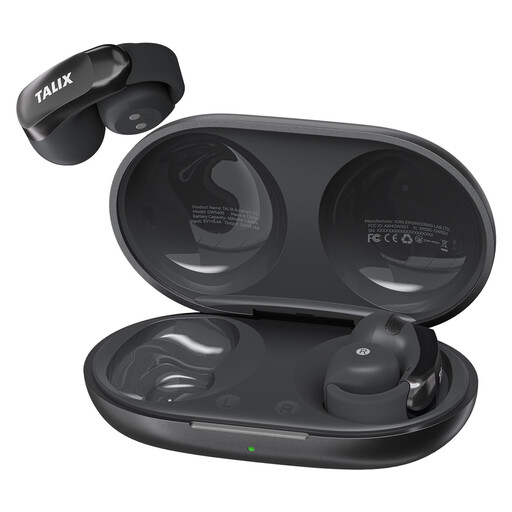
Why it suits this profile: This model is designed for everyday use, online calls and casual gaming. The clip-on fit may appeal to players who do not want to wear closed-back headphones.
The product specifications state Bluetooth 5.3, four microphones, IPX4 and a separate battery life of up to 7 hours per charge.
Up to 28 hours with the charging case, fast charging and a silicone ear hook. However, check that your device and game are suitable for Bluetooth gaming.
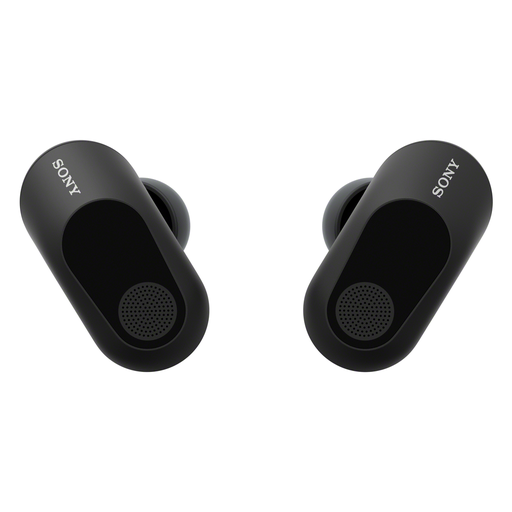
Why it suits this profile: For players looking for gaming earbuds with noise cancellation, spatial audio and a dedicated wireless dongle for PC or console.
The product information distinguishes battery life by connection mode and states latency of less than 30 ms via the USB-C dongle.
Active noise cancellation, 360 Spatial Sound for Gaming, IPX4 and a microphone with an AI DNN algorithm, according to Sony.
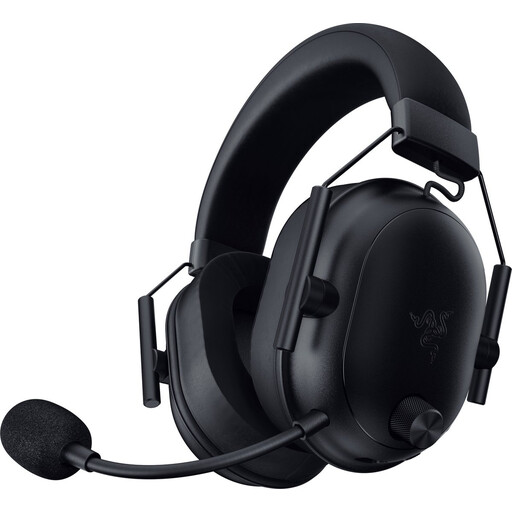
Why it suits this profile: This is an over-ear alternative for gamers who value a larger microphone, physical controls and broad platform support more than the compact size of earbuds.
The stated 70-hour battery life is separate from the smaller earbud form factor. The headset also uses a USB-C dongle alongside Bluetooth.
280 grams, a HyperClear microphone, 50 mm TriForce drivers and support for PC, PlayStation, Xbox, Nintendo Switch and Bluetooth devices according to the product details.
We have compiled a complete, up-to-date list of products that fully meet these strict selection criteria and the applicable European safety regulations.
Before buying, check that the dongle is physically compatible with your device. A USB-C connection is not equally accessible on every console; in some cases, you may need a USB-C-to-USB-A adapter. Then install the manufacturer’s app, if available, to adjust the equaliser, spatial audio, touch controls and microphone settings.
Before your first gaming session:
Use a moderate volume and take breaks during long sessions. Stop if you experience irritation or discomfort. Clean the earbuds with a soft, dry cloth and keep them away from water, heat and small children.
That depends on the connection and compatibility. Models with a USB-C dongle are often designed for gaming, but check the supported platforms for each product. Bluetooth alone does not automatically provide the same latency or chat support on every console.
Battery life per charge varies by model and function. Noise cancellation, spatial audio and a gaming dongle can drain the battery more quickly. The lifespan of the built-in battery also depends on charging cycles, temperature and usage. Store the earbuds in the charging case and use suitable accessories.
That depends on your surroundings. In a quiet room, active noise cancellation may be less important. In a busy household or while travelling, it can reduce ambient noise. Compare the feature with latency, microphone quality, fit and battery life rather than focusing solely on the term noise cancellation.
