
Vandaag of morgen in huis

Kwaliteit gegarandeerd

Welkomstaanbiedingen ontgrendelen: GRATIS bezorging | Tot 80% korting | Gratis 30 dagen JoyPlus-proefperiode
Download de app
A wireless game controller might seem straightforward to choose at first. However, unclear compatibility, exaggerated battery claims and features that don’t work with your console in practice can easily lead to the wrong purchase. A controller for Nintendo Switch, for example, won’t automatically work with Xbox, PC and smartphones.
So don’t focus only on colour, price or RGB lighting. First check the connection, supported platforms and the features you’ll actually use.
A Bluetooth game controller works differently from one with a 2.4GHz dongle. Bluetooth is handy for smartphones, tablets and some consoles, while a dongle is often designed for PC or specific gaming platforms. Some models also support a USB cable, but that doesn’t automatically mean every feature will remain available in wired mode.
So check:
Brands often quote battery life such as “up to 40 hours”. This is a stated maximum and can vary depending on vibration, lighting, wireless connection and how intensively you use the controller. For models with a built-in battery, charging time is also worth checking.
An Xbox controller, for example, can run on AA batteries and, according to the product description, offer up to 40 hours of use. Other controllers have a built-in battery of, for example, 860, 1000 or 1500 mAh. A USB-C gamepad is easy to charge, but check whether the cable is included.
Controllers with Hall effect sticks or TMR sticks use magnetic sensors instead of traditional potentiometers. Manufacturers often present this as a way to reduce wear and stick drift. According to GameSir, its Cyclone 2’s Mag-Res TMR sticks combine precision with lower power consumption. That’s the brand’s claim, so you should still check the warranty, software and adjustment options.
It’s also worth remembering that stick technology doesn’t automatically mean the shape, resistance and position of the sticks will suit your hands.
Start with the platform you play on most. For a Nintendo Switch controller or Switch 2 controller, features such as motion sensors, the Home button and NFC support may be important. Not every controller supports all the features of an official controller.
For PC, a wireless controller for PC is often more versatile when it combines Bluetooth, USB and a dongle. The GameSir Cyclone 2 lists compatibility with Switch, PC, iOS and Android, and supports Bluetooth, a wireless dongle and a cable.
An Xbox controller is generally designed for Xbox consoles and Windows. According to the product information, the Xbox Wireless Controller models in Velocity Green and Robot White support Xbox Series X|S, Xbox One, Windows and mobile devices. For smartphones, check that your operating system and game support the controller.
Bluetooth is often good enough for casual games. Competitive players are more likely to pay attention to the connection method, polling rate and stability. The GameSir Cyclone 2 lists a 1000Hz report rate in both wired and wireless modes. That’s a technical specification, but its noticeable impact also depends on the game, platform and connection used.
A higher polling rate doesn’t automatically make a controller a better choice. Also consider:
Consider the weight, grip texture and distance between the sticks. A heavier model may feel more stable, but can be less comfortable during long sessions. A lightweight mobile game controller is handy on the go, but may feel different in your hands from a traditional gamepad.
Programmable buttons, vibration, turbo and motion sensors are useful if they suit the games you play. Also check for limitations. The Hori Horipad Turbo, for example, has programmable rear buttons, profiles and TMR sticks, but the product information states that HD vibration isn’t supported. So a feature mentioned on the box doesn’t tell you everything about the full range of features.
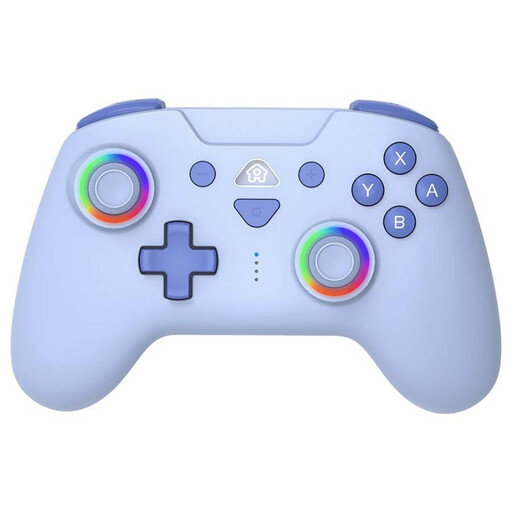
Why it suits this user: For Switch players who want a traditional grip rather than separate Joy-Cons, without jumping straight to a feature-packed PC model.
The specifications list Switch, Switch OLED, Switch Lite and Switch 2. A USB-C cable, motion sensors and three vibration levels are also listed.
Bluetooth, two programmable rear buttons, turbo, gyroscope and a stated battery life of 9 to 10 hours.
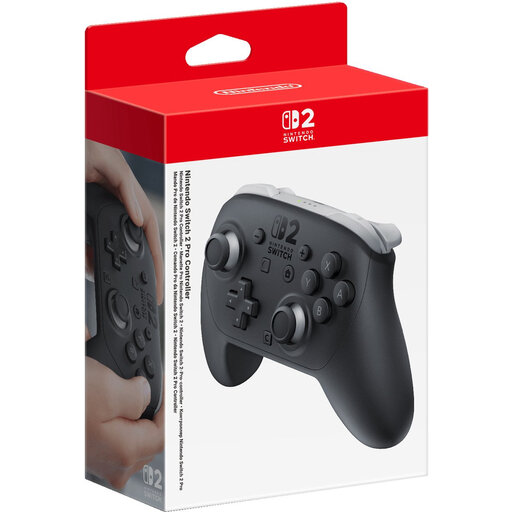
Why it suits this user: Designed for players looking for an official controller for Switch 2 with motion controls, HD vibration and amiibo functionality.
The Switch 2 connection and pairing steps are clearly described. The controller also has a USB-C connection as well as Bluetooth.
1070mAh battery, stated battery life of 40 hours, HD vibration, motion controls and integrated amiibo support according to the product information.
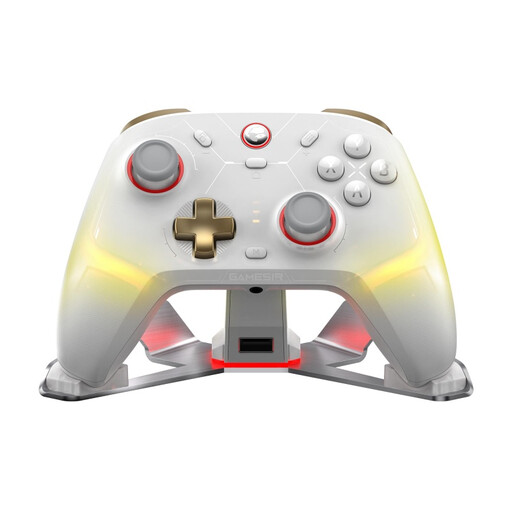
Why it suits this user: For players who switch between PC, Switch, iOS and Android and want more customisation options.
The tri-mode connection lets you switch between Bluetooth, a dongle and a cable. Check in advance which mode you want to use with each device.
Mag-Res TMR sticks, a 1000Hz report rate according to GameSir, programmable rear buttons, vibration, gyroscope and software for customisation.
We’ve put together a complete, up-to-date list of products that meet these strict selection criteria and the applicable European safety regulations.
No. Always check the listed platform and connection method. A controller for Switch won’t automatically work with Xbox. Bluetooth may be widely supported on PC and mobile devices, but features such as vibration, button mapping and motion sensors can vary between games.
It depends on the battery, mode of use and features. Product information may quote, for example, 8, 9 to 10 or up to 40 hours. Treat these figures as stated maximums. Vibration, RGB lighting and an intensive wireless connection can reduce battery life.
It depends on how you use it. For players who use analogue sticks frequently, TMR or Hall effect sticks may be a useful specification to look for. Also consider grip, button layout, warranty and software. The technology alone doesn’t determine whether the controller will feel comfortable with your games.
