
Vandaag of morgen in huis

Kwaliteit gegarandeerd

Welkomstaanbiedingen ontgrendelen: GRATIS bezorging | Tot 80% korting | Gratis 30 dagen JoyPlus-proefperiode
Download de app
Wireless electronics make listening, driving, working and keeping your home secure easier. But a wireless connection isn’t automatically practical. A device might promise long battery life, for example, but prove awkward to use because of limited compatibility, a tricky app or an underpowered charging accessory.
As Joybuy’s Product Recommendation Officer, I start by checking the specifications you can verify. Not the big marketing claims, but the connections, wireless standards, battery, installation and conditions of use.
Many products need more than Bluetooth: they may also require Wi-Fi, an app or a specific smartphone. This applies, for example, to wireless CarPlay, Android Auto screens and AI translation earbuds. So check:
A supplied 3.5mm cable is a useful backup for wireless headphones, for example. A smart doorbell may still depend on 2.4GHz Wi-Fi.
Claimed playback or standby time usually depends on volume, brightness, lighting, Wi-Fi signal and notifications. A Bluetooth speaker with RGB lighting will have different battery performance from one playing audio at low volume with the lights off.
So pay attention to the difference between:
According to the product information, the Marshall Major V offers more than 100 hours of wireless playback. Treat this as a stated product specification, not a guarantee for every situation.
A dash cam or Android Auto screen may be advertised as suitable for vehicles with a standard 12V or 24V connection. Even so, you should check the available space, viewing angle, audio options and smartphone version.
“Plug and play” is relative with RGB car interior lighting, too. Installation may involve fitting fibre-optic cables, concealing wires and connecting to a Bluetooth app. Test the lights before fitting them, and use only the specified voltage.
The wireless standard doesn’t tell you everything. Check the supported profiles and connections, too:
A mechanical keyboard with Bluetooth, 2.4G and USB-C is a practical choice for working from home, gaming and using on the go. Also check that the QWERTY US layout suits you. It isn’t the same as a Dutch QWERTY layout.
Don’t look at capacity in mAh alone. The charging port, charging time, whether the battery can be replaced and how the product works while charging all matter, too. A product with a large battery may be less convenient if it takes a long time to charge or doesn’t support wired mode.
For earbuds, check whether the stated battery life is for one charge or includes the charging case. For a doorbell, it’s important to distinguish between event-triggered recording and continuous recording. According to the product specification, the WOOX doorbell supports event-triggered recording, but not continuous 24/7 recording.
Look for specific ratings and markings such as IPX5, IP65, IP67, CE, RoHS and REACH. An IP rating describes protection against dust and water under certain conditions; it doesn’t automatically mean a product is suitable for immersion.
According to the product information, the WOOX video doorbell has an IP65 rating, while some earbuds are listed as IPX5. Always check the instructions and usage limits. For wireless equipment sold in the EU, product information and conformity markings are important checks. A CE mark isn’t a quality rating; it indicates that the manufacturer declares the product meets the relevant EU requirements.
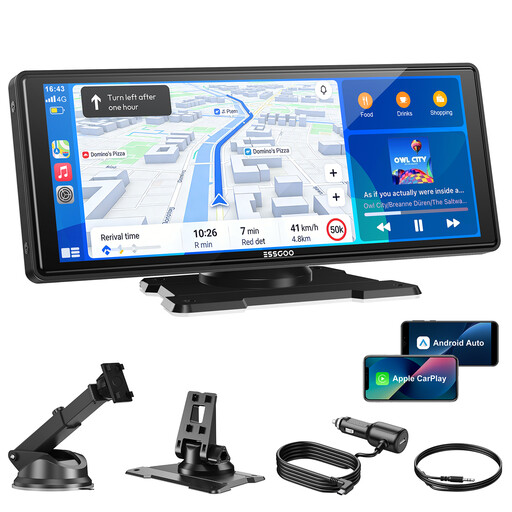
Why it suits this profile: This standalone screen is designed for drivers who want to upgrade an older vehicle without replacing its built-in system. According to the product information, it works with wireless CarPlay and Android Auto and uses a 12V-24V connection.
Four audio options – Bluetooth, FM, AUX and a built-in speaker – give you an alternative if one connection doesn’t suit your car.
10.26-inch screen, voice control, OTA updates and support for 12V-24V vehicles.
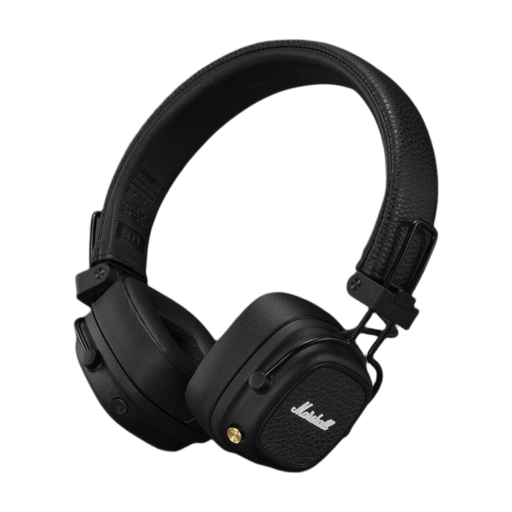
Why it suits this profile: For everyday listening, travel and work, multi-point connectivity, a foldable design and a wired backup connection are all useful features.
According to the product information, these headphones aren’t water-resistant. This helps set realistic expectations if you plan to wear them for sport or on a rainy commute.
Bluetooth 5.3, multi-point connectivity, USB-C, wireless charging and a stated playback time of more than 100 hours.

Why it suits this profile: This mechanical keyboard is aimed at users who switch between a PC, laptop and tablet, and want a compact layout with mechanical switches.
As well as wireless connectivity, the keyboard has USB-C. So if the battery runs out or you experience latency while gaming, you can switch to a wired connection.
75% layout with 82 keys, Bluetooth, 2.4G, USB-C, RGB lighting, hot-swap switches and a 4000 mAh battery according to the product information.
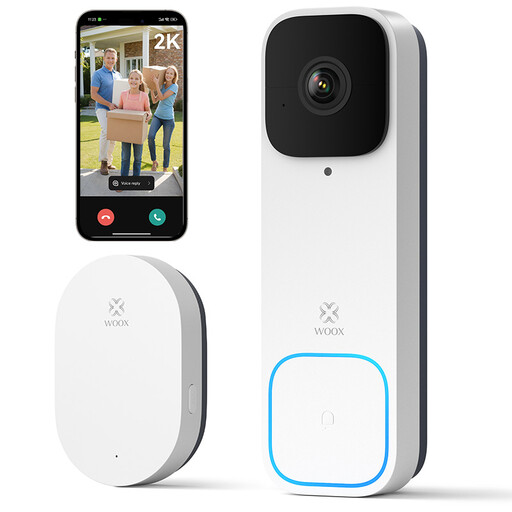
Why it suits this profile: This smart doorbell combines a camera, wireless chime and app notifications for anyone looking for a straightforward setup.
The specifications clearly state that continuous recording isn’t supported. Recordings are triggered by events and can be saved locally to a microSD card.
2K video, 170° viewing angle, two-way communication, night vision, included chime and support for microSD cards up to 128GB.
We’ve put together a full, up-to-date list of products that meet these strict selection criteria and the current European safety requirements.
For driving, a dash cam and wireless CarPlay are especially useful when the installation, visibility and audio options suit your car. Check that the rear camera cable can be neatly concealed, and never position a screen where it blocks your view.
For audio, you can choose wireless headphones, Bluetooth earbuds or a wireless speaker. If you’re considering AI translation earbuds, pay particular attention to the companion app, supported languages and whether translation works online. According to the HTC NE33 product information, a dedicated app and account are required for the translation features. This is worth bearing in mind when travelling.
RGB car interior lighting is mainly for creating ambience. Check the voltage, cable route and Bluetooth controls. A wireless speaker with a phone holder can be handy at home, in the office or when travelling, but check the available battery and audio information before buying.
It depends on the product. Bluetooth headphones, keyboards and speakers usually work without Wi-Fi. Wireless CarPlay, smart doorbells and some AI translation earbuds may also need Wi-Fi or an internet connection for certain features.
Battery life depends on use, charging habits, temperature and battery type. The stated playback or standby time is a product specification measured under certain conditions. Charge lithium batteries with suitable accessories, and don’t store them for long periods in extreme heat or cold.
Not always. Wireless is convenient when you want freedom to move, but a cable can be more stable, reduce lag and work without needing to pair devices. That’s why a product with USB-C, AUX or a 3.5mm connection is often more versatile for everyday use.
