
Vandaag of morgen in huis

Kwaliteit gegarandeerd

Welkomstaanbiedingen ontgrendelen: GRATIS bezorging | Tot 80% korting | Gratis 30 dagen JoyPlus-proefperiode
Download de app
Wireless earbuds are useful for music, podcasts, calls, travel and exercise. However, a long list of features means little if the model does not fit properly, the battery is disappointing or the microphone barely works on a busy street. This practical guide focuses on the features that make a real difference in everyday use.
Packaging often states the maximum playback time. This may apply only to one earbud, a particular volume level or use without noise cancelling. So check whether the stated time refers to a single charge or to the combined capacity of the earbuds and charging case.
It is also important to remember that a charging case does not make wireless earbuds usable indefinitely. The case itself needs to be recharged regularly via USB-C. If you travel every day or work long hours, you will benefit from a clear usage time per charge and a reliable charging indicator.
Noise-cancelling earbuds use microphones and software to reduce background noise. The result depends on the fit, the type of sound and the settings being used. Low, constant sounds from a train engine are often processed differently from voices or sudden noises.
Claims such as “up to 46 dB” or a specific percentage of noise reduction come from the product description. According to the brand’s own testing, the result may have been measured under specific conditions and may not match your experience on the train, in the office or at home.
An IP code indicates the conditions a product is protected against according to its stated classification. IPX4, for example, means protection against splashing water, while IP55 indicates a certain level of protection against dust and water jets. Neither rating automatically means you can submerge the earbuds.
Pay particular attention when choosing earbuds for exercise. Sweat, rain and a damp gym bag require careful maintenance. Dry the earbuds and charging contacts before placing them in the case.
Do not choose based on appearance alone. Try different ear-tip sizes if they are included. A good seal affects comfort, bass reproduction and the performance of active noise cancellation.
Bluetooth 5.3 or 5.4 is found on many modern TWS earbuds. A newer version may support power-saving and connectivity features, but on its own it says little about sound quality. Also check whether your phone or laptop supports the codec you want to use.
A multipoint connection is useful for people working from home. It allows you to keep, for example, a laptop and smartphone connected at the same time and switch more easily between music and phone calls.
For earbuds used for calls and music, the number and positioning of the microphones are relevant specifications. Multiple microphones can help with voice capture and noise processing, but according to the brand’s own testing, actual call quality still depends on wind, traffic, software and the network connection.
Also look out for:
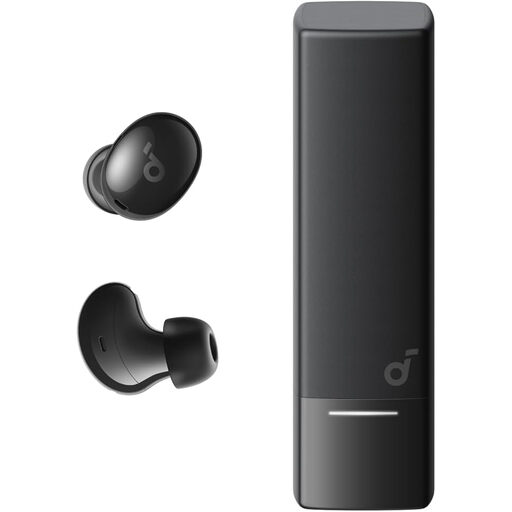
Why it suits this profile: These compact in-ear earbuds are designed for everyday use, with Bluetooth 5.4, multipoint and a charging case.
The product description states 7 hours of use per charge and up to 24 hours with the case. The IP54 rating clearly defines the limits for outdoor use.
Four built-in microphones, USB-C, multipoint and a compact case.

Why it suits this profile: For listeners who place great value on adjustable noise cancellation, music features and call quality.
The specifications list six microphones, USB-C and up to 10 hours of battery life, or up to 40 hours with the case. The product description mentions adjustable noise cancellation; performance in practice still depends on fit and surroundings.
Six microphones, USB-C and a stated playback time of up to 10 hours per charge.
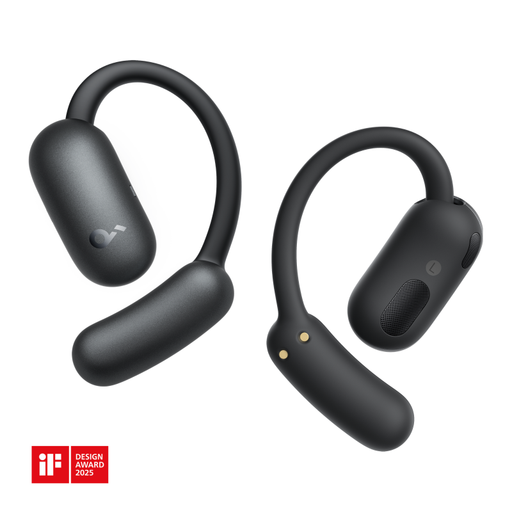
Why it suits this profile: The open-ear fit is designed for exercise, phone calls and everyday use where staying aware of your surroundings is important.
The stated IP55 rating is clearer than a general claim such as “waterproof”. Bear in mind that this rating does not mean the earbuds can be submerged.
Bluetooth 5.4, two microphones, an open-ear design and 750 mAh battery capacity.
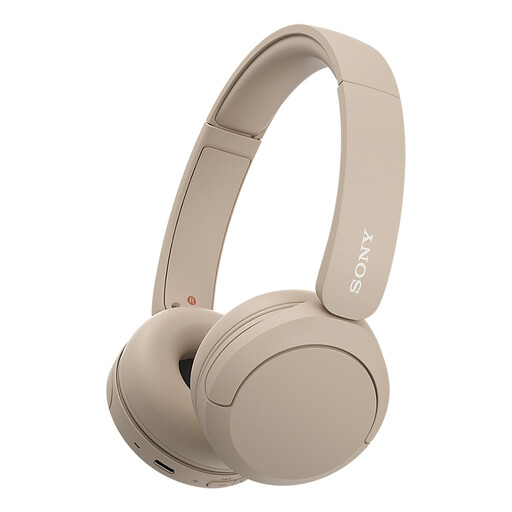
Why it suits this profile: These on-ear wireless headphones are ideal for anyone who does not want in-ear earbuds and values long playback time.
The product information states up to 50 hours of battery life and multipoint connectivity. However, check the current product specifications when buying, as details may vary between versions.
On-ear design, microphone, multipoint connectivity and USB-C connection.
We have put together a complete, up-to-date list of products that fully meet these strict selection criteria and the applicable European safety regulations.
Charge the earbuds and case first. Then open your phone’s Bluetooth settings, put the earbuds into pairing mode and select the product name. If the connection does not work, remove any previous pairing and try again. For specific models, refer to the included manual.
Battery capacity decreases over time. Practical battery life depends on charging cycles, temperature, volume and maintenance. Store the earbuds in the case, keep the charging contacts clean and avoid prolonged exposure to heat or moisture. A stated playback time is a product specification, not a guarantee that you will get the same usage time in every situation.
Open-ear models can be comfortable for walking, running or fitness because the ear canal remains open. Always check the IP rating and do not use them in situations where distraction or insufficient awareness of your surroundings could create a risk. Water-resistant earbuds are not automatically suitable for swimming or submersion.
