
Vandaag of morgen in huis

Kwaliteit gegarandeerd

Welkomstaanbiedingen ontgrendelen: GRATIS bezorging | Tot 80% korting | Gratis 30 dagen JoyPlus-proefperiode
Download de app
Wireless earbuds are convenient for music, films, calls, travel, the office and sport. However, a long list of features does not always tell you how well they perform in everyday use. For example, a model with ANC may be less comfortable to wear, while a high battery-life claim may only apply under specific conditions.
With this buying guide, you can compare Bluetooth earbuds, true wireless earbuds and models with microphones based on verifiable specifications. This helps you avoid paying for features that do not suit your phone, situation or listening habits.
Battery life is often listed separately for the earbuds, the charging case or the combination of both. Using active noise cancellation also affects playback time. For example, the Samsung Galaxy Buds4 Pro states up to 6 hours with ANC and up to 7 hours without ANC, with up to 30 hours via the case.
Pay attention to these three figures:
A model with long battery life is most useful when the figures are clearly broken down.
ANC earbuds use microphones and electronics to reduce background noise. The result varies depending on the shape of your ears, the fit and the type of noise. Low, constant sounds such as train or aeroplane noise are generally a different scenario from voices in an office.
According to information provided by the relevant brands or product sellers, some models may offer a specific level of noise reduction. Treat such percentages as product claims, not as a guarantee for every user. A good seal in the ear canal and several sizes of ear tips are at least as important.
An IP rating indicates the conditions against which a product has been tested. IP54 includes protection against dust and splashing water. IP55 and IP57 offer different levels of protection, but they do not automatically make earbuds suitable for swimming.
Sweat, rain and immersion are not the same thing. Always check the exact IP rating and the manufacturer's warnings. Also, allow the charging port to dry thoroughly before connecting the case.
In-ear earbuds partially seal the ear canal. This can reduce surrounding noise, but the wrong size may cause pressure, a loose fit or less powerful bass. Check whether several sizes of silicone ear tips are included. According to the product information, the Apple AirPods Pro 3 come with five sizes of ear tips.
Open earbuds and bone-conduction earbuds work differently. The Verbex K08 uses an ear-hook design and is intended to keep your ears more open during activities such as cycling or running. This can be useful when you want to remain aware of traffic and other surrounding sounds.
Bluetooth 5.3, 5.4 or 6.1 does not tell you everything about the connection; the actual experience also depends on your smartphone, codec support and software. Pay particular attention to:
Apple AirPods also work with other Bluetooth devices, but certain features are primarily designed for Apple devices. Samsung Galaxy Buds4 Pro, on the other hand, are closely integrated with the Galaxy ecosystem and the Galaxy Wearable app.
If you make frequent calls, you should not only look at the speakers. Check the number of microphones, whether call noise reduction is available and how the earbuds are controlled. Touch controls can be convenient, but a physical button can sometimes prevent accidental touches during exercise.
Also note the difference between passive noise isolation, active noise cancellation and microphone noise reduction. These are three different functions: the first partially blocks sound through the fit, the second works on the listening side and the third is designed to make your voice clearer during calls.
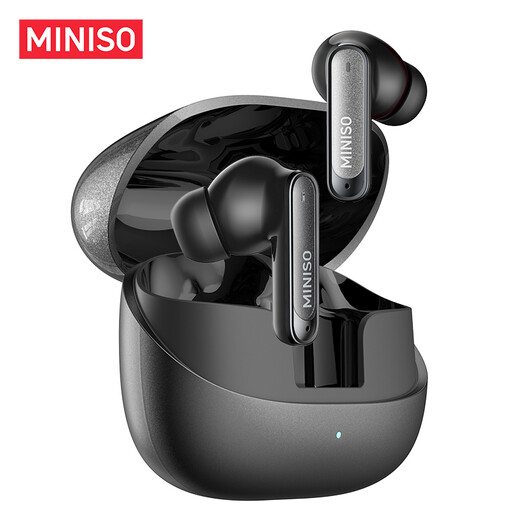
Why it suits this profile: This model combines true wireless controls, a built-in microphone and a charging case for everyday use, the office and commuting.
The product information lists IPX5, up to 55 hours of total battery life and six microphones for calls. However, check that these figures suit your volume level and usage.
Bluetooth 6.0, IPX5 rating, touch controls and USB charging via the case.
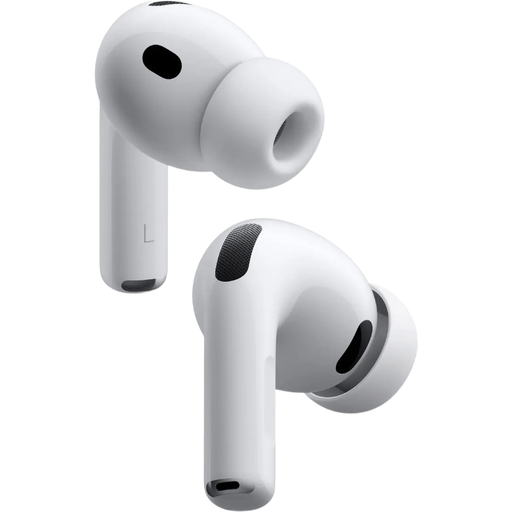
Why it suits this profile: Apple users get in-ear earbuds with ANC, spatial audio, several ear-tip sizes and easy pairing with Apple devices.
The fit can be adjusted with five sizes of silicone ear tips. The stated battery life is up to 8 hours with noise cancelling.
Bluetooth 5.3, microphone, wireless and USB-C charging, heart-rate sensor and IP57 rating according to the product listing.
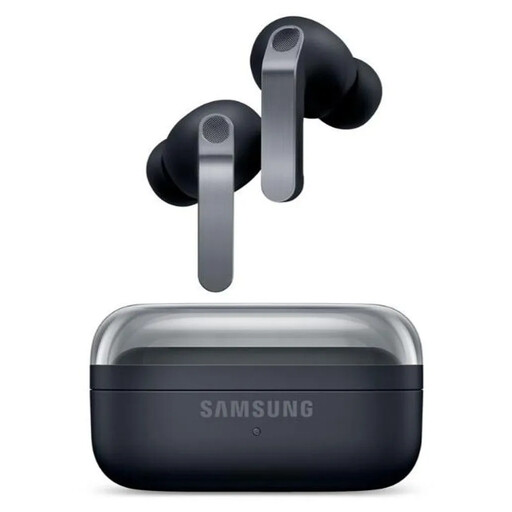
Why it suits this profile: This model is designed for users who want to combine ANC, calls, customisable audio and a robust IP rating with Android and Galaxy features.
Battery life is specified as 6 hours with ANC and 7 hours without ANC. The IP57 rating makes it clear that the earbuds are water-resistant against splashes, not suitable for swimming.
Bluetooth 6.1, two-way speakers, six microphones, USB-C, wireless charging and 360 Audio according to the product specifications.
We have put together a complete, up-to-date list of products that fully meet these strict selection criteria and the applicable European safety regulations.
Check the following before ordering:
Charge the earbuds, open the case and switch on Bluetooth on your phone. Select the name of the earbuds from the Bluetooth list. With Apple AirPods, a pairing window often appears when you open the case near an iPhone. With Samsung Galaxy Buds, setup usually takes place through the Galaxy Wearable app.
Their lifespan depends on battery use, charging cycles, moisture, drops and maintenance. Store the earbuds in the case, clean them with a soft, dry cloth and do not charge them when the connection is damp. Battery capacity decreases over time; a model with a case offering extra charging capacity can keep everyday use practical for longer.
No, charging wireless earbuds generally uses very little electricity. Most of the energy goes into the built-in batteries in the earbuds and the case. Use the supplied or a suitable USB-C cable and, preferably, do not charge them in a damp environment.
