
Vandaag of morgen in huis

Kwaliteit gegarandeerd

Welkomstaanbiedingen ontgrendelen: GRATIS bezorging | Tot 80% korting | Gratis 30 dagen JoyPlus-proefperiode
Download de app
Wireless earbuds are handy for music, podcasts, meetings and phone calls. However, a long list of features means little if the model does not fit well, the connection keeps dropping or the battery life falls short in everyday use. With Bluetooth earbuds and true wireless earbuds in particular, some specifications matter more than attention-grabbing marketing terms.
Manufacturers often state the playback time including the charging case. This is not the same as the listening time provided by the earbuds themselves. ANC earbuds also generally use more power when active noise cancellation is switched on.
Always check:
A model offering, for example, 6 hours per charge may be sufficient for commuting, while someone working long days may prefer an over-ear model with longer battery life.
Water-resistant earbuds are not automatically suitable for swimming. IPX4 generally indicates protection against splashing water, while IPX5 offers protection against water jets under specified test conditions. A higher rating still does not mean that the product can be exposed to water without limits.
Also pay attention to the difference between the earbuds and the charging case. The case may have a lower level of protection. Sweat and light rain are also very different from submersion.
Earbuds with noise cancellation use microphones and electronics to reduce certain background sounds. Low, consistent noises such as train or aeroplane noise are often better suited to this technology than voices or sudden sounds. ANC is therefore not a guarantee of complete silence.
A transparency mode can be particularly useful in the office or while travelling. When cycling, crossing the road or dealing with traffic, always remain sufficiently aware of your surroundings. Do not use earbuds while driving or in situations where you need to hear warning signals.
The right fit affects comfort, sound isolation and how well ANC works. In-ear models with multiple ear-tip sizes give you more ways to adjust the fit. Open-ear or clip-on models let in more ambient sound but block the ear canal less.
For exercise, sports earbuds with an ear hook or stabilising band may stay in place more comfortably. Also check the weight of each earbud. A difference of just a few grams can be noticeable during extended use.
Bluetooth 5.3 or 5.4 mainly indicates the Bluetooth generation being used; the final connection also depends on your phone, laptop and surroundings. Various models advertise a range of around 9 to 10 metres, but walls and other wireless devices can reduce this.
If you want to switch between a laptop and smartphone, look for multipoint or multi-device connectivity. Also check which features are available on iOS and Android. Some settings, equalisers or firmware updates only work through the brand’s app.
With wireless earbuds with a microphone, it is not just the number of microphones that matters. Wind reduction, microphone placement and software that filters background noise all affect clarity. Check whether the model is specifically designed for calls and meetings, and read the full product information rather than relying solely on the title.
SBC and AAC are widely used Bluetooth audio codecs. Some models also support LDAC or other codecs. Your smartphone must support the same codec for you to use it. A higher resolution on paper does not automatically guarantee a difference that everyone can hear.
A USB-C charging port is practical because you can often use the same cable for your phone, tablet or laptop. Check whether wireless charging is supported if that is important to you.
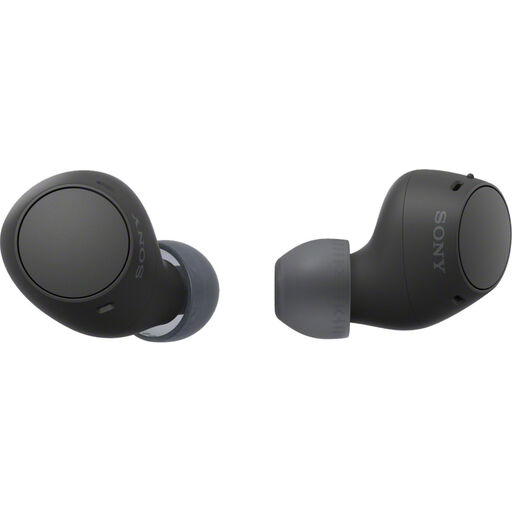
Why it suits this profile: This compact model is suitable for everyday listening, calls and commuting. The earbuds work with Android and iOS and feature multipoint connectivity.
The product information lists the 22-hour battery life with the charging case separately from its IPX4 splash resistance. This makes expectations clearer than a general battery-life claim alone.
Bluetooth 5.3, USB-C, 4.6 grams per earbud and an equaliser in the Sony app.
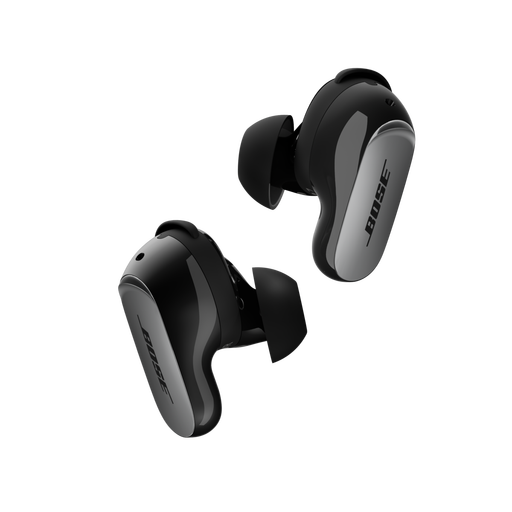
Why it suits this profile: This in-ear model is aimed at travellers, home workers and listeners who value ANC and extensive controls.
The product description mentions both an active noise cancellation mode and Aware Mode. According to Bose, CustomTune adapts the sound to the shape of your ear; this remains a brand claim and is not a guarantee of the same experience for every user.
Up to 6 hours of playback, Bluetooth 5.3, multipoint, USB-C and wireless charging; IPX4 splash resistance.
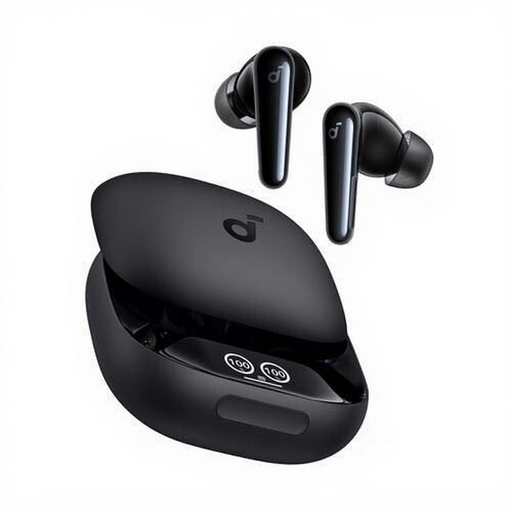
Why it suits this profile: According to the product information, this model is designed for calls, music, sport and everyday use. It is therefore suitable for users who want to use one pair of earbuds in a range of situations.
The IPX5 rating, extra ear tips and six built-in microphones make the intended uses more specific. IPX5 does not mean that the earbuds are suitable for submersion.
Up to 10 hours of continuous playback, USB-C charging case, touch controls and TWS connectivity.
We have put together a complete, up-to-date list of products that fully meet these strict selection criteria and the applicable European safety regulations.
First, charge the earbuds and charging case. Open the case, activate Bluetooth on your phone and select the model name from the list. Many models will reconnect automatically the next time. If this does not work, remove the existing Bluetooth pairing and repeat the pairing process according to the instructions.
Battery capacity decreases over time, as it does with other devices that use a lithium-ion battery. Actual service life depends on charging cycles, temperature, volume and maintenance. Keep the earbuds in their case, keep the charging contacts clean and avoid prolonged exposure to heat or moisture.
They can be, but check the microphone specifications and product information. A built-in microphone does not automatically mean that calls will remain clear in windy or busy environments. For regular home working or calls, multipoint, a good fit and a clear description of the microphone features are more important than simply having a low purchase price.
