
Vandaag of morgen in huis

Kwaliteit gegarandeerd

Welkomstaanbiedingen ontgrendelen: GRATIS bezorging | Tot 80% korting | Gratis 30 dagen JoyPlus-proefperiode
Download de app
Wireless earbuds are handy when you’re out and about, at the office, while exercising and during phone calls. However, it’s not wise to rely solely on terms such as “hi-fi”, “AI” or “noise cancelling”. The differences between models often come down to details you only notice after purchase: an average fit, limited battery life with noise cancellation switched on, or an IP rating that offers less protection than expected.
As a Joybuy Product Recommendation Officer, I filter the most important product information down to practical points. This allows you to compare Bluetooth earbuds based on verifiable specifications rather than marketing copy alone.
For example, packaging may quote a long total battery life. This usually includes the capacity of the charging case. The playback time of the earbuds themselves is considerably shorter. Active noise cancellation also affects power consumption.
Therefore, pay attention to the difference between:
Always check the official IP rating. The first digit refers to dust and the second to water. For example, IP54 offers protection against dust and splashing, while IPX5 indicates protection against water jets. None of these ratings automatically means that you can submerge the earbuds.
A model designed for running in the rain is therefore not necessarily suitable as swimming headphones. For products with a dedicated swimming function, you should also check whether Bluetooth works underwater or whether music must first be stored internally.
Active Noise Cancelling, also known as ANC, uses microphones and electronics to reduce background noise. Its effectiveness varies depending on the environment and the individual ear. A good seal with the right silicone ear tips remains important.
When choosing noise-cancelling earbuds, look out for:
Brands may make their own claims about the level of noise reduction. For example, treat a quoted decibel value as a specification from the product description, not as a guaranteed result in every situation.
Bluetooth 5.2, 5.3, 5.4 or 6.0 can provide a modern connection, but your experience also depends on your smartphone, laptop and software. Check whether you need multipoint connectivity. This allows you to connect the earbuds to, for example, a phone and laptop at the same time.
For TWS earbuds, it is also useful to look for:
In-ear models partially seal the ear canal and are often suitable for music, travelling and commuting. A neckband headset or open-ear bone conduction headset lets in more ambient sound. This can be practical when cycling or walking, but the listening experience differs from that of closed in-ear earbuds.
Choose sports earbuds with a secure attachment, such as an ear hook or neckband, if you move around a lot. Also consider the weight. A lightweight housing can be comfortable, but on its own it says nothing about the fit.
If you often make calls, don’t just look at the number of microphones. Wind, traffic and the positioning of the microphones also affect speech clarity. Product descriptions mentioning AI call noise cancellation come from the manufacturer, so focus particularly on whether calling and multipoint connectivity are important for the way you use them.
USB-C charging is standard on modern models. A wired model with a 3.5mm connection does not need Bluetooth or a battery. This can be particularly useful with a laptop, games console or older device.
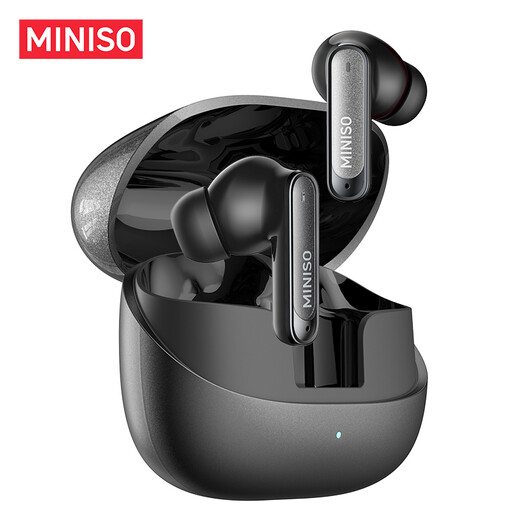
Why it suits this profile: This TWS model is designed for everyday use, commuting, studying and phone calls. According to the product description, it has an IPX5 rating, a built-in microphone and total battery life of up to 55 hours with the case.
The product information lists fast charging, microphones and water resistance separately. Still, check the manual and don’t treat IPX5 as permission to submerge the earbuds.
10mm dynamic drivers, touch controls, dual-device connectivity and, according to the manufacturer, up to 3 hours of playback after 10 minutes of charging.
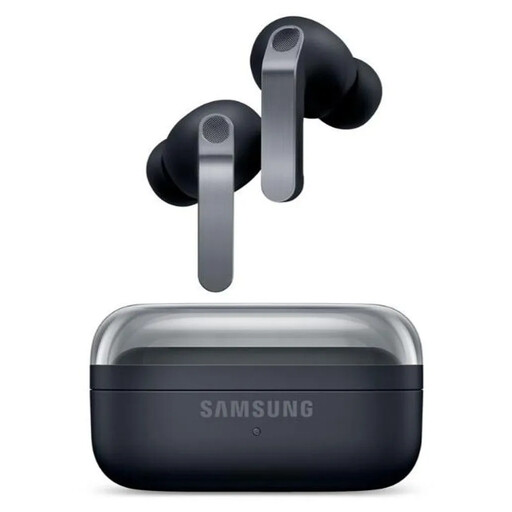
Why it suits this profile: This model combines ANC, a 2-way speaker system, 360 Audio and features for Galaxy devices. It is particularly well suited to users who value adjustable sound and integration with a Samsung ecosystem.
The specifications list playback time with and without ANC separately: up to 6 and 7 hours per charge. The IP57 rating is intended for dust and splashing, not swimming.
Bluetooth 6.1, six microphones, a 9-band equaliser, USB-C and wireless charging; according to the product information, total playback time with the case is up to 30 hours without ANC.
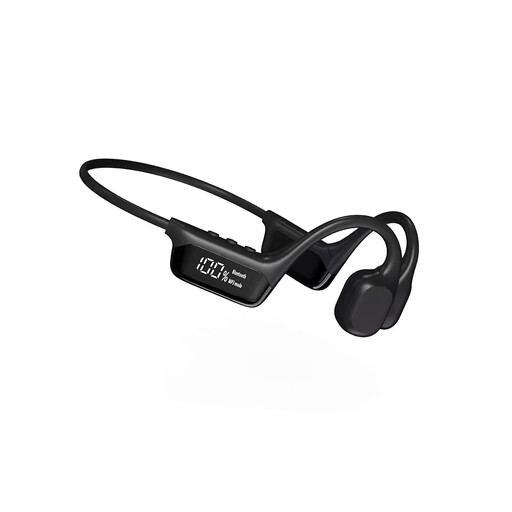
Why it suits this profile: The open-ear design with ear hook is intended for swimming, running, cycling and office use. The product description mentions Bluetooth 5.3, multipoint connectivity and an internal mode for use while swimming.
The usage instructions warn that the charging port must be dried completely. Before swimming, check which mode and water limits apply; the description does not give general approval for every swimming situation.
Open design, magnetic charging cable, voice control and, according to the specifications, up to 8 hours of memory or playback time.
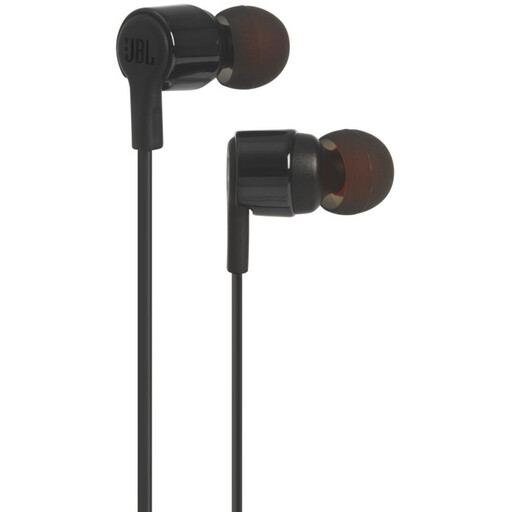
Why it suits this profile: If you don’t want to charge a battery, these wired JBL earbuds with microphone and 3.5mm connection are a practical choice. They work with compatible laptops, tablets, MP3 players and games consoles.
No Bluetooth pairing or battery is required. However, check whether your device has a 3.5mm port; many recent phones only use USB-C.
Plug-and-play, integrated microphone, volume controls and 8.7mm dynamic drivers according to the product information.
We’ve put together a complete, up-to-date list of products that fully meet these strict selection criteria and the applicable European safety regulations.
Use this quick checklist before ordering:
Open the charging case, activate Bluetooth on your phone and select the model name from the list. Some models pair automatically. If this doesn’t work, place the earbuds back in the case and follow the reset or pairing steps in the manual.
Playback time per charge is often shorter than the total capacity quoted with the case. ANC, volume, phone calls and temperature all affect playback time. The built-in lithium battery loses capacity over time; charging correctly and storing the earbuds in a dry, moderate environment helps limit unnecessary wear.
That depends on the fit and IP rating. For fitness and running, sports earbuds with an ear hook or a secure in-ear fit are practical. For swimming, only use a model whose product information clearly describes this application and specifies the appropriate operating mode.
