
Vandaag of morgen in huis

Kwaliteit gegarandeerd

Welkomstaanbiedingen ontgrendelen: GRATIS bezorging | Tot 80% korting | Gratis 30 dagen JoyPlus-proefperiode
Download de app
Wireless earbuds are ideal for commuting, working from home, travelling and exercising. However, a long list of features does not automatically mean that a model suits the way you use it. For example, a high battery life may only apply when noise cancellation is switched off. Terms such as “noise cancelling”, “water-resistant” and “AI calls” do not always mean the same thing either.
The Joybuy Product Recommendation Officer helps you separate the key specifications from marketing language. This makes it easier to choose between TWS earbuds, wireless headphones, sports earbuds or open-ear models.
Manufacturers often quote total playback time including the charging case. This figure is not the same as playback time per charge. Active noise cancellation can also reduce battery life. Always check:
A model with a shorter total playback time but fast charging may be more useful in practice than one that only lasts longer on paper.
An IPX4 or IP54 rating is generally intended for splashes, sweat or light rain. It does not make a product suitable for submersion. With water-resistant earbuds, you should also check whether the charging case has the same protection. On many models, the case is less well protected than the earbuds.
Do not use a product with a lower protection rating while swimming. Even with a model that has a swimming mode, you should follow the manufacturer’s instructions and allow the charging port to dry completely before charging.
Active noise cancellation, or ANC, uses microphones and electronics to reduce ambient noise. Its effectiveness depends on the fit, the type of sound and the surroundings. Low, constant sounds on a train or plane are often easier to reduce than voices or sudden noises.
According to brands’ own product information, some models may quote a specific reduction figure, such as -45 or -50 dB. Treat this figure as a product specification under certain conditions, not as a promise that all noise will disappear.
Bluetooth 5.3, 5.4 or a later version mainly indicates the connection standard used. The actual experience is also affected by your phone, laptop, distance and obstacles. A range of around 10 metres in an open environment is a commonly quoted product specification.
Multipoint is useful in the office and when working from home. It lets you connect the earbuds to, for example, a laptop and smartphone, if the model and devices support this. Check that multipoint is explicitly mentioned; Bluetooth alone does not automatically mean that two devices will stay connected simultaneously.
Choose the design based on your activity:
The first numbers or letters in an IP rating refer to protection against dust; the second digit concerns water. IPX4 does not mean the same as IPX5 or IP57. Always check the full rating and read the warnings.
Do not use earbuds while cycling, driving or operating machinery if the model significantly reduces your awareness of ambient sound. Avoid listening at high volume for prolonged periods and take regular breaks.
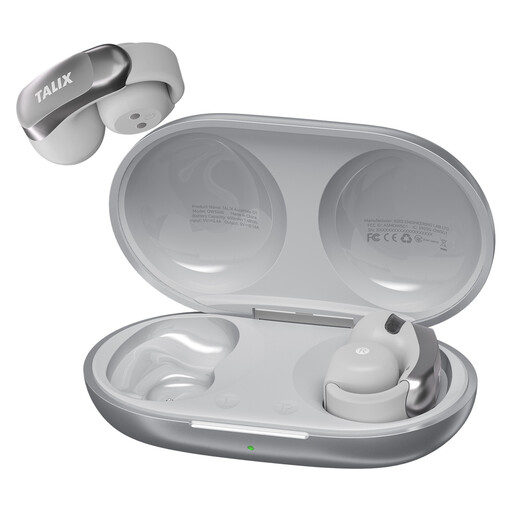
Why it suits this profile: The clip-on design with silicone ear hook is intended for everyday use, commuting and light workouts. According to the product information, the earbuds weigh 5.2 grams each.
The IPX4 rating makes it clear that the model is intended for sweat and light rain, not submersion. Battery life is stated separately per charge and with the case.
Bluetooth 5.3, four microphones for calls, up to 28 hours with the charging case and fast charging according to the product description.
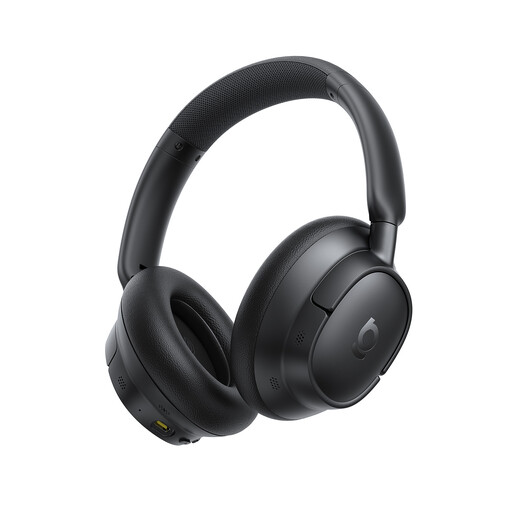
Why it suits this profile: The over-ear design is suitable for long listening sessions, travelling and working. According to the product information, the model supports Hi-Res audio and LDAC.
The product information states playback time separately with and without ANC. This makes it easier to assess the battery-life claim against your own usage.
Up to 80 hours without ANC and up to 55 hours with ANC according to the product description, plus five microphones for calls.
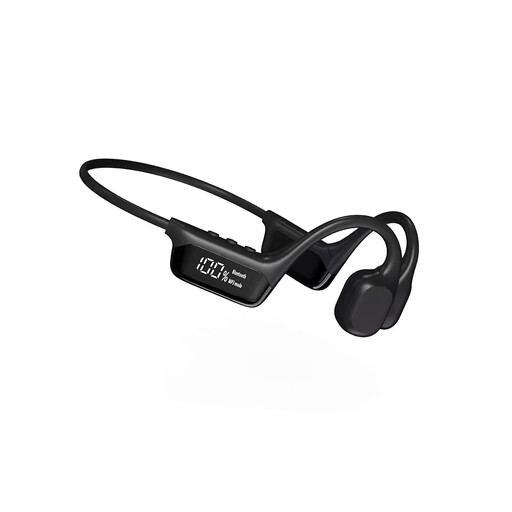
Why it suits this profile: The open-ear design with ear hook is intended for exercise, cycling and situations where you want to remain aware of ambient sound. Swimming is subject to separate instructions in the product information.
The product specifications mention a dedicated swimming mode and warn that the charging port should be kept dry. Before use, check that the selected mode and water protection are suitable for your activity.
Bluetooth 5.3, multipoint support according to the product information and a quoted wireless range of 10 metres or more.
We have put together a complete, up-to-date list of products that fully meet these strict selection criteria and the applicable European safety regulations.
For online meetings and phone calls, microphones, wind-noise reduction and a stable connection are more important than simply the number of speakers. According to the product description, a model with several microphones may offer additional noise reduction for calls, but clarity also depends on wind, distance and the surrounding environment.
If you mainly want to listen to music, look at the supported codecs, driver size and any app settings. A larger driver does not automatically mean fuller sound; tuning and fit also play a part. For Apple, Samsung or Android users, features such as quick pairing, an app and automatic switching can make everyday use easier.
First charge the earbuds, open the case and activate Bluetooth on your phone. Select the product name from the Bluetooth list. If pairing does not work, remove an old connection and follow the reset instructions in the manual. With multipoint, you can then pair a second device if required.
Battery capacity decreases over time, especially if the earbuds are frequently fully discharged or exposed to high temperatures. Store them in the charging case, use a suitable USB-C charger and check the warranty and returns conditions. Practical service life also depends on hinges, charging contacts, software support and everyday use.
You do not need a separate cable, but you do need electricity to charge the earbuds and charging case. Energy costs are generally limited. Pay particular attention to battery quality, the supplied charging solution and whether a worn-out product can be disposed of as electronic waste in line with local regulations.
