
Vandaag of morgen in huis

Kwaliteit gegarandeerd

Welkomstaanbiedingen ontgrendelen: GRATIS bezorging | Tot 80% korting | Gratis 30 dagen JoyPlus-proefperiode
Download de app
Wireless earbuds are convenient for travelling, phone calls and everyday use. However, comparing models fairly can be difficult. For example, a long battery life may only apply when ANC is switched off, while a high IP rating does not automatically mean you can submerge the earbuds.
With this buying guide, you can compare wireless earbuds based on specifications that make a real difference in everyday use. This helps you avoid paying mainly for marketing terms.
Brands often state the total playback time including the charging case. This is not the same as the usage time of a single earbud. ANC, high volume, codec use and phone calls can also drain the battery more quickly.
Therefore, always check:
For example, the JBL Wave Buds 2 offer up to 40 hours of total playback when ANC is switched off. The product specification also states up to 8 hours of music playback with Bluetooth enabled. Details like these provide a more realistic picture than one large total figure.
Noise-cancelling earbuds and ANC earbuds use microphones and electronics to reduce surrounding noise. Their effectiveness varies by model and environment. Low, constant sounds such as train engines are generally handled differently from voices or sudden noises.
According to Apple's product information, the AirPods Pro 3 feature active noise cancellation. Bose lists active noise cancellation and an Aware mode for the QuietComfort Ultra Earbuds. Think of these as features for adjusting your listening experience, not as a guarantee that every surrounding sound will disappear.
Also pay attention to transparency mode. It can be useful in the office or while travelling, but do not use noise cancelling in situations where you need to hear traffic or warning sounds clearly.
Good sound starts with the right fit. In-ear earbuds with silicone tips partially seal the ear canal. This can help with sound isolation, but not everyone finds this fit comfortable. A loose fit also reduces bass response and can cause an earbud to fall out while walking.
Look out for:
Open-ear earbuds do not seal the ear canal. This means surrounding sounds remain easier to hear, but music may sound less isolated in a busy environment.
Bluetooth 5.3 or 5.4 mainly indicates the Bluetooth generation used. The actual connection also depends on your phone, distance, obstacles and software. For home use, commuting and the office, a range of around 9 to 10 metres is common according to the product information.
Multipoint Bluetooth earbuds can connect to multiple devices. According to the product information, the Sony WF-C510 supports multipoint for two devices. The Bose QuietComfort Ultra Earbuds and JBL Wave Buds 2 also list support for connecting to multiple devices. However, check whether automatic switching works exactly as expected with your laptop and smartphone.
Do not compare total playback time alone. Also look at the time per charge and the charging time of the case. Baseus states that the Eli Sport 1 offers approximately 7 to 8 hours per charge and approximately 30 hours with the case, at a volume of 70 per cent. The manufacturer explains that this was measured in laboratory conditions and may vary in everyday use.
An IP code consists of two digits, or a digit and an X. The first part refers to protection against solid particles, while the second refers to water. IPX4 means protection against splashing water according to the classification; it is not permission to submerge the earbuds. With IP55, the product specification indicates protection against dust and water jets, but you should still avoid prolonged contact with water.
Always check the manual before using sports earbuds in heavy rain. The information supplied with the Baseus Eli Sport 1 explicitly describes it as not waterproof. The TALIX G1 lists IPX4 and, according to the product information, is designed to withstand sweat and light rain.
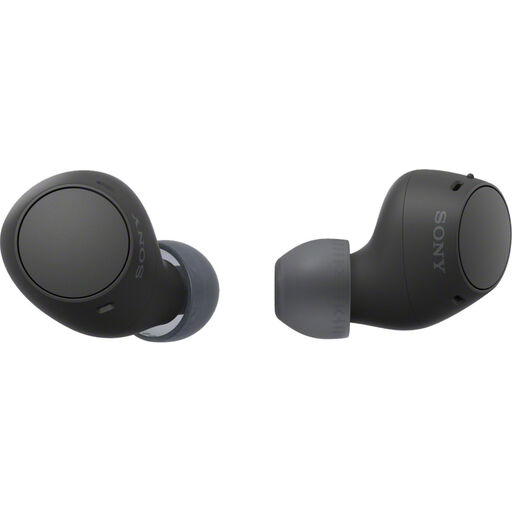
Why it suits this profile: According to the product information, this in-ear model combines a compact weight of 4.6 grams per earbud with USB-C, a microphone and 22 hours of total battery life.
The product information distinguishes between the earbuds' own playback time and the total playback time with the case. The IPX4 rating is not presented as complete waterproofing.
Bluetooth 5.3, multipoint, USB-C, IPX4 and support for Android and iOS.
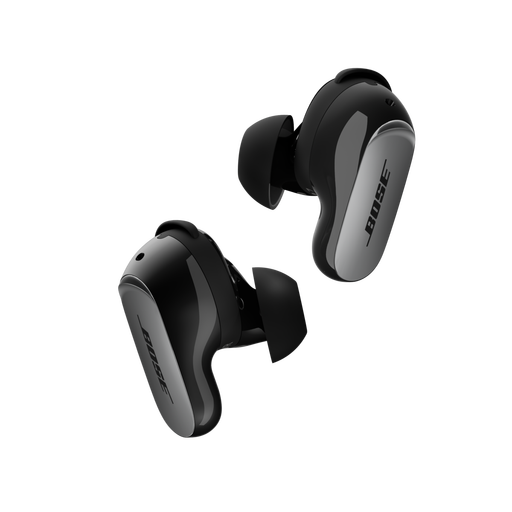
Why it suits this profile: The product information lists active noise cancellation, Aware mode, CustomTune, multipoint and microphones for calls. This makes it well suited to travelling, working and everyday listening.
The available Aware mode offers an alternative to using ANC continuously. The stated battery life is clearly listed as up to 6 hours per charge.
Bluetooth 5.3, wireless or USB-C charging for the case and IPX4 splash resistance.
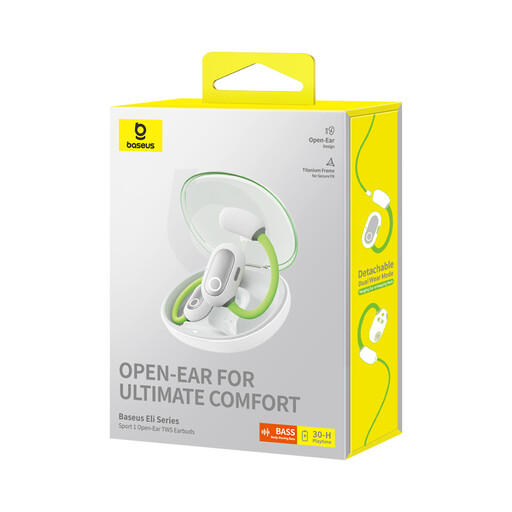
Why it suits this profile: The open-ear design keeps the ear canal clear. According to Baseus, playback time is approximately 7 to 8 hours per charge and approximately 30 hours with the case at 70 per cent volume.
The product specification states the measurement conditions and explains that the model is not waterproof. This makes expectations around battery life and moisture clearer.
Open-ear fit, Bluetooth 5.3, USB-C and a charging case included.
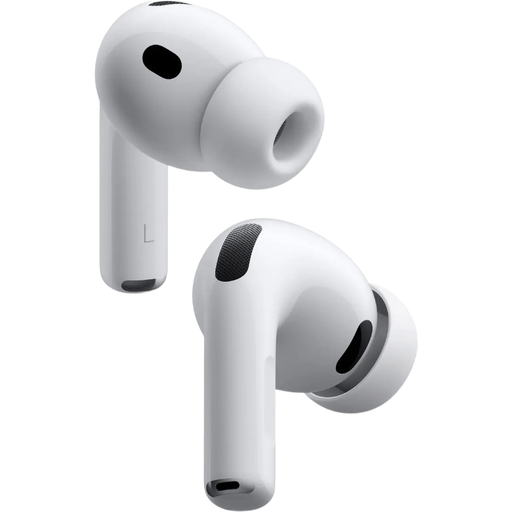
Why it suits this profile: This model is aimed at Apple users who want easy pairing and seamless switching between Apple devices. The product information lists five sizes of silicone ear tips, ANC and spatial audio.
Five sizes of ear tips help prevent you from being stuck with an unsuitable fit. The manufacturer lists battery life separately for ANC and transparency mode.
Bluetooth 5.3, up to 8 hours with ANC according to the product information, a microphone and IP57 rating.
We have put together a complete, up-to-date list of products that fully meet these strict selection criteria and the applicable European safety regulations.
Charge the earbuds and case first. Then open your phone's Bluetooth settings, remove the earbuds from the case or activate pairing mode, and select the correct product name. If the earbuds have already been paired with the device, this often happens automatically. If it does not work, remove the old Bluetooth pairing and try again.
Battery capacity decreases over time, as it does with other devices that use lithium batteries. Practical usage time depends on volume, ANC, calls and temperature. Store the earbuds in the case when you are not using them and charge them with a suitable USB-C cable. A model with replaceable ear tips and a sturdy case may also remain practical to use for longer.
No, charging earbuds and their case generally uses very little power. Most of the energy consumption comes from charging them regularly. Use a certified charger, do not charge the case if it is damaged or unusually hot, and follow the manufacturer's safety instructions.
