
Vandaag of morgen in huis

Kwaliteit gegarandeerd

Welkomstaanbiedingen ontgrendelen: GRATIS bezorging | Tot 80% korting | Gratis 30 dagen JoyPlus-proefperiode
Download de app
Wireless earbuds are handy for music, calls, travel and exercise. However, a long list of features does not automatically mean that a model is right for the way you use it. An unsuitable fit, unclear battery claims or insufficient water resistance can leave you disappointed in practice.
Joybuy Product Recommendation Officer selects products based on verifiable specifications. Pay particular attention to these three common pitfalls:
The wearing style largely determines how useful wireless earbuds are. With in-ear earbuds, having several sizes of silicone tips is helpful, as you can adjust the seal and comfort. A good seal can also affect the perceived bass and how much surrounding noise you hear.
An ear hook, clip-on design or neckband may be more suitable for running and fitness. The Soundcore AeroFit Pro, for example, uses an ear-hook design. The Soundcore AeroClip is an open-ear clip-on model. Designs like these seal the ear canal less, but this also means that surrounding sounds may remain more clearly audible.
The IP code consists of two numbers, or a number and a letter. The first number refers to protection against solid particles, while the second refers to water. Many models only show a water-resistance classification, such as IPX4 or IPX5. The X means that no dust classification has been provided.
An IP rating does not automatically make earbuds suitable for swimming. Also check that the charging case stays dry; the earbuds’ water resistance does not always apply to the case.
Look at the continuous playback time per charge as well as the total playback time with the charging case. The Redmi Buds 6 Pro, for example, states up to 9 hours per charge and up to 38 hours with the case. The Soundcore Liberty 4 NC states up to 10 hours per charge.
Bluetooth 5.3 or 5.4 mainly indicates the connection standard being used; the actual experience also depends on your smartphone, distance and surroundings. Codec support, such as AAC, SBC or LDAC, may be relevant for compatible devices, but a codec alone does not guarantee a particular level of sound quality.
For calls, microphones and software-based noise reduction are important specifications. According to the product information, the Anker P30i has four microphones. The Soundcore Liberty 4 NC is listed as having six microphones. These are technical features, not a guarantee that every caller will rate call quality the same way in every environment.
The selection below matches a specific user profile with verifiable features. Product claims about sound reproduction or noise cancellation are presented as product specifications or as information provided by the brand.
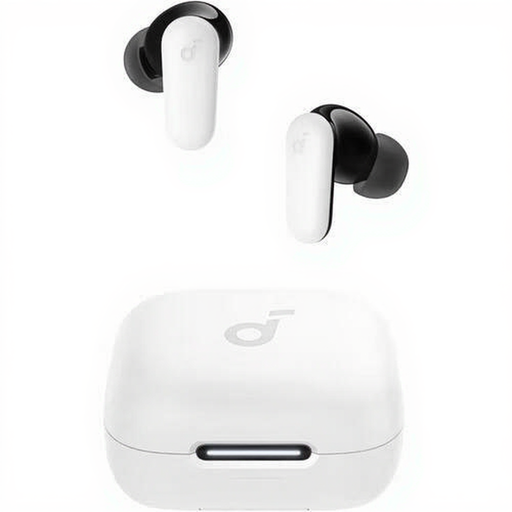
Why it suits this profile: A practical choice for everyday listening and calls, without extra features you may not use. The in-ear fit and included charging case are suitable for commuting and use on the go.
The product information states up to 10 hours of playback, IP54 protection, Bluetooth 5.4 and four microphones. This makes the key usage information easy to find.
Bluetooth 5.4, USB Type-C, touch controls, charging case and IP54 rating.
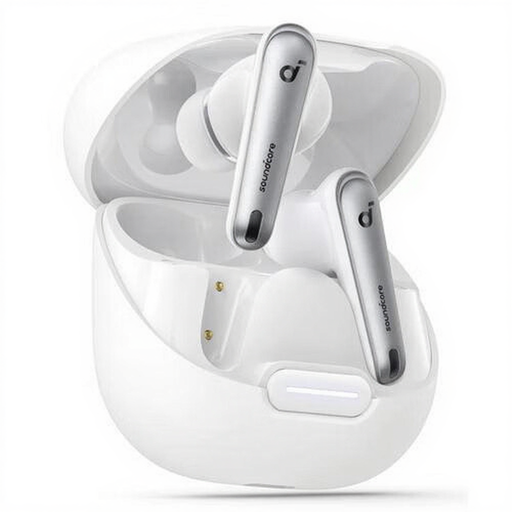
Why it suits this profile: This model is aimed at listeners looking for earbuds with noise cancellation, touch controls and LDAC support.
The stated IPX4 rating makes it clear that this is protection against splashing water, not complete waterproofing. The 10-hour battery life and presence of the case are also specified.
ANC according to the product information, LDAC, Bluetooth 5.3, six microphones, USB Type-C and extra ear tips.
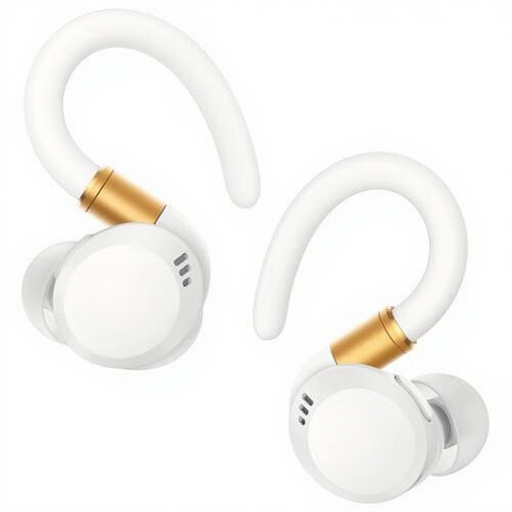
Why it suits this profile: The ear hook and IP68 rating are suitable for users who want to wear their sports earbuds during intensive workouts.
The product description explicitly mentions sweat and water resistance, an ear-hook wearing style and up to 12 hours of continuous playback. However, check the current usage and care instructions.
IP68, ear-hook design, AAC and SBC support, physical controls, charging case and USB Type-C.
We have compiled a complete, up-to-date list of products that fully meet these strict selection criteria and the applicable European safety regulations.
First charge the earbuds, open your smartphone’s Bluetooth settings and select the product name. When pairing for the first time, you may need to remove the earbuds from the case or hold down a button. If you experience connection problems, check that the earbuds have enough charge and remove an old Bluetooth pairing before trying again.
Battery life per charge is usually between a few hours and around a working day, depending on volume, ANC and call usage. The total lifespan also depends on the battery, charging cycles, moisture and care. Keep the earbuds in the case, keep the charging contacts clean and avoid prolonged exposure to heat or moisture.
In addition to the purchase price, replacement earbuds, a possible replacement case and battery wear are the main costs to consider. A model with USB Type-C often uses the same cable as other devices in your home. Before buying, check whether a cable, adapter and extra ear tips are included.
