
Vandaag of morgen in huis

Kwaliteit gegarandeerd

Welkomstaanbiedingen ontgrendelen: GRATIS bezorging | Tot 80% korting | Gratis 30 dagen JoyPlus-proefperiode
Download de app
Wireless earbuds are handy for listening to music and podcasts, making calls and travelling. But a long product list tells you little about how they’ll perform in everyday use. A low price may be tempting, but a poor fit, limited microphone performance or disappointing battery life can quickly make a purchase impractical.
As a Joybuy Product Recommendation Officer, I focus on features that can be checked. Look out for these three common pitfalls before you choose:
True wireless earbuds come as two separate earbuds with a charging case. They’re compact and suitable for everyday use. With in-ear models, a good seal is important for bass and passive noise isolation. Check whether the box includes several sizes of ear tips.
Open-ear earbuds rest next to or around your ear. This means you can stay more aware of traffic, colleagues or fellow travellers. That makes them an interesting choice for walking, commuting and some sports. However, the sound may feel different outdoors than it does with a sealed in-ear model.
An over-ear model, such as the AirPods Max 2, covers your whole ear. It’s a different category from wireless earbuds, but may appeal if comfort during long listening sessions and a spacious sound are important to you.
Look for three separate figures:
According to the product information, the JBL Wave Buds 2 offer up to 40 hours of total playtime with ANC switched off. The same listing gives up to 10 hours from the earbuds themselves. The Bose QuietComfort Ultra Earbuds 2nd Gen are listed with up to 6 hours per full charge. These differences are only useful when you compare the testing conditions.
A quick-charge feature can be just as practical as a large case. For example, the manufacturer states that the Soundcore Liberty 4 Pro offers up to 4 hours of playtime after 5 minutes of charging. Always check whether this is a brand claim rather than an independent guarantee for every use case.
Bluetooth 5.2, 5.3, 5.4 or 6.1 tells you which connection technology is used, but it doesn’t tell you on its own how stable the connection will be in your home or on a train. Also check for features such as multipoint, which lets you switch between devices such as a laptop and smartphone.
For sport and rainy weather, the IP rating is relevant:
An IP rating doesn’t make a product suitable for swimming. Dry your earbuds after they’ve been exposed to moisture, and only charge them once the connectors are dry.
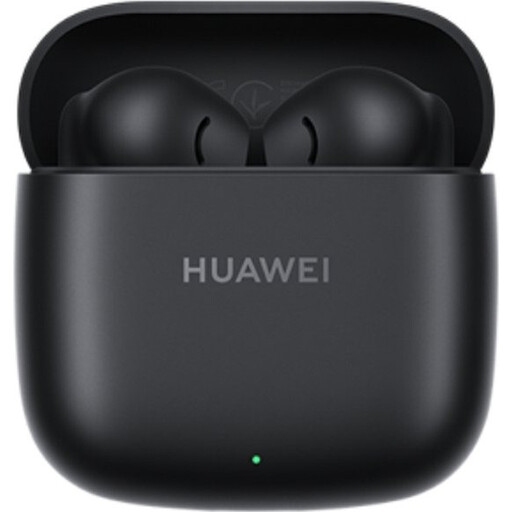
Why it suits this profile: A lightweight in-ear model for everyday listening, calls and commuting. The product listing states that each earbud weighs 3.8 grams and features Bluetooth 5.3.
The stated battery life is broken down into up to 9 hours per charge and 40 hours with the case. The listing also specifies IP54 protection against dust and splashes.
Lightweight design, USB-C charging and up to 40 hours of stated total playtime.
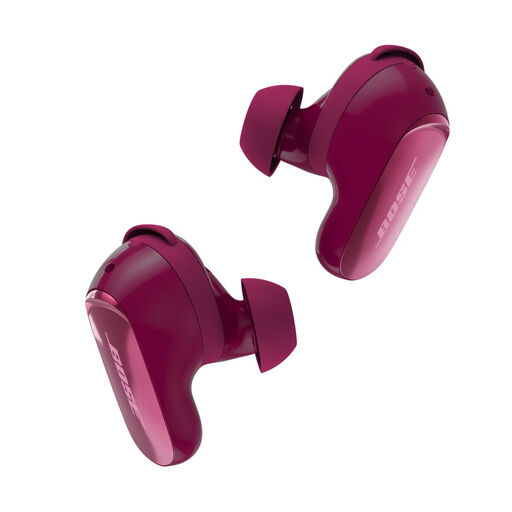
Why it suits this profile: Designed for listeners who value active noise cancelling, adjustable sound and a secure fit when travelling or working.
The product information lists nine combinations of ear tips and stability bands. This lets you tailor the fit rather than settle for one standard size.
According to Bose, the model offers ANC, Aware Mode, Bluetooth 5.3, IPX4 and up to 6 hours of playtime.
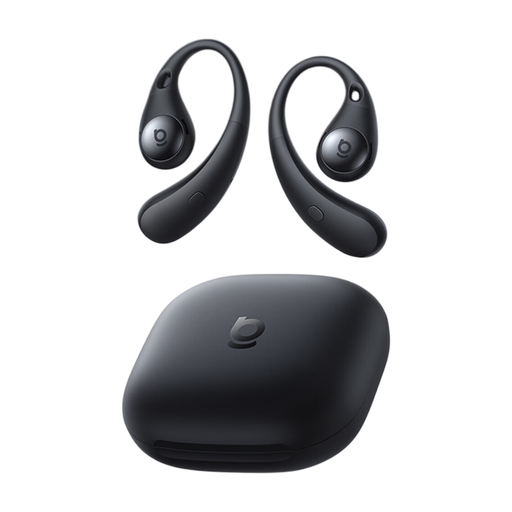
Why it suits this profile: An open-ear design for walking, light exercise and situations where you want to stay aware of your surroundings.
The open design avoids the pressure of a sealed ear canal. Bear in mind, though, that background noise may affect your listening experience.
Bluetooth 6.0, USB-C, support for SBC, AAC and LDAC, and around 8 hours of listening at 50% volume according to the specifications.
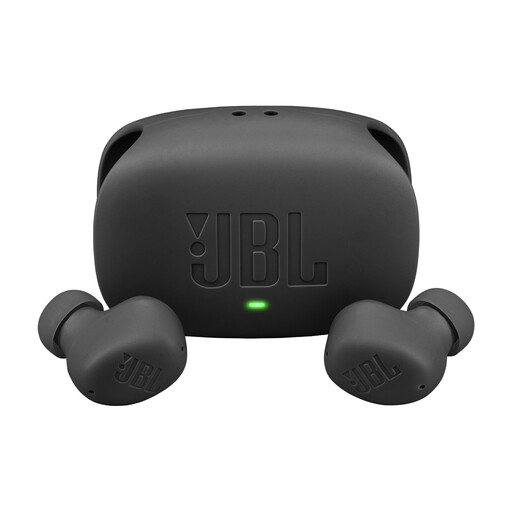
Why it suits this profile: Handy for users who switch between a smartphone and laptop, and want ANC, ambient modes and a charging case with plenty of capacity.
The product listing distinguishes between up to 40 hours with ANC off and the ANC, Ambient Aware and TalkThru features. It also mentions multipoint for two devices.
Four microphones per set according to the product information, IP54 and a USB-C quick-charge feature.
We’ve put together a complete, up-to-date list of products that meet these strict selection criteria and current European safety regulations.
Charge the earbuds and case first. Then open your smartphone’s Bluetooth settings, put the earbuds into pairing mode and select the product name. Google Fast Pair, Microsoft Swift Pair or the brand’s app can help with some models. If the connection doesn’t work, remove the previous pairing and try again.
Battery life per charge is often between a few hours and roughly a full working day. Overall lifespan depends on charging cycles, temperature, moisture, care and software support. Keep the earbuds in their case, clean the charging contacts carefully and avoid prolonged exposure to heat.
Don’t use active noise cancelling in situations where you need to hear traffic or warning signals clearly. When cycling, choose an open-ear model or transparency mode instead, and be mindful of traffic rules and your surroundings. Also avoid listening at high volume for long periods; safety information from several brands warns that prolonged exposure can cause hearing damage.
