
Vandaag of morgen in huis

Kwaliteit gegarandeerd

Welkomstaanbiedingen ontgrendelen: GRATIS bezorging | Tot 80% korting | Gratis 30 dagen JoyPlus-proefperiode
Download de app
Wireless earbuds may look similar, but they can differ considerably in comfort, battery life, water resistance and controls. A low price can be tempting, but a poor fit may mean you hardly use the earbuds at all. Terms such as “noise cancelling”, “studio sound” and “long battery life” do not always tell the full story either.
With this practical buying guide, you can compare Bluetooth earbuds based on verifiable specifications. This helps you avoid paying for features you do not need and make a more informed choice between true wireless earbuds, sports models, open-ear designs and gaming earbuds.
Manufacturers sometimes state the total playback time including the charging case. This is different from the playback time of a single fully charged pair of earbuds. Active noise cancellation, high volume levels and phone calls can also affect battery life.
Always check:
IPX4 generally means protection against splashing water, such as sweat or light rain. It does not make a product suitable for swimming or submersion. A higher rating may offer additional protection, but also check whether the charging case has the same protection.
The Anker AeroFit is listed in the product information with IPX7, while the Soundcore AeroFit Pro has an IPX5 rating. Many Sony models, such as the LinkBuds Fit and WF-C710N, are listed with IPX4. Use these models within the stated limits and allow a wet case to dry completely before charging it.
Earbuds with noise cancelling use active electronics to reduce ambient noise. However, their performance also depends on the fit and the seal in the ear canal. If silicone ear tips do not fit securely, more ambient noise may get in and the bass may sound less full.
An open design works differently. Open-ear earbuds do not block the ear canal, allowing you to continue hearing your surroundings. This can be useful when walking or working, but on a busy train you may hear more background noise than with closed in-ear earbuds.
First, choose the design that suits the way you use your earbuds:
Pay attention to the weight of each earbud, the available earbud sizes and how they are secured in place. A model that shifts while running is less practical, even if it offers extensive audio features.
For everyday use, the combined battery life of the earbuds and charging case is important. The Sony WF-C510, for example, lists a total battery life of 22 hours, while the Sony LinkBuds Clip offers up to 9 hours from the earbuds and 37 hours in total with the case, according to the product description. The stated figures depend on volume, connection and features.
Fast charging is handy if you are often on the move. According to the product information, several Sony models can provide around an hour of playback after just a few minutes of charging. Check the exact product specifications before making your purchase.
Bluetooth 5.3 is available on several models in this selection. In practice, the supported profiles, codecs and microphones are also relevant. If you make frequent calls, consider the number of microphones and any noise-reduction features for calls.
Wireless earbuds with a microphone are suitable for phone calls, online meetings and voice assistants. Multipoint is useful if, for example, you want to connect to a laptop and smartphone at the same time. For gaming, low latency and compatibility with your preferred platform are more important than simply having a large number of audio codecs.
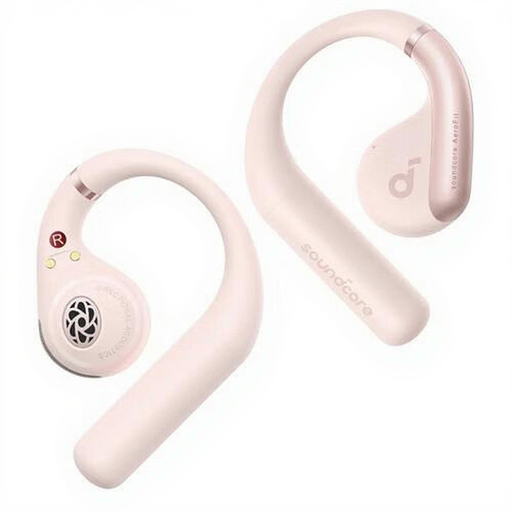
Why it suits this profile: The ear-hook-style on-ear design is intended for calls, music, exercise and everyday use. Touch controls and Bluetooth 5.3 make switching from wired to wireless easy.
The product information separately states 11 hours of continuous playback and a charging time of 1 hour. The IPX7 rating is clearly listed, but submersion should still be avoided in accordance with the usage instructions.
11 hours of continuous audio, four microphones, a USB-C cable and Bluetooth 5.3 according to the product specifications.
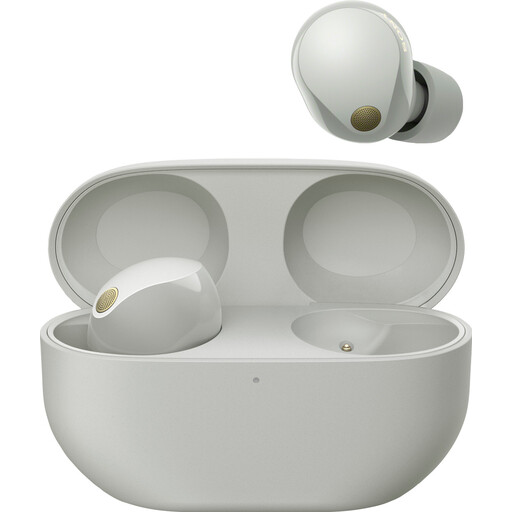
Why it suits this profile: According to the product information, this closed in-ear model focuses on active noise cancellation, calls and detailed music playback.
The battery information separately states the usage time with and without noise cancelling. The IPX4 rating makes it clear that the model is splash-resistant, not intended for submersion.
LDAC, AAC, LC3 and SBC are listed, along with multipoint and up to 24 hours of battery life with the charging case according to the product description.
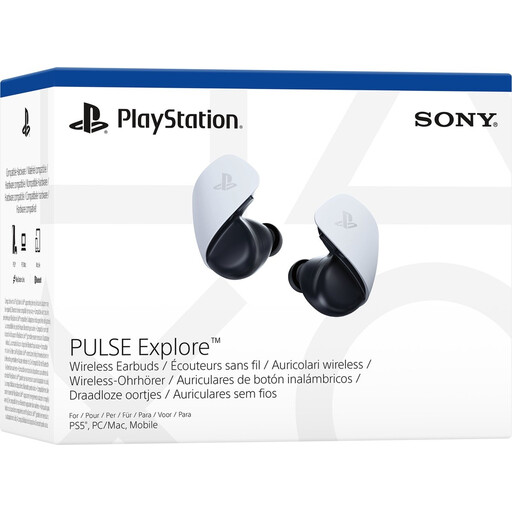
Why it suits this profile: This model is designed for gaming on PS5, PC, Mac and PlayStation Portal. The combination with PlayStation Link is particularly relevant for users who play within this ecosystem.
The compatible devices and connection technology are clearly stated. This allows you to check in advance whether PlayStation Link is compatible with your console or computer.
The product information lists low latency, lossless PlayStation Link technology and two microphones with AI-assisted noise reduction.
We have compiled a complete, up-to-date list of products that fully meet these strict selection criteria and the applicable European safety regulations.
Charge the earbuds, open the charging case and activate pairing mode according to the instructions. Then go to Settings > Bluetooth on your smartphone and select the product name. If the connection does not work, remove the previous pairing and try again. Some models have their own app for the equaliser, updates and additional features.
Battery life per charge varies by model and settings. Noise cancelling, phone calls and high volume usually reduce playback time. Battery capacity decreases over time, as it does with other lithium-ion devices. Store the earbuds in the case, avoid extreme heat and use a suitable USB-C charger.
That depends on the fit and the IP rating. Sports earbuds with an ear-hook or wing may stay more securely in place while you move. IPX4 is suitable for splashing water and sweat according to the product information, but not for swimming. Clean and dry both the earbuds and the charging contacts before storing or charging them.
