
Vandaag of morgen in huis

Kwaliteit gegarandeerd

Welkomstaanbiedingen ontgrendelen: GRATIS bezorging | Tot 80% korting | Gratis 30 dagen JoyPlus-proefperiode
Download de app
Wireless earbuds are handy for commuting, the office, studying and exercise. However, a long product list is not much help if you do not know which specifications suit the way you use them. A low price may be tempting, but an unsuitable fit, limited battery life or unclear water resistance can quickly lead to disappointment.
Manufacturers sometimes quote total playback time including the charging case. This is not the same as usage time from a single charge. Features such as active noise cancellation, high volume levels and phone calls can also affect battery life.
Therefore, pay attention to the difference between:
A model with a high total battery capacity is particularly practical if you are often on the go and do not want to charge every day.
The IP rating indicates the conditions against which a product has been tested. IPX4, for example, means protection against splashing water, such as sweat or light rain. This is different from being submerged.
So check whether you need earbuds for:
Always follow the product specifications and safety instructions. Do not use a charging case in a damp environment unless it has been certified for this purpose.
Earbuds with noise cancellation can reduce distracting sounds, but active noise cancellation is not desirable in every situation. When cycling, walking or running, it may be important to hear traffic and other road users.
Open-ear earbuds and some sports earbuds leave your ears open, while in-ear models with ANC provide more isolation. You should also treat claims such as “AI noise cancellation” or “clear calls” as product claims. According to the brand’s own information, this function may improve speech clarity; the result depends on the wind, the distance from the microphone and the surroundings.
A good fit stops you from constantly adjusting your earbuds. In-ear earbuds partially seal the ear canal and are often supplied with several sizes of silicone ear tips. This can help with sound isolation, but not everyone finds it comfortable.
Ear-hook earbuds hook behind or around the ear and are suitable for movement. Open-ear earbuds rest beside the ear, allowing you to stay more aware of your surroundings. An open design can be comfortable during extended wear, but generally provides a different listening experience from a sealed in-ear model.
Almost all modern Bluetooth earbuds work with smartphones, tablets and laptops that support Bluetooth audio. A newer Bluetooth version may contribute to lower energy consumption and a more stable connection, but on its own it says nothing about sound quality.
In particular, check:
TWS earbuds consist of two completely separate earbuds and a charging case. This is practical, but you need to store and charge both earbuds properly and separately.
Anyone who makes frequent calls needs more than just a good speaker. Look at the number of microphones, wind reduction and the position of the microphone. Claims about “crystal-clear calls” come from the brand’s product information and are not a guarantee in every environment.
Touch controls are convenient, but check whether you can control the volume, calls and voice assistant without taking out your phone. For long working days, the weight and pressure on your ears are more important than a striking design.
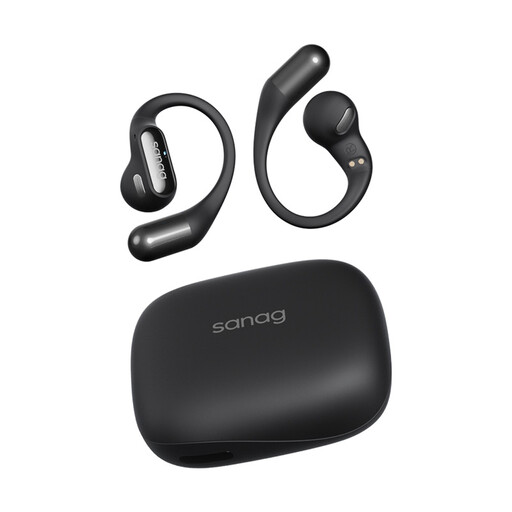
Why it suits this profile: The open-ear design and weight of approximately 5.6 grams per earbud are designed for everyday comfort and exercise.
The specifications list Bluetooth 5.3, touch controls and IPX4. This makes the key connection and usage conditions clearer than a general claim about sports use.
Open-ear hook design, USB-C charging case and, according to the product information, approximately 26 to 48 hours of total usage time, depending on the usage mode.
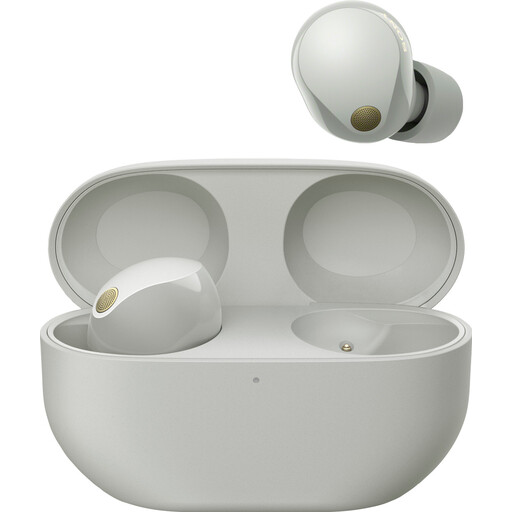
Why it suits this profile: This in-ear model is aimed at users who combine music, calls and travel, and consider active noise cancellation important.
The product information lists playback time separately with and without noise cancellation, as well as Multipoint and IPX4. This makes it easier to compare the claims with the way you use them.
Bluetooth 5.3, support for AAC, LC3, LDAC and SBC, microphone, Multipoint and a stated total battery life of 24 hours with the charging case.
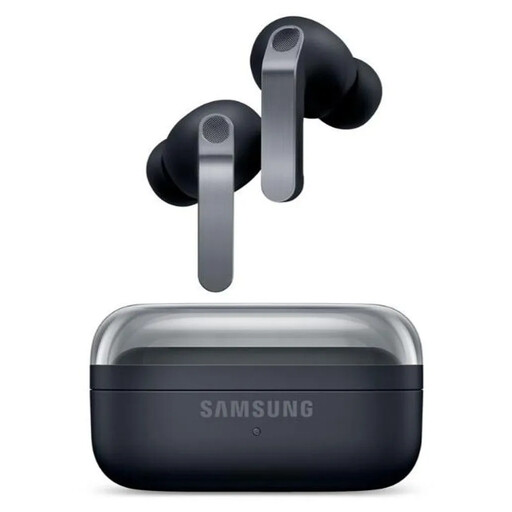
Why it suits this profile: Suitable for users within the Galaxy ecosystem who are looking for ANC, advanced controls and a higher IP rating.
The specifications list separate ANC battery life, IP57, six microphones and USB-C. However, IP57 is not an invitation to go swimming with them.
Two-way speakers, Bluetooth 6.1, ANC, 360 Audio, wireless charging and, according to the product information, up to 30 hours in total without ANC.
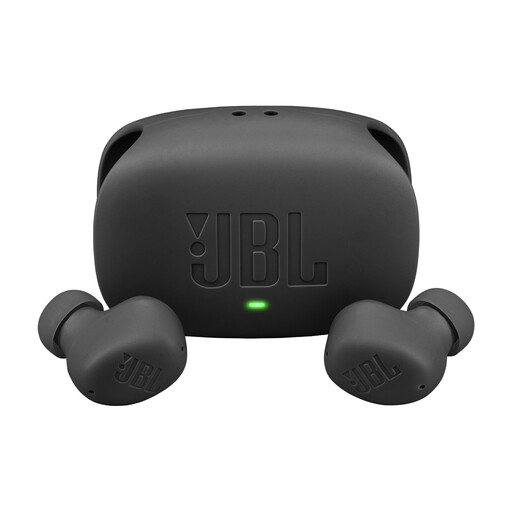
Why it suits this profile: A practical choice for music, calls and switching between, for example, a laptop and smartphone.
The product details list Multipoint, IP54 for the earbuds and a separate IPX2 rating for the case. This makes it clear that not every component has the same level of protection.
Bluetooth 5.2, microphone, USB-C, fast charging and, according to JBL, up to 40 hours of total playback time when ANC is switched off.
We have put together a complete, up-to-date list of products that fully meet these strict selection criteria and the applicable European safety regulations.
Use these points before ordering wireless Bluetooth earbuds:
First, charge the earbuds and case. Open the case, activate Bluetooth on your phone and select the product name from the list of available devices. Some models require an app for controls, updates or equaliser settings.
Usage time per charge varies depending on the model and settings. Battery capacity decreases over time, particularly after many charging cycles and exposure to heat. Store the earbuds in the case, keep the charging contacts clean and use a suitable USB-C charger.
Not always. A more expensive model may offer features such as ANC, Multipoint, wireless charging or a more comprehensive app, but not everyone needs these functions. Compare the specifications with the way you use them: for commuting, battery life and the microphone are often more important than advanced audio codecs; for sport, fit and water resistance matter more.
