
Vandaag of morgen in huis

Kwaliteit gegarandeerd

Welkomstaanbiedingen ontgrendelen: GRATIS bezorging | Tot 80% korting | Gratis 30 dagen JoyPlus-proefperiode
Download de app
Wireless earbuds are useful on the train, while working from home and when exercising. However, a long battery life or the term “noise cancelling” does not tell you everything about how suitable a model is. Some buyers pay too little attention to connectivity, fit or the microphone, only to discover after purchase that the earbuds do not stay in place or do not work with their laptop.
As a Joybuy Product Recommendation Officer, I filter product information using verifiable specifications. This helps you compare marketing claims more effectively and choose a model that suits your everyday use.
The stated playback time often applies under specific conditions. Active noise cancellation, phone calls, high volume and use of the charging case can all affect actual battery life. So do not just look at the highest number of hours. Also consider:
A model offering 10 hours of playback per charge may be enough for a daily commute. If you work long days, you may get more out of wireless headphones with a larger battery.
Noise-cancelling earbuds can use different forms of sound reduction. Passive isolation comes from the seal created by the earbud in your ear. Active noise cancellation, also known as ANC, uses electronics to reduce ambient noise. The result depends on the fit, your surroundings and the settings.
Check whether the product information clearly states whether the model uses ANC, passive noise reduction or a transparency mode. According to the product description, the JBL Wave Buds 2 feature active noise cancellation and Smart Ambient. The manufacturer also states that the earbuds have IP54 protection. This information describes the listed features; the experience may vary depending on the user and environment.
Not every smartphone still has a 3.5mm socket. USB-C earbuds only work if your device supports audio via USB-C. With Bluetooth earbuds, check which devices can be paired and whether features such as multipoint or an app are available for your operating system.
A wired model does not need Bluetooth pairing or a battery, but the cable can be less practical when you are out and about. Wireless headphones offer greater freedom of movement, while a gaming headset needs to be compatible with your console, PC or mobile device.
For everyday use, there are three sensible options:
The Samsung EO-IC100 uses USB-C and, according to the product specifications, has a built-in DAC, a microphone and in-line controls. The Sony IER-EX15C also has USB-C, a microphone and a 1.2-metre cable.
For online meetings, phone calls and working from home, earbuds with a microphone are more practical than models without voice functionality. Check the number of microphones, their positioning and any information about noise reduction during calls.
According to the product description, the Anker P30i comes with four microphones and Bluetooth 5.4. The Soundcore Liberty 4 Pro lists six microphones. These are verifiable product details, but having more microphones does not in itself guarantee perfect call quality in every situation.
In-ear headphones partially seal the ear canal, which can make them more compact. Some users find half-in-ear models less enclosing. With sports earbuds, stability and protection against splashing are particularly important.
Pay attention to the IP rating:
Do not use headphones while cycling, driving or in other situations where you need to remain fully aware of surrounding sounds.
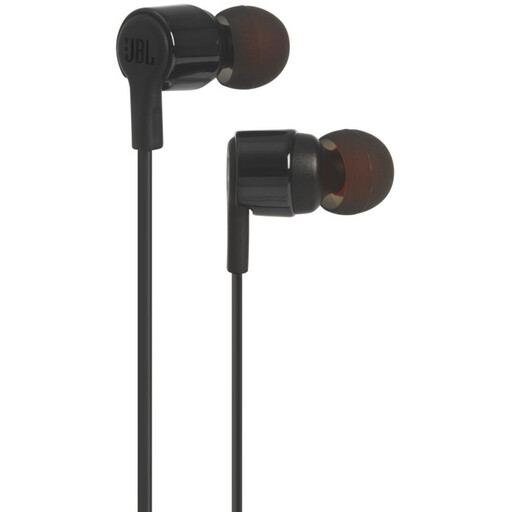
Why it suits this profile: This wired model uses a 3.5mm connection and, according to the product information, has a built-in microphone. There is no battery to charge and no Bluetooth to set up.
No reliance on battery life or Bluetooth. However, check that your device has a 3.5mm port.
3.5mm connection, microphone and controls according to the product description.
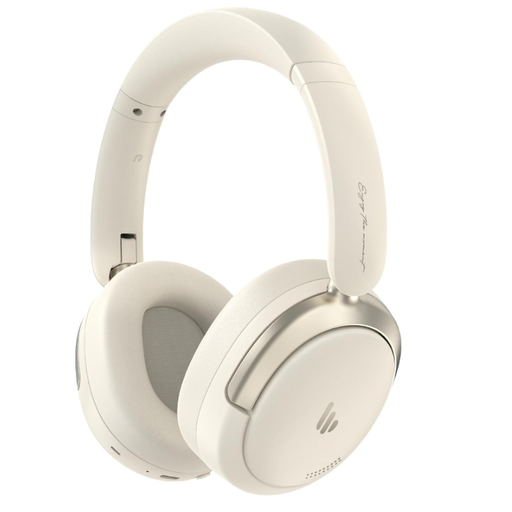
Why it suits this profile: These wireless headphones are aimed at users looking for an over-ear design, long playback time and multiple connectivity options for work, travel and music.
The stated specifications list 45 hours of playback, Bluetooth 5.4 and a wired USB-C audio mode. Check which mode and settings you are using when you buy.
40mm drivers, microphone, Bluetooth 5.4 and hybrid active noise cancellation according to the product information.
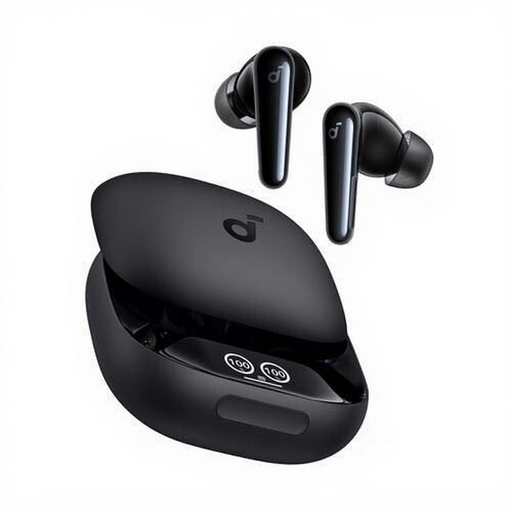
Why it suits this profile: According to the product information, this TWS model is designed for calls, music, sport and everyday use. The IPX5 rating may suit active users looking for protection against splashing.
The product information lists six microphones, a charging case and a specified IPX5 rating. Check the fit before exercising.
Up to 10 hours of continuous playback, USB-C case, touch controls and IPX5 according to the product specifications.
If you are mainly looking for compact Bluetooth earbuds, the Anker P30i is worth considering. According to the product information, this model has Bluetooth 5.4, four microphones, an IP54 rating and up to 10 hours of playback time. For Apple users, the Apple AirPods 4 with USB-C are an option offering Bluetooth 5.3, a case with more than 30 hours of total battery capacity and passive noise reduction according to the specifications.
For office calls, the Jabra Evolve2 65 USB-A Black MS Mono may be more suitable. The stated battery life is up to 37 hours, and the model comes with a USB-A Bluetooth adapter. Check beforehand that USB-A is available on your computer.
We have put together a complete, up-to-date list of products that fully meet these strict selection criteria and the applicable European safety regulations.
Open the Bluetooth settings on your smartphone, charge the earbuds and put them into pairing mode. Then select the product name from the list. When connecting for the first time, a pop-up or instruction may appear in the associated app. If it does not work, remove any previous pairing and try again.
Their lifespan depends on charging cycles, temperature, moisture, daily use and maintenance. Keep the earbuds in their case, keep the charging contacts clean and use a suitable USB-C cable. A battery is a consumable component, so the stated playback time may decrease over time.
Wireless models use power and may require an app or charging case. Wired earbuds do not incur charging costs, but may require an adapter if your device does not have a 3.5mm port. So do not compare only the purchase price. Also consider the connection, accessories and how you use them every day.
