
Vandaag of morgen in huis

Kwaliteit gegarandeerd

Welkomstaanbiedingen ontgrendelen: GRATIS bezorging | Tot 80% korting | Gratis 30 dagen JoyPlus-proefperiode
Download de app
Wireless earbuds are handy for listening to music, making calls, travelling, working and exercising. But a long list of features doesn’t automatically mean a pair is right for you. A low price might look tempting, for example, but the battery life, fit or microphone may disappoint.
Look out for these three common pitfalls:
Choose between in-ear, semi-in-ear and open-ear earbuds. In-ear models partially seal the ear canal, which can help block out more background noise. They’re often a good choice for travelling, working in an office and listening with fewer distractions.
Open-ear models sit beside or around the ear. According to the product description, the Lenovo LE302 is an open-ear model with an earclip design. This can be comfortable for walking, cycling or working when you want to stay aware of your surroundings. The listening experience and fit are different from those of traditional wireless in-ear earbuds.
For in-ear models, check whether they come with multiple ear tip sizes. A good fit helps keep them in place and can also affect how clearly you hear calls and how much bass you perceive.
Most Bluetooth earbuds work with Android and iOS devices, tablets and computers. Check the Bluetooth version, but also look for features such as multipoint connectivity, app support and compatibility with your operating system.
A higher Bluetooth version number doesn’t guarantee better sound on its own. For gaming and watching videos, synchronisation and latency matter more. According to the product information, the Lenovo LE302 features Wireless 6.0 and low latency. Check that all the features are supported by your phone, laptop or games console.
Apple and Samsung models may offer extra features within their own ecosystems. Some settings, updates or assistant features, for example, may require iOS, Android or a specific app.
Compare battery life on a like-for-like basis. A model offering, say, 5 hours per charge and more than 30 hours with the charging case works differently in practice from one that claims 10 hours per charge without the same test conditions.
For calls, earbuds with a microphone and well-positioned microphones are important. Brands use ENC or AI noise reduction for calls, but performance can depend on wind, traffic and how far you are from your phone. Treat claims such as “clear calls” as manufacturer information, rather than a guaranteed result in every situation.
If you’re exercising, check the IP rating:
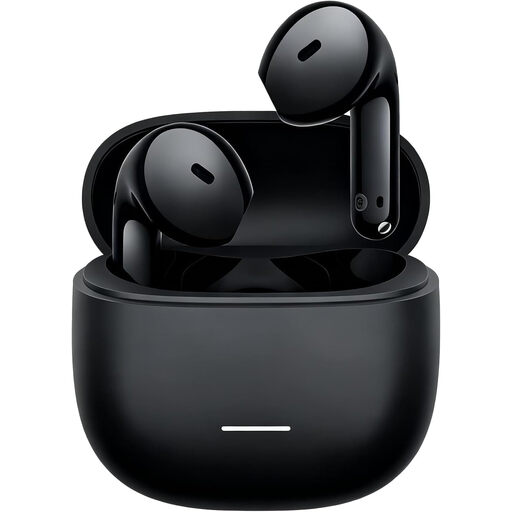
Why it suits this profile: A straightforward choice for everyday listening, travelling and calls with an Android or iOS phone.
The product information lists 7 hours of play time per charge and 37 hours with the charging case separately. It also clearly states that the IP54 rating applies only to the earbuds.
Bluetooth 5.4, USB-C, 14,2mm dynamic drivers and a weight of around 3,8 grams per earbud.
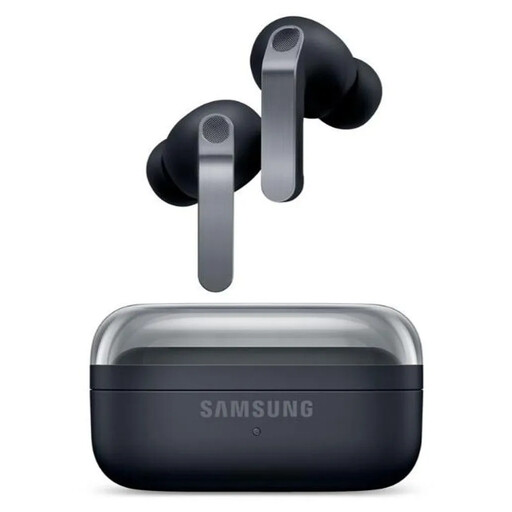
Why it suits this profile: Designed for users who value ANC, customisable audio and integration with Galaxy devices.
The specifications list separate play times with ANC switched on and off. The IP57 rating is also not presented as protection for swimming.
2-way speakers, six microphones, Bluetooth 6.1, wireless charging and up to 30 hours of total play time without ANC, according to the product information.
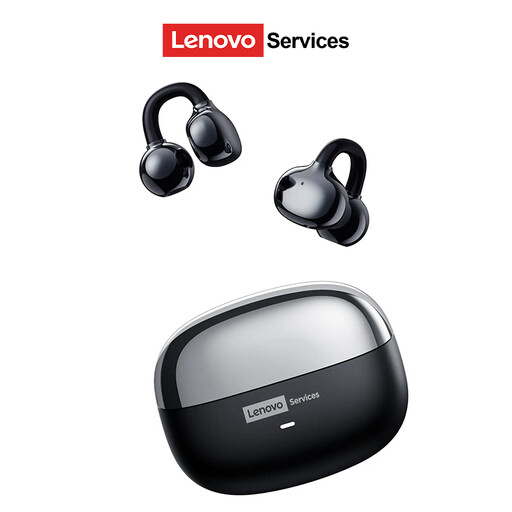
Why it suits this profile: The open-ear design is well suited to walking, working in an office and exercising when you want to stay aware of your surroundings.
The product description clearly identifies the open-ear design, so you won’t mistake it for a snug in-ear set with full passive isolation.
Compatible with Android, iOS and Windows; the stated battery life is up to 25 hours and the connection uses Wireless 6.0.
We’ve put together a complete, up-to-date list of products that meet these strict selection criteria and current European safety regulations.
Open the charging case or switch on the earbuds, then press and hold the pairing button if needed. Next, go to Settings > Bluetooth on your phone and select the product name. Some models require you to use a companion app for the initial pairing.
It depends on battery use, charging cycles, moisture, temperature and care. Keep the earbuds in their case, charge them with the recommended cable and keep the charging contacts clean. Battery-life claims usually apply to new products and may decrease over time.
It depends on the fit and IP rating. For exercise, choose a pair that stays securely in place and offers suitable splash protection at a minimum. Also check whether the charging case has the same water-resistance rating as the earbuds. Don’t turn the volume up unnecessarily, and avoid using earbuds in situations where you need to hear traffic.
