
Vandaag of morgen in huis

Kwaliteit gegarandeerd

Welkomstaanbiedingen ontgrendelen: GRATIS bezorging | Tot 80% korting | Gratis 30 dagen JoyPlus-proefperiode
Download de app
Wireless earbuds are handy for commuting, exercising, online meetings and phone calls. However, a low price or a long list of features doesn’t automatically make them a good buy. Fit, battery life and moisture protection often have a greater impact on whether you still enjoy using them after a few weeks.
In this buying guide from the Joybuy Product Recommendation Officer, you’ll find out what to look for and which models suit different situations.
Brands often quote battery life including several charges from the charging case. This means playback time on a single charge can be much lower. Volume, noise cancellation, calls and the Bluetooth codec used can all affect battery life too.
So always check:
For example, a model offering 8 hours per charge may be more practical than one with a higher total battery-life figure but very short playback time per charge.
An IPX4 rating generally means protection against splashes and sweat, not submersion. IPX5 indicates protection against water jets under specific test conditions. The charging case may have a different rating or may not be water-resistant at all.
So don’t wear sports earbuds in the shower or take them into a swimming pool. Dry the charging contacts before connecting the case to a USB-C charger.
Earbuds with noise cancellation can electronically reduce background noise, but the results depend on how well they seal in your ears. Open-ear and clip-on earbuds, on the other hand, let in ambient sound. This is useful when walking or cycling, but less suitable if you want to block out as much noise as possible on a busy train.
Remember to think about safety too: don’t use ANC in situations where you need to hear traffic, bicycle bells or warnings.
Bluetooth 5.3, 5.4 or 6.0 mainly tells you about the connection technology used. A newer version doesn’t automatically mean better sound. Check compatibility with your smartphone, tablet or laptop too. For everyday use, a stable connection, a decent range and easy pairing are often more important than a high Bluetooth version number.
Touch controls are handy for music, calls and voice assistants. However, sensitive touch surfaces can sometimes be activated accidentally when you put the earbuds in or adjust them.
There are several types:
Weight is a useful point of comparison. Some models’ product details quote around 3.9 to 5.6 grams per earbud. This may seem like a small difference, but you can notice it when wearing them for a long time. An ear hook or silicone fitting can improve stability, but not every design will suit every ear shape.
For online meetings and phone calls, the number of microphones and the noise-reduction technology used are relevant specifications. According to the product description, a model with four or six microphones can help distinguish voices from background noise. However, this doesn’t guarantee the same call quality in every environment.
Check that the wireless earbuds with microphone are compatible with your laptop or phone, and look in the product details for ENC, call noise reduction or a similar feature.
A USB-C charging port is handy because you can often use the same cable for other devices. As well as battery capacity, pay particular attention to the stated playback time. Examples from the available models include around 7 hours per charge, 8 hours at a specified volume and up to 11 hours according to a model’s product details.
For water-resistant earbuds, check the exact IP rating. A higher rating for the earbuds doesn’t automatically mean the charging case has the same level of protection.
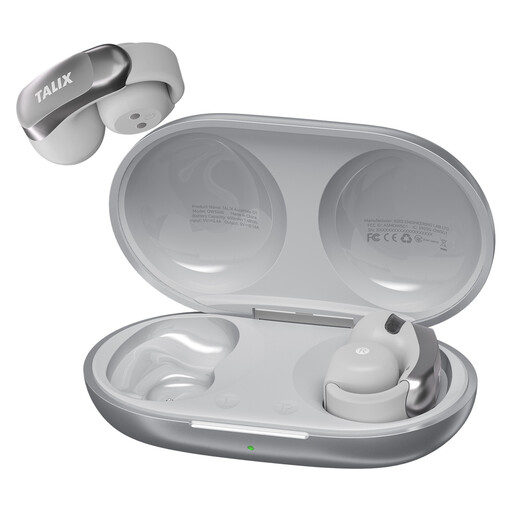
Why it suits this profile: This clip-on model combines a weight of around 5.2 grams per earbud with Bluetooth 5.3, touch controls and a charging case. It’s a good fit for everyday listening, calls and light workouts.
The product details list around 7 hours of listening time per charge and 28 hours with the case separately. They also state an IPX4 rating, so the moisture protection shouldn’t be mistaken for waterproofing.
Four-microphone setup for calls, fast charging for around 2 hours of playback after 10 minutes, and a silicone ear hook.
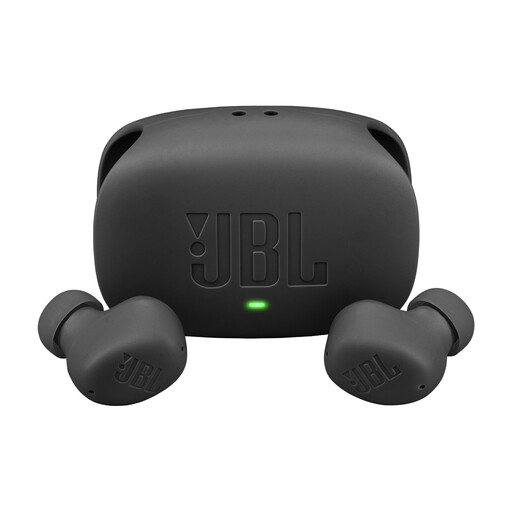
Why it suits this profile: This in-ear model is designed for everyday use, with active noise cancellation, Smart Ambient, multipoint connectivity and support through the JBL Headphones app.
The product details distinguish between up to 8 hours of playback per charge and up to 40 hours with the case; the total applies with ANC off. The IP54 rating for the earbuds and IPX2 rating for the case are listed separately.
Multipoint connectivity for two devices, an app with adjustable settings and a quoted talk time of up to 4.5 hours.
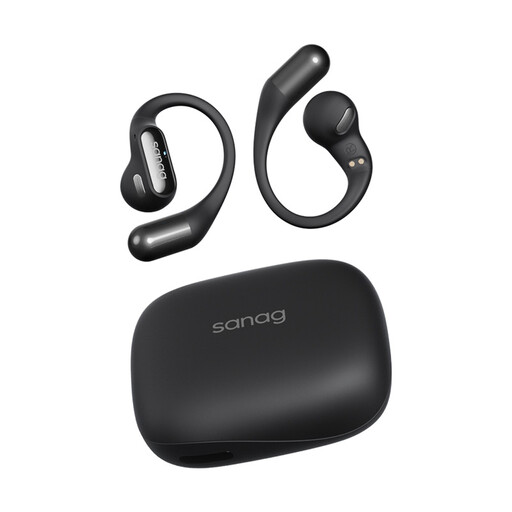
Why it suits this profile: The open-ear hook design is made for running, cycling, fitness and outdoor activities where it’s important to stay aware of ambient sound.
The specifications state a weight of around 5.6 grams per earbud, Bluetooth 5.3 and IPX4. This makes the weight, connection and splash resistance clearer than general claims such as ‘sports-ready’.
Open-ear design, touch controls and, according to the product details, around 26 to 48 hours of total battery life depending on the mode used.
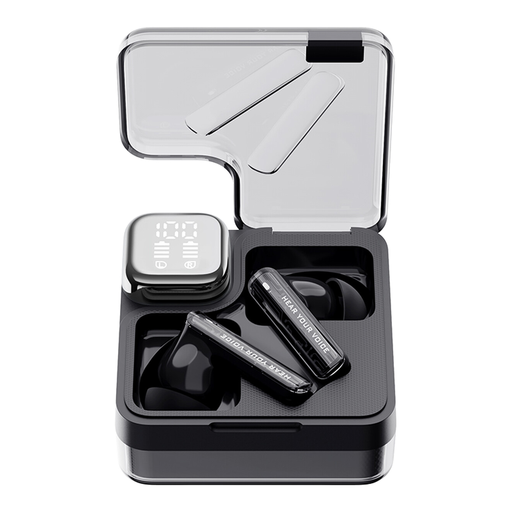
Why it suits this profile: This in-ear model combines ANC, ENC for calls, an app and a low-latency mode for watching videos or gaming on your phone.
The product details quote around 6 to 7 hours per charge and around 28 hours in total. They also make it clear that the charging case must be kept dry, despite the earbuds having an IPX5 rating.
ANC and transparency modes, customisable touch controls through the QCY app and a quoted latency of 0.06 seconds in gaming mode.
We’ve put together a complete, up-to-date list of products that meet these strict selection criteria and the applicable European safety regulations.
First, charge the earbuds and the case. Open the case or take the earbuds out to activate pairing mode. Turn on Bluetooth on your phone and select the product name from the list of available devices. If it doesn’t work, remove any previous pairing and try again by following the instructions.
Many models offer around 5 to 11 hours of use per charge, depending on volume, calls and ANC. Battery life decreases over time. Keep the earbuds in the case, avoid exposing them to heat and use a suitable USB-C charger. Clean the charging contacts carefully and keep moisture out of the case.
Not always. ANC can reduce ambient sound, making traffic harder to hear. An open-ear design is often more practical for cycling when you need to stay aware of your surroundings. Always consider road safety and local rules, and don’t listen to music if it reduces your awareness of what’s around you.
