
Vandaag of morgen in huis

Kwaliteit gegarandeerd

Welkomstaanbiedingen ontgrendelen: GRATIS bezorging | Tot 80% korting | Gratis 30 dagen JoyPlus-proefperiode
Download de app
Wireless earbuds are handy for listening to music, making calls, travelling, studying and exercising. But a long list of features doesn’t automatically mean a model is right for you. A high number of microphones, a high IP rating or impressive battery life may sound appealing, but the details determine how useful the earbuds are in practice.
Look out for these common pitfalls:
There are three common styles. In-ear earbuds sit partly inside the ear canal and usually provide a better passive seal. This can be useful on public transport or in the office. Semi-in-ear models fit more loosely and may feel more comfortable, but let in more ambient noise.
An open-ear headset or ear-clip model sits beside the ear. This helps you stay more aware of your surroundings, which can be useful when walking or working. According to Lenovo’s product description, the LE302 is designed for uses including office work, watching videos, gaming and exercise. The manufacturer lists an open-ear design and battery life of up to 25 hours. Do check that the fit is secure enough for the way you move.
The IP code indicates how well a product is protected against dust and water. IPX4 means protection against splashes, but not immersion. IPX5 is designed to withstand low-pressure water jets. A rating such as IP54 combines limited dust protection with splash resistance.
The rating often applies only to the earbuds. A charging case with an open USB-C port may be more vulnerable. So don’t wear water-resistant earbuds while swimming, and only charge them once the earbuds and charging port are completely dry.
Bluetooth 5.4 or Bluetooth 6.0 tells you which connection technology is used, but doesn’t tell you on its own how stable the connection will be in your home. Also check compatibility, range, supported codecs and whether you can pair the earbuds with multiple devices.
For calls, the microphone set-up matters. According to a brand’s product description, ENC technology can help reduce ambient noise during calls, but performance depends on wind, how far you are from your phone and the software. The same applies to ANC: claims such as a specific decibel figure come from the brand’s product information and don’t guarantee the same experience in every situation.
The following selection is based on verifiable details from the available product information, such as Bluetooth version, IP rating, battery life and design.
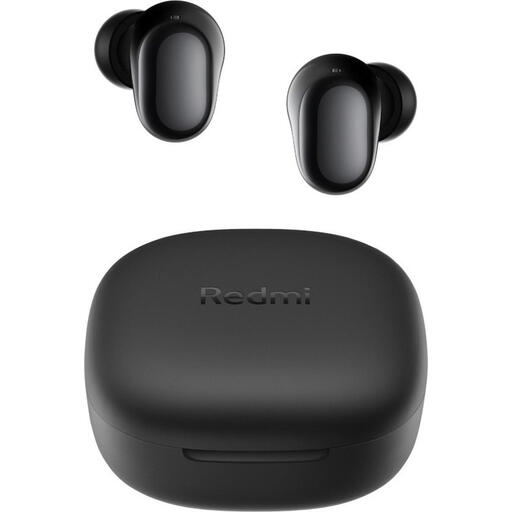
Why it suits this profile: This model has Bluetooth 5.4, weighs 3.6 grams per earbud and offers up to 7.5 hours of playback per charge. It’s a good choice for everyday listening without complicated set-up.
The product information lists the earbuds’ playback time separately from the total playback time of 36 hours with the charging case. The IPX4 rating is clearly limited to sweat resistance.
Bluetooth 5.4, USB-C, 36 hours of total playback and extra ear tips in different sizes.
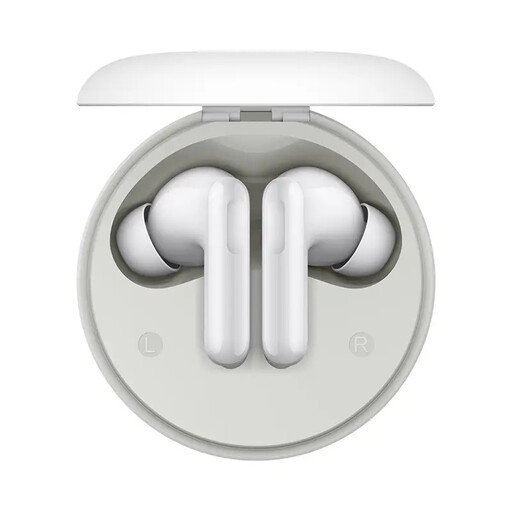
Why it suits this profile: The product details list a 12.4 mm driver, active noise cancellation of up to 49 dB and total battery life of up to 42 hours. This makes them suitable for commuting, studying and long listening sessions.
The product information distinguishes between Noise Cancelling, Transparency and Off modes. This means you can switch off noise cancellation when you need to hear what’s going on around you.
12.4mm driver, listed ANC function, USB-C charging case and app settings for the equaliser and controls.
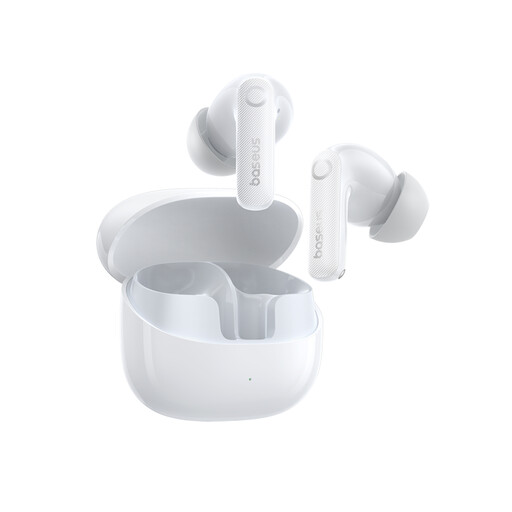
Why it suits this profile: According to the product information, this model combines adaptive hybrid ANC, six microphones, IP55 splash resistance and support for SBC, AAC and LDAC.
The product information lists 11 hours of listening time at 50 per cent volume and makes clear that IP55 splash resistance doesn’t protect against immersion.
LDAC support, six microphones, USB-C, up to 55 hours of battery life with the charging case and a communication range of 10 metres.
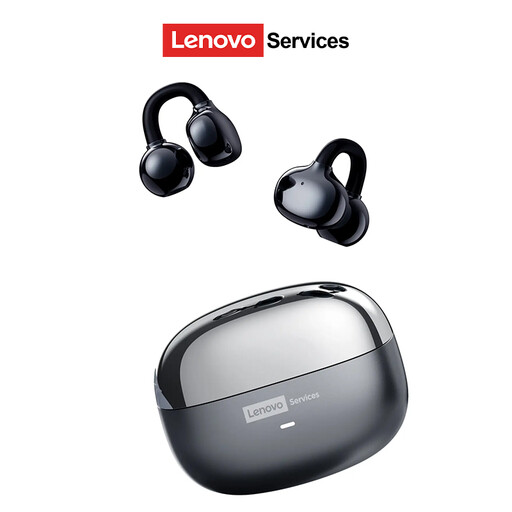
Why it suits this profile: The open-ear ear-clip design leaves your ear canal clear. It may suit office work, walking and exercise when you want to hear traffic or your colleagues.
The design makes clear that this isn’t a model for a close seal or complete isolation. According to the product description, staying aware of your surroundings is one of its intended uses.
Open-ear design, Wireless 6.0 according to the product information, compatibility with Android, iOS and Windows, and up to 25 hours of battery life.
We’ve put together a complete, up-to-date list of products that meet these strict selection criteria and the applicable European safety requirements.
Open the charging case or press and hold the pairing button. On your phone, go to Settings > Bluetooth and select the name of your earbuds. A pop-up may appear the first time you connect. If it doesn’t work, remove any previous Bluetooth pairing and try again. Also check that your earbuds are sufficiently charged.
Playback time per charge is often between a few hours and around ten hours, depending on volume, ANC and the connection. The charging case extends the total battery life. Battery capacity decreases over time, particularly if the battery is often allowed to run flat or is exposed to high temperatures. Keep your earbuds and case dry, and charge them with a suitable USB-C cable.
That depends on the fit and IP rating. IPX4 may be enough for light exercise, while heavy sweating or rain may call for a higher rating. Always check whether the protection applies only to the earbuds. Don’t use them while cycling or in traffic if noise cancellation could make you less aware of your surroundings.
