
Vandaag of morgen in huis

Kwaliteit gegarandeerd

Welkomstaanbiedingen ontgrendelen: GRATIS bezorging | Tot 80% korting | Gratis 30 dagen JoyPlus-proefperiode
Download de app
Wireless earbuds are handy for listening to music, making calls, travelling, studying and exercising. But a long list of features doesn’t automatically mean a model is right for you. Bluetooth earbuds are particularly easy to buy in haste, with three common pitfalls to watch out for: unclear battery claims, misunderstanding water resistance, and focusing too much on noise cancellation without considering comfort and call quality.
A claim such as “40 or 55 hours of battery life” usually refers to total playtime with the charging case. The earbuds themselves may last considerably less on a single charge. For example, the JBL Wave Buds 2 are said to offer up to 40 hours with ANC switched off, while the specifications state up to 8 hours of playback per charge.
So check these three figures separately:
So earbuds with long battery life aren’t simply a model with a high total figure. Check whether quick charging is available and how long a full charge takes, too.
An IP rating describes protection against dust and water in certain conditions. IPX4 is generally designed to protect against splashes and sweat, while IPX5 indicates protection against water jets. IP55 or IP57 offers additional protection, but it doesn’t mean you can swim with the earbuds.
Also check whether the rating applies only to the earbuds. For example, the Redmi Buds 6 Play have an IPX4 rating for the earbuds; the charging case isn’t water-resistant. Always dry the earbuds and USB-C port before charging.
Noise-cancelling earbuds use active technology to reduce background noise. Results can vary depending on the fit, surroundings and device. According to product information from MINISO and Baseus, certain models feature adaptive ANC with claimed noise reduction of up to -50 dB. This is a brand claim, not a guarantee that every sound will disappear completely.
ANC is also different from microphone noise reduction when making calls. If you often take calls on a busy train or in the office, look at the number of microphones, any stated ENC or AI noise reduction, and the call settings available.
Bluetooth 5.4 or 6.0 can help provide a modern connection, but your experience also depends on your phone, computer and the codecs used. So check:
According to the product information, the JBL Wave Buds 2 support multipoint and can be connected to two devices at the same time. The Baseus Bass EP10 Pro lists Bluetooth 5.4 and support for SBC, AAC and LDAC.
A lightweight set isn’t automatically comfortable. The shape of your ears, the size of the silicone tips and the pressure inside your ears all play a part. In-ear earbuds often provide a better seal, while semi-in-ear models may feel less enclosed.
Also check whether the earbuds come with multiple tip sizes. A good fit helps with comfort and can improve passive noise isolation. Touch controls are handy, but check whether you can customise them and whether they’re easy to activate by accident.
For online meetings and phone calls, wireless earbuds with a microphone are a natural choice. Check the number of microphones and how the call feature is described. Phrases such as “clear calls” are marketing language, so look for the specific details behind the claim.
Earbuds with a charging case are handy when you’re out and about. USB-C is now common, so you can use the same cable for several devices. If it matters to you, check whether wireless charging is supported, too.
The models below have been selected based on the product details provided. Claims about sound quality, ANC or improved calls are presented as information from the manufacturer or seller, not as guaranteed results for every user.
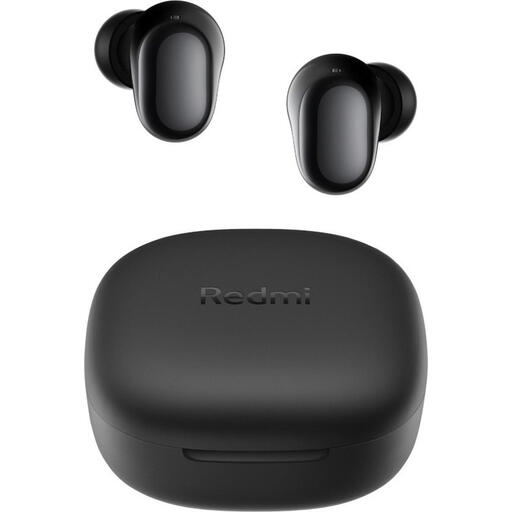
Why it suits this profile: A simple set for music, podcasts and everyday calls, without lots of features you may never use.
The product details list 7.5 hours of playback per charge and 36 hours with the case separately. They also make it clear that the IPX4 rating applies only to the earbuds.
Bluetooth 5.4, USB-C, 10mm dynamic drivers and a weight of 3.6 grams per earbud.
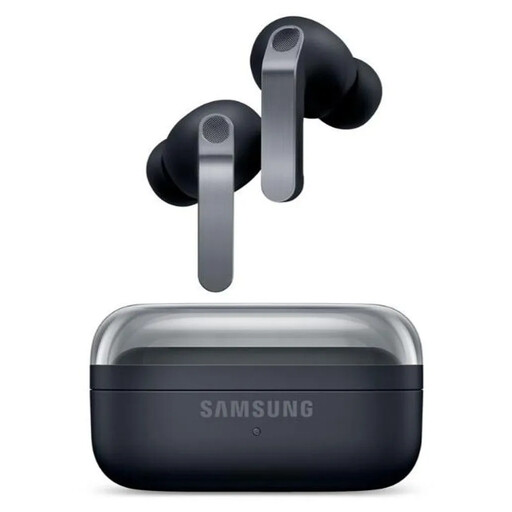
Why it suits this profile: Designed for users who value detailed audio settings, ANC and integration with Galaxy devices.
Battery life is listed as 6 hours with ANC and 7 hours without ANC, with up to 30 hours in total without ANC. This makes the difference between the two usage scenarios clear.
2-way speaker system, Bluetooth 6.1, six microphones, IP57, and support for USB-C and wireless charging.
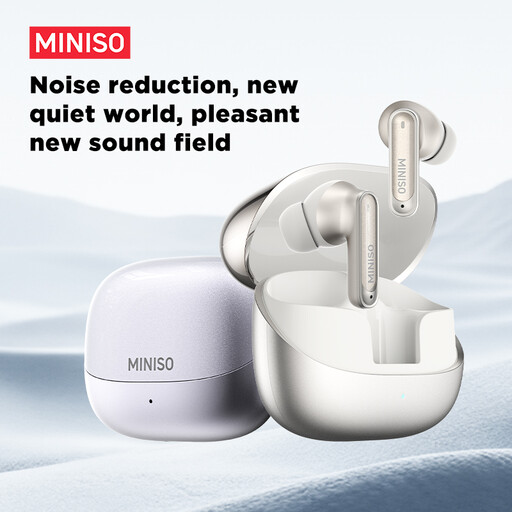
Why it suits this profile: A good option for commuting, the office, studying and exercise if you want ANC, a microphone and long total playtime.
The product information states IPX5 and warns that the earbuds aren’t suitable for swimming or immersion. The stated 55-hour battery life is the total with the case.
10mm driver, six microphones, customisable touch controls, dual-device connection and, according to the product description, 10 minutes of quick charging for 3 hours of playback.
We’ve put together a complete, up-to-date list of products that meet these strict selection criteria and the current European safety regulations.
Charge the earbuds and case first. Then open the case, switch on Bluetooth on your phone and select the model name from the list. If the model doesn’t appear, put the earbuds back in the case and hold down the pairing button or touch control as instructed in the manual.
Battery capacity decreases over time. How long they last depends on the volume, ANC, call use and charging habits. Don’t leave the case for long periods in extreme heat or cold, and only charge it with a suitable cable and adapter. Clean the earbuds regularly with a soft, dry cloth.
That depends on the IP rating and fit. IPX4 may be enough for light exercise; a higher rating may offer more protection against sweat and rain during more intense use. None of these ratings automatically makes a model suitable for swimming. Also check that the earbuds stay securely in place, and don’t use them in traffic when it’s important to hear your surroundings.
