
Vandaag of morgen in huis

Kwaliteit gegarandeerd

Welkomstaanbiedingen ontgrendelen: GRATIS bezorging | Tot 80% korting | Gratis 30 dagen JoyPlus-proefperiode
Download de app
Wireless earbuds come in all shapes and sizes, from compact Bluetooth earbuds for everyday use to TWS earbuds with active noise cancellation, open-ear models for sport and earbuds with translation features. The differences aren’t just about sound quality or price. Comfort, battery life, water resistance and microphone performance all affect how well a pair works in everyday use.
A big discount or an impressive figure on the packaging doesn’t tell you everything. Keep an eye out for these common pitfalls.
The stated playtime usually refers to the earbuds and charging case combined. Battery life on a single charge can be considerably shorter, especially when using noise cancellation, listening at high volumes or making phone calls.
So always check both figures:
A feature such as ‘10 minutes of charging for several hours of listening’ can be useful, but check whether the product description says this applies to listening to music or making calls as well.
Active noise cancellation, often abbreviated to ANC, uses microphones and electronic processing to reduce background noise. ENC usually refers to noise cancellation for calls. Passive isolation, on the other hand, comes from how the earbuds fit.
A claim such as ‘up to -50 dB’ doesn’t guarantee that every sound will disappear completely. According to the MINISO MS106 product description, this is a maximum figure under certain conditions. So, on a train or in a busy office, expect background noise to be reduced, not eliminated.
The IP code tells you the conditions a product has been tested against according to its stated rating. IPX4, for example, is designed to withstand splashes, while IPX5 indicates protection against water jets under specified conditions. Neither rating automatically means the earbuds are suitable for submersion.
Also check whether the earbuds and charging case have the same rating. The case may have a different level of protection, or no water resistance at all. Always dry the charging port before connecting a cable.
In-ear models partially seal the ear, which can help block out more background noise. They’re often a good choice for travelling, studying and working in a busy space. Getting the right fit is important: a poorly fitting tip can cause pressure, sound leakage or an unstable connection.
Open-ear earbuds and ear-hook models sit around or alongside the ear. They let in more background noise and can be comfortable for walking, working in an office or exercising. They generally offer less isolation in noisy surroundings. Even with open-ear models, you still need to stay alert to traffic.
Bluetooth 5.3, 5.4 or 6.0 tells you about the technology used, but doesn’t automatically indicate sound quality. Also check:
Low latency is particularly useful for gaming and watching videos. According to the product description, the Lenovo LE302 offers a low-latency experience and supports multiple operating systems.
If you work from home or make calls on the go, multiple microphones and noise cancellation for calls are more useful than a large number of audio modes. Check whether the manufacturer mentions a built-in microphone, ENC or multiple microphones. These are technical features, not a guarantee that your voice will sound perfect in every windy or busy traffic situation.
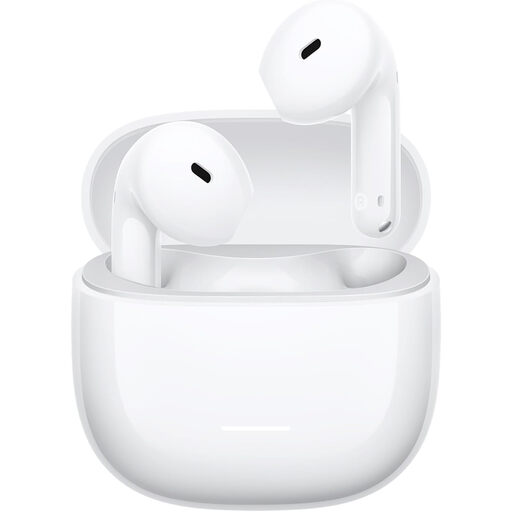
Why it suits this profile: The semi-in-ear design, low weight of around 3.8 grams per earbud and Bluetooth 5.4 make these an accessible choice for music, podcasts and phone calls.
The product information lists up to 7 hours of playtime on a single charge and up to 37 hours with the case. It also states that the earbuds are rated IP54; this does not mean they’re suitable for swimming or submersion.
Bluetooth 5.4, a USB-C charging case, dual microphones with AI noise cancellation for calls according to the product information, and a 14,2mm dynamic driver.
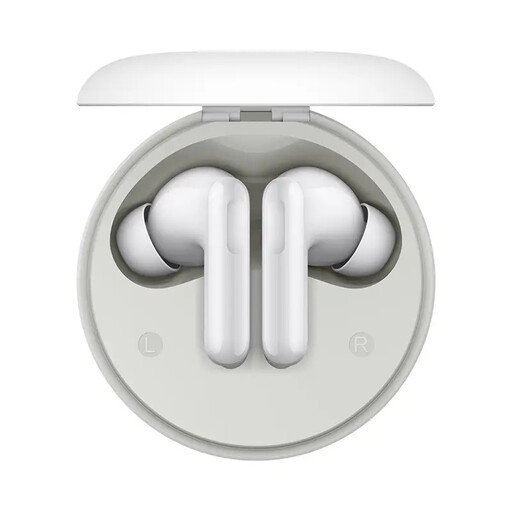
Why it suits this profile: This model is aimed at people who value ANC, a large driver and long total battery life for travelling, office use and everyday listening.
The stated specifications list ANC of up to 49 dB and total battery life of up to 42 hours. Treat these as product specifications, not a guarantee of complete noise isolation.
12,4mm driver, Noise Cancelling, Transparency and Off modes, plus a USB-C charging case according to the instructions.
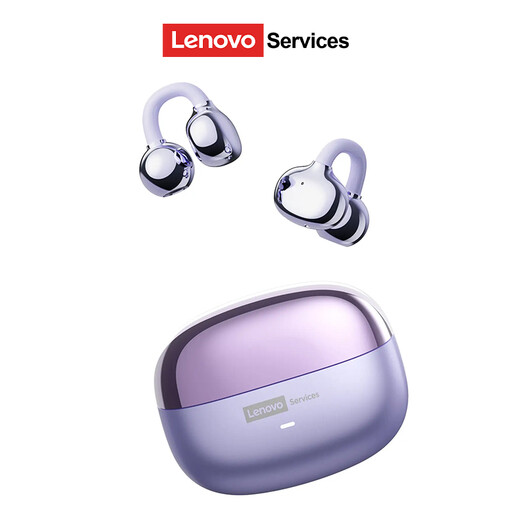
Why it suits this profile: The open-ear hook design is a good fit for exercise, walking and working when you want to stay aware of your surroundings.
The open design means you’re not completely cut off from your surroundings. Still, check that it suits where you’ll be listening: more background noise may be audible on a busy train.
Up to 25 hours of battery life according to the product description, compatibility with Android, iOS and Windows, and an ear-clip design that sits outside the ear canal.
We’ve put together a complete, up-to-date list of products that meet these strict selection criteria and the applicable European safety regulations.
Charge the earbuds and case first. Then open the Bluetooth settings on your Android or iOS device, open the case and select the product name from the list. Follow the instructions for the first pairing. If the connection doesn’t work, remove the old Bluetooth pairing and try again.
Battery capacity decreases over time due to charging cycles and heat. Practical lifespan also depends on use, storage and care. Keep the earbuds in their case, avoid prolonged exposure to heat and don’t charge them in a damp environment. Clean them with a soft, dry cloth and keep the charging contacts free of dirt.
Power consumption per charge is generally low. The main ongoing costs usually come from wear and tear, loss or replacing the case or earbuds. A model with a secure fit, a suitable IP rating and enough battery life may therefore be more practical than a cheaper pair that doesn’t suit the way you use them.
