
Vandaag of morgen in huis

Kwaliteit gegarandeerd

Welkomstaanbiedingen ontgrendelen: GRATIS bezorging | Tot 80% korting | Gratis 30 dagen JoyPlus-proefperiode
Download de app
Wireless earbuds are handy for listening to music, making phone calls, travelling and working out. However, a model that looks impressive on paper can disappoint in practice. Long battery life, for example, means little if the earbuds won’t stay in place. And a high IP rating doesn’t automatically protect the charging case too.
With this buying guide from the Joybuy Product Recommendation Officer, you can compare wireless earbuds using verifiable features. That way, you’re less likely to pay mainly for marketing claims.
Manufacturers often state the playback time for a single fully charged earbud. The total playback time with the charging case can be much higher. Features such as noise cancelling, high audio quality and phone calls can also affect how long the earbuds last.
So, check:
Noise-cancelling earbuds use microphones and electronics to reduce background noise. How well they work depends on the fit, the type of sound and the settings. Low, constant sounds such as train or aeroplane noise are generally handled differently from voices or sudden noises.
A claim such as “up to a certain number of decibels of noise reduction” is a stated product figure, not a guarantee that you’ll have the same experience in every situation. If you want to stay aware of your surroundings while out and about, choose a model with a transparency mode too.
An IPX4 rating means protection against splashes, such as sweat or light rain. It doesn’t mean the earbuds are waterproof enough for swimming or showering. What’s more, the charging case is often less protected than the earbuds themselves.
So, check:
A good fit affects comfort, noise isolation and stability. Classic wireless in-ear earbuds use silicone ear tips to seal the ear canal. Extra sizes are useful if the standard tips don’t fit properly.
For running or working out, ear hooks or an open-ear design may be more practical. Open-ear sports earbuds leave the ear canal unobstructed, so you can stay more aware of your surroundings. They usually provide less isolation than in-ear models.
Bluetooth 5.3 or Bluetooth 5.4 tells you which wireless connection version is used. Your actual experience also depends on your phone, laptop and the audio codecs they support. AAC, SBC and LDAC are examples of codecs; not every device supports the same options.
For everyday listening, a stable connection, easy pairing and reliable controls are often more important than a long list of technical terms. If you use two devices at once, look for multipoint or a similar feature.
For earbuds for calls, the number of microphones and how voice audio is processed are relevant specifications. Models with several microphones may be designed for calls in noisy environments, but call quality is also affected by wind, positioning and the phone app you use.
Also check whether you can make calls using just one earbud and whether the controls let you answer, end and reject calls.
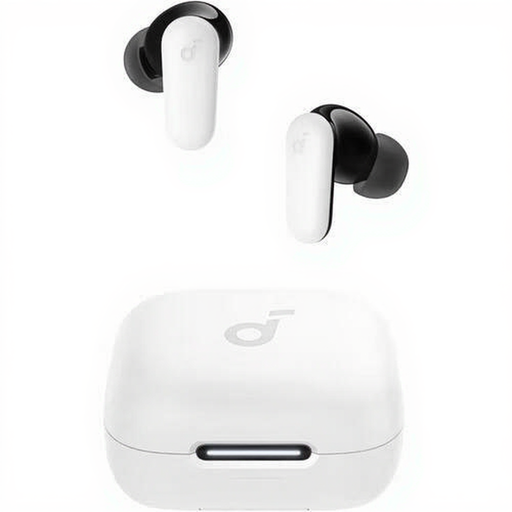
Why it suits this profile: This model combines Bluetooth 5.4, touch controls and a charging case with a straightforward set of features for everyday use and calls.
The specifications list four microphones, IP54 protection and up to 10 hours of playback. This makes it easier to compare key features rather than relying on advertising claims alone.
Bluetooth 5.4, four microphones, USB-C and a charging case included.
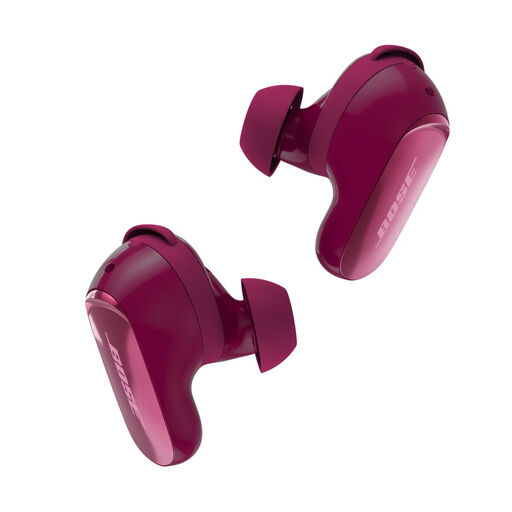
Why it suits this profile: Designed for users who value active noise cancelling, adjustable sound modes and a choice of fit options.
The set includes several ear tips and stability bands, so the fit doesn’t depend entirely on one standard size. Bose also lists Quiet and Aware modes for different listening situations.
Adjustable noise cancelling, multipoint Bluetooth and a wireless charging case.
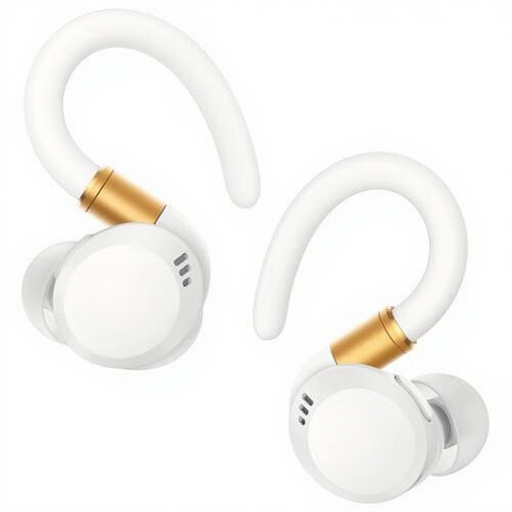
Why it suits this profile: The ear-hook design and IP68 rating make these earbuds a good match for exercise, outdoor use and an active daily routine.
The stated IP68 rating provides a clear point of comparison for sweat and water resistance. Always check the product instructions, though, and keep the charging case dry.
Up to 12 hours of playback and physical buttons for playback and volume.
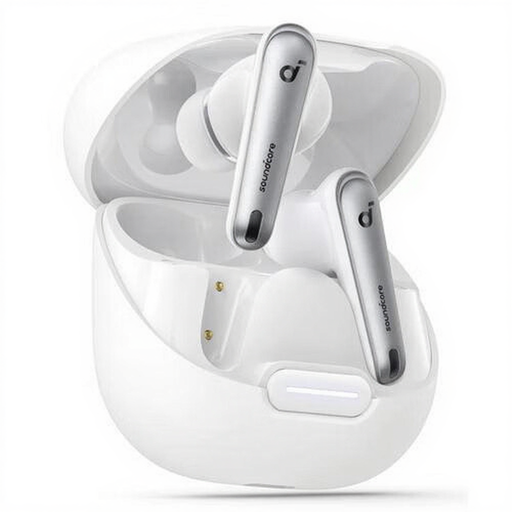
Why it suits this profile: These true wireless earbuds are designed for listening to music and making calls, with Bluetooth 5.3, six microphones and active noise cancelling.
The stated 10 hours of playback per charge, USB-C case and extra ear tips included make it easy to check the key details for everyday use.
Bluetooth 5.3, LDAC profile, six microphones and IPX4 splash resistance.
We’ve put together a full, up-to-date list of products that meet these strict selection criteria and the applicable European safety regulations.
First, charge the earbuds and put them into pairing mode. Then open the Bluetooth settings on your phone and select the product name. Some models need a brand app for equaliser settings, firmware updates or extra features. If you can’t connect, remove the old Bluetooth profile and try pairing again.
Battery capacity decreases over time. Battery life per charge varies by model and is affected by volume, ANC, codec and calls. Keep the earbuds in their case, avoid extreme heat and keep the charging contacts clean. You may need to replace them when the battery life no longer suits the way you use them.
It depends on the fit and the IP rating. Ear hooks or a secure in-ear fit can be practical for exercise. Choose a model with a rating that specifies at least protection against sweat and splashes. Don’t use noise cancelling in situations where you need to hear traffic or other important sounds around you.
