
Vandaag of morgen in huis

Kwaliteit gegarandeerd

Welkomstaanbiedingen ontgrendelen: GRATIS bezorging | Tot 80% korting | Gratis 30 dagen JoyPlus-proefperiode
Download de app
Wireless earbuds may look similar, but they differ markedly in fit, battery life, water resistance and call quality. A low price can be appealing, yet a mediocre fit or a battery that runs flat quickly makes everyday use frustrating. Conversely, you can sometimes end up paying for features you hardly ever use.
So don’t focus solely on terms like ‘AI’, ‘hi‑fi’ or ‘noise cancelling’. Check which specifications are actually listed and whether they suit the way you’ll use them. Below you’ll find the most important points to consider and a few popular picks for different listening profiles.
Active noise cancellation, also known as ANC, uses microphones and electronics to reduce ambient sound. The effect varies by model, sound frequency and fit. Low, constant noises such as train or aircraft hum are often handled differently to voices or sudden sounds.
A product with ANC isn’t automatically suitable for every situation. For cycling, walking in busy traffic or working in an environment where you need to hear alerts, a transparency mode or open design can be more practical.
Manufacturers usually state a maximum playtime under specific conditions. ANC, high volumes, phone calls and features such as spatial audio can shorten usage time. Look at two figures:
A model offering six hours per charge and a case providing several extra top‑ups may be sufficient for commuting. For long journeys or lots of calls, a model with longer total battery life is more convenient.
An IP rating consists of numbers and letters. The first digit relates to dust protection; the second to water. IPX4, for example, means resistance to splashes, while the case is often less well protected than the earbuds themselves.
IP57 or IPX7 doesn’t mean you can immerse the earbuds without limitations. Always check the user manual and only charge wet earbuds once they are completely dry.
A pair of wireless in‑ear earphones partially seals the ear canal. This can provide a secure fit and passive noise isolation, but not everyone finds silicone ear tips comfortable. Check whether multiple ear tip sizes are included.
Open‑ear earbuds and clip‑on models rest on or around the ear. They let ambient sound through more readily and are a good option for walking, working or exercising. The listening experience and bass response can differ from a closed in‑ear design. Stay alert when cycling and around traffic.
Almost all Bluetooth earbuds work with smartphones, tablets and laptops, but features can vary by operating system. Apple AirPods integrate naturally with Apple devices, while Samsung Galaxy Buds offer extra features within the Galaxy ecosystem.
Look out for:
A newer Bluetooth version can help deliver a stable, energy‑efficient connection, but it doesn’t, on its own, say anything about sound quality.
If you spend a lot of time in meetings or on calls, earbuds with microphones will serve you better than a music‑only model. Check the number of microphones and features such as ENC or wind noise reduction. These are technical features, not a guarantee that your voice will come through clearly in every busy environment.
Ideally, test whether the person on the other end can hear you clearly while walking, travelling and working from home. Microphone placement and the fit also affect the result.
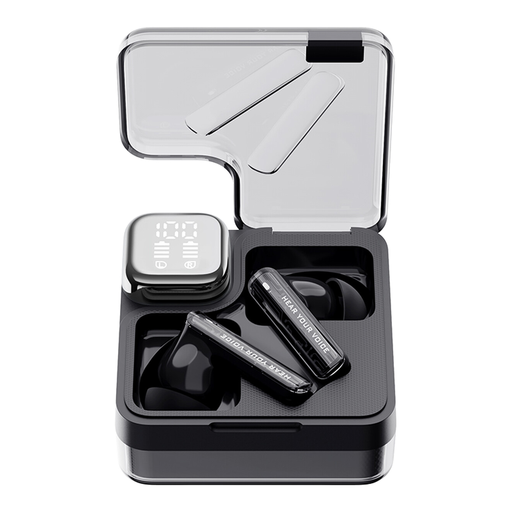
Why this fits the profile: This model combines ANC, an app and low quoted latency in a compact true wireless design for everyday listening and mobile gaming.
The product specifications list separate modes for ANC, transparency and low latency. The IPX5 rating is geared towards sweat and light splashes; keep the case dry.
Bluetooth 5.3, around 28 hours’ total playtime and support for the QCY app with equaliser settings.
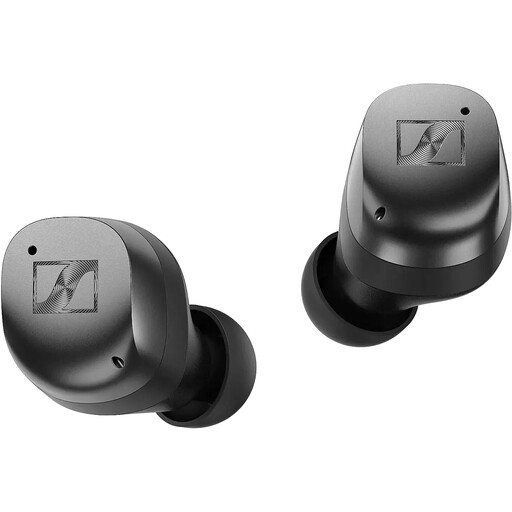
Why this fits the profile: Ideal for listeners who value tunable sound, adaptive ANC and modern connectivity more than the lowest possible purchase price.
The product specifications mention an adjustable 5‑band equaliser and Sound Zones via the app. This lets you tailor settings for work, travel or home use.
Up to 30 hours’ playtime with the case, Bluetooth 5.4, Auracast support and Qi wireless charging. The IP54 rating is suitable for splashes.
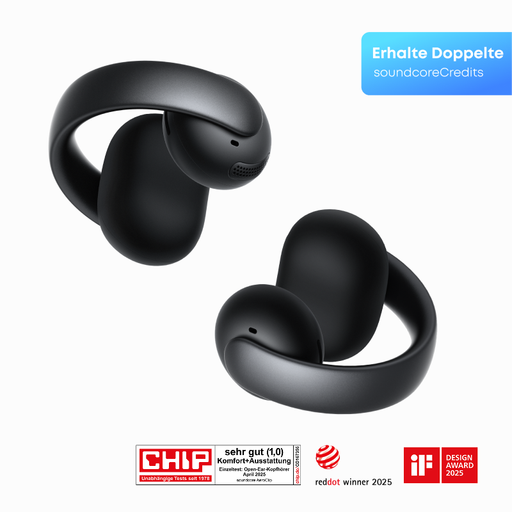
Why this fits the profile: An open‑ear clip‑on design suits walking, commuting and sport when you want to stay aware of your surroundings.
The open‑ear construction means you’re not entirely reliant on ANC. According to the product specifications, four microphones and wind protection help with calls.
Clip‑on fit, a 12 x 12 mm driver per the product information, and four beamforming microphones for everyday calls.
We’ve compiled a complete, up‑to‑date list of products that fully meet these stringent selection criteria and comply with current European safety regulations.
Use this short checklist:
Place both earbuds in the case, open the lid and enable Bluetooth on your phone. Select the product name in the list of available devices. On models with their own app, you can then configure extra features, equaliser settings and touch controls.
That depends on battery usage, charge cycles, storage and maintenance. Playtime per charge usually decreases over time. Keep the earbuds in the case, avoid prolonged heat and use a suitable USB‑C or Qi charger. The quoted battery life is a product specification under certain conditions, not a fixed usage time for every user.
Not automatically. A pricier model may offer features such as ANC, multipoint, spatial audio or wireless charging, but not everyone needs them. Compare the features you’ll actually use with battery life, warranty terms, fit and price. That way, you pay with purpose rather than just for marketing terms.
