
Vandaag of morgen in huis

Kwaliteit gegarandeerd

Welkomstaanbiedingen ontgrendelen: GRATIS bezorging | Tot 80% korting | Gratis 30 dagen JoyPlus-proefperiode
Download de app
Wireless earbuds are handy for music, podcasts, calls, travel and exercise. However, a cheap set – or one described with great enthusiasm – can disappoint in practice. The fit may not be right, the battery may only achieve its advertised playtime under ideal conditions, or the connection may not work smoothly with your phone.
As a Joybuy Product Recommendation Officer, I filter product information for practical details. Below, you’ll find which specifications to check, which marketing claims need a little context and which type of wireless earbuds best suits the way you use them.
Advertised battery life often applies to a specific setup, such as low volume with noise cancellation switched off. For example, the JBL Wave Buds 2 are listed with up to 40 hours including the charging case and without ANC. According to the product specifications, the earbuds themselves offer up to 8 hours of playback.
So always check:
ANC, or active noise cancellation, uses microphones and electronics to reduce surrounding noise. The result varies depending on your ears, the fit and the type of sound. Low, constant sounds on a train or aeroplane are generally handled differently from voices or sudden noises.
Claims about a specific number of decibels come from the brand. According to the manufacturer’s own testing, for example, the MINISO MS106 can offer adaptive noise cancellation of up to -50 dB. Treat this as a product specification under certain conditions, rather than a guarantee that all background noise will disappear.
The IP code indicates the conditions a product is protected against according to its stated classification. IP54 and IP55 are not the same as being completely waterproof. According to the product information, the JBL Wave Buds 2 have an IP54 rating for the earbuds and IPX2 for the charging case. The Samsung Galaxy Buds4 Pro are listed with an IP57 rating.
Always check whether the protection applies to the earbuds, the case or both. Dry the charging contacts before charging and avoid submerging the product unless the manual explicitly allows it.
With true wireless earbuds, choosing the right ear tips is important for comfort, sound isolation and bass reproduction. A loose fit may mean you have to keep adjusting them while walking or exercising. A fit that is too tight can become uncomfortable during longer listening sessions.
Open-ear models, such as clip-on or bone-conduction earbuds, let in more surrounding sound. This can be useful when cycling or running, but it also means your music will sound different and you’ll have less isolation. For sports use, also check the weight, how they are secured and the stated water resistance.
Bluetooth 5.2, 5.4 or 6.1 indicates the version, but does not by itself guarantee better sound quality. Also check the supported audio codecs, apps and device compatibility.
Multipoint is useful if, for example, you use a laptop and smartphone at the same time. According to the product information, the JBL Wave Buds 2 support connections to two devices. The Samsung Galaxy Buds4 Pro are particularly appealing to users within the Galaxy ecosystem, with features such as Auto Switch. When using an iPhone, Android device, PC or console, check that all the features you want are actually supported.
With earbuds with a microphone, the number of microphones is not the only thing to consider. Wind, traffic noise and microphone placement all affect how clearly you can be heard. Brands may claim to offer noise cancellation for calls, but according to the brand’s own testing, performance can vary depending on the surroundings.
For video calls and phone conversations, a stable Bluetooth connection, simple controls and a good fit are at least as important as a long list of technical terms.
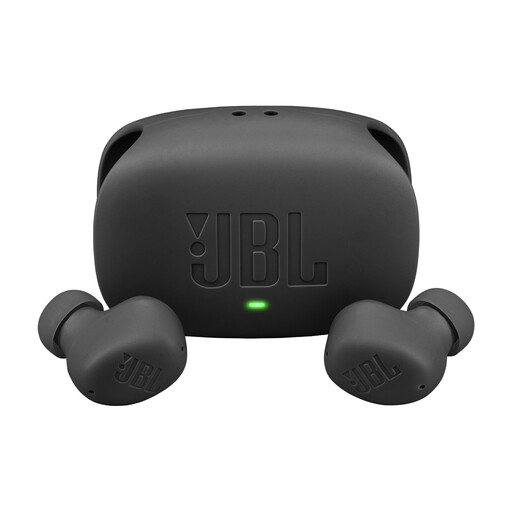
Why it suits this profile: A versatile choice for everyday use, podcasts, music and phone calls without complicated controls.
The product information distinguishes between battery life with and without ANC. The IP54 rating for the earbuds and IPX2 rating for the case are also listed separately.
Up to 8 hours of playback per charge, up to 40 hours with the case, Bluetooth 5.2, multipoint and support for Google Fast Pair and Microsoft Swift Pair.
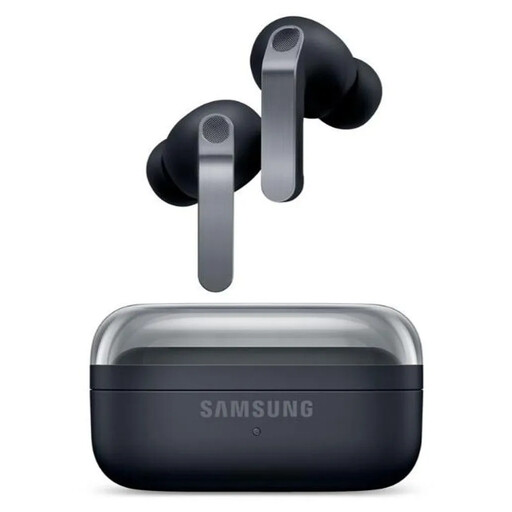
Why it suits this profile: Designed for users who value ANC, customisable audio and integration with Galaxy devices.
Playback time is listed separately for ANC on and off: up to 6 and 7 hours respectively. The IP57 classification does not mean you can swim with them.
Two-way speaker system, six microphones, 9-band equaliser, wireless charging and up to 30 hours of total playback according to the product details.
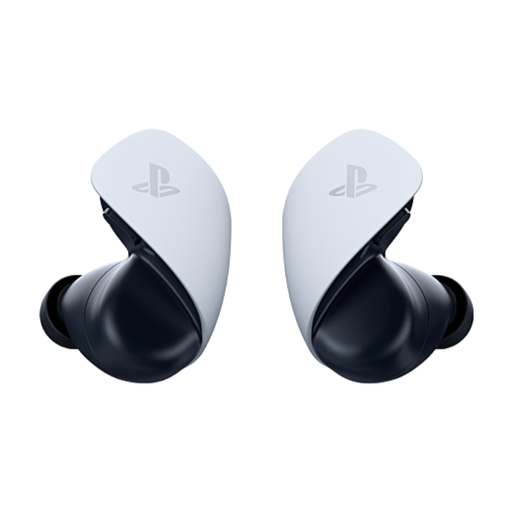
Why it suits this profile: Designed for PS5 gamers looking for low latency, PlayStation Link and chat through built-in microphones.
The connection types are clearly separated into PlayStation Link for compatible devices and Bluetooth for mobile devices and PCs. Battery life is listed as 5 hours per earbud and up to 10 hours with the case.
Planar magnetic drivers, two noise-cancelling microphones, USB-C charging case and compatibility with PS5, PlayStation Portal, PC and mobile devices.
We’ve put together a complete, up-to-date list of products that fully meet these strict selection criteria and the applicable European safety regulations.
Switch on Bluetooth on your Android phone or iPhone, open the charging case and select the earbuds from the Bluetooth list. Some Bluetooth earbuds support Google Fast Pair or a similar quick-pairing feature. If it doesn’t work, put the earbuds back in the case, charge them and check that they aren’t already connected to another device.
Battery life depends on battery capacity, charging habits, volume, ANC and software. A model with a large case can last longer during everyday use without needing a power socket, but the batteries in the earbuds will wear out over time. Keep them in the case, avoid heat and use a suitable USB-C charger as described in the manual.
Noise-cancelling earbuds can reduce surrounding noise. This is useful on public transport, but it can make it harder to hear traffic. When cycling, only use a setting and volume that allow you to remain sufficiently aware of your surroundings, and follow local traffic regulations.
