
Vandaag of morgen in huis

Kwaliteit gegarandeerd

Welkomstaanbiedingen ontgrendelen: GRATIS bezorging | Tot 80% korting | Gratis 30 dagen JoyPlus-proefperiode
Download de app
A wireless CarPlay screen for your car is an easy way to upgrade an older vehicle with navigation, hands-free calling and music streaming. You usually do not need to replace the original car stereo: the separate screen draws power through the 12V or 24V socket and is mounted on the dashboard or windscreen.
However, not every model is equally suitable for every driver. Marketing copy often focuses on a large touchscreen, 4K dashcam or wireless connectivity, while important details are less clearly stated. Pay particular attention to these three common pitfalls:
An Apple CarPlay screen works with a compatible iPhone. An Android Auto screen is designed for suitable Android phones. Check the stated iOS and Android version for each model. The product specifications for various ESSGOO models state support for iOS 10 or later and Android 11 or later; other models have different minimum requirements.
Also check the power supply. 12V is standard for a car, while motorhomes, vans, lorries and some commercial vehicles use 24V. Models advertised with a 12V-24V wide input are more practical if you want to use the screen in different vehicles.
A large touchscreen for your car makes maps and menus easier to read, but it also takes up more space. Screens of around 10 to 11 inches provide a spacious view, while a more compact size may be more convenient on a small dashboard or motorbike handlebars.
Pay attention to the resolution. A screen with 1920 × 720 or 1600 × 600 pixels can display maps and camera footage clearly, but overall visibility also depends on brightness, viewing angle and reflections. Position the screen so that it does not obstruct your view of the road. A sturdy mount with an adjustable viewing angle is more important than simply choosing a large screen.
A portable CarPlay screen can transmit sound via:
In many cars, AUX or Bluetooth provides a more direct connection than FM. Check which input your car has beforehand.
If you want a CarPlay display with dashcam, consider the combination of resolution, viewing angle, loop recording and storage. A model with a 4K front camera may capture detailed footage according to the product specifications, but this does not guarantee that number plates will be legible in all lighting conditions. A waterproof 1080P rear camera can help when parking, but it must be mounted and wired carefully.
An included TF card is convenient. However, check the maximum supported storage capacity and whether the card is suitable for continuous video recording.
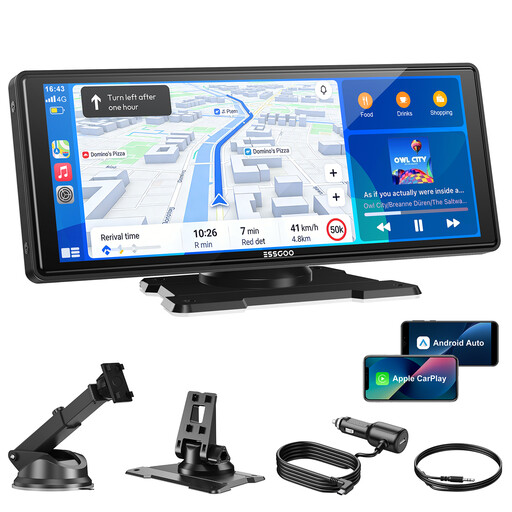
Why it suits this profile: This plug-and-play CarPlay screen is designed for drivers who mainly want to add navigation, music and hands-free control to an older car. It connects via a 12V-24V socket and offers several audio options.
The product specifications explicitly mention wireless CarPlay and Android Auto support, four audio outputs and a wide input voltage range. However, check that your smartphone version is supported.
10.26-inch screen, Bluetooth 5.3, dual-band Wi-Fi, AUX, FM transmitter, plus AirPlay and Super Link support.
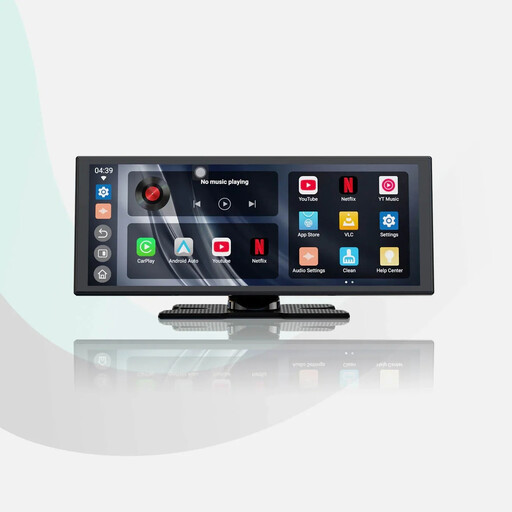
Why it suits this profile: Ideal if you are looking for a large screen and extra features without replacing the factory-fitted stereo. The built-in apps and wireless smartphone connection are well suited to long journeys and everyday commuting.
The product specifications list a 1920 × 720 screen, dual Wi-Fi and dual Bluetooth. Streaming requires a hotspot or Wi-Fi, so check your preferred audio connection beforehand.
11.4-inch HD display, wireless CarPlay and Android Auto, built-in apps, reversing camera and audio mixing according to the product description.
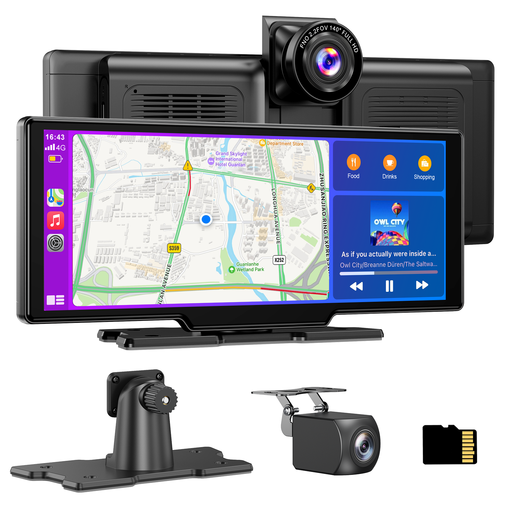
Why it suits this profile: Suitable for drivers of cars, SUVs, motorhomes, vans or lorries who want to combine navigation, recording and a parking camera in one system.
The specifications list 4K front recording, a waterproof 1080P rear camera, loop recording, an included 64GB card and a 12V-24V connection. The rear camera still needs to be installed neatly.
10.26-inch display, two cameras with a 140° viewing angle, 64GB TF card, split screen, Bluetooth, AUX and FM transmitter.
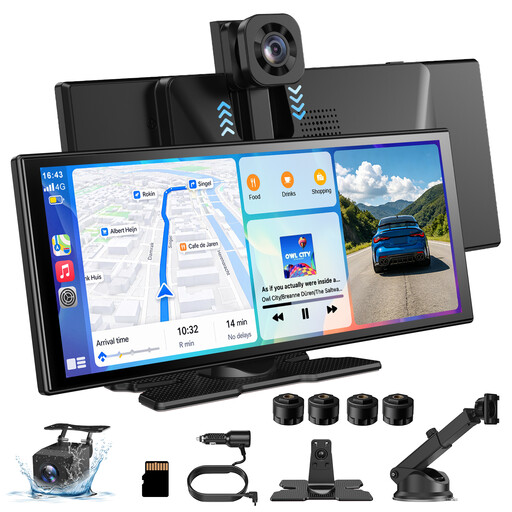
Why it suits this profile: This model is a good choice for users looking for a large display, wireless navigation and a combination of front and rear cameras for a car, motorhome, bus or lorry.
The listed features include a 360° rotating front camera and a waterproof 1080P rear camera. The recording angle and positioning still depend on how the system is installed in your vehicle.
11.3-inch display, 4K front camera according to the product description, wireless CarPlay and Android Auto, AirPlay, Miracast and four audio options.
We have put together a complete, up-to-date list of products that fully meet these strict selection criteria and the applicable European safety regulations.
A portable CarPlay screen is generally easy to connect, but plan the installation in advance:
Only use streaming apps when the car is stationary, and observe the rules of the road. A screen assists the driver but does not replace paying attention to the traffic.
Not literally in every situation. Your car must have a suitable 12V or 24V socket, and your smartphone must be compatible with Apple CarPlay or Android Auto. Also check the available audio connection and whether there is enough space for safe installation.
The wireless connection usually uses Bluetooth for pairing and Wi-Fi for data transfer. The exact operation varies by model. Navigation and streaming may also use mobile data from your smartphone.
After purchase, the main possible costs are a suitable memory card, replacing a damaged power cable and professional installation of the reversing camera. An included 64GB card can reduce the initial outlay, but always check the recording capacity and storage limit of the model you choose.
