
Vandaag of morgen in huis

Kwaliteit gegarandeerd

Welkomstaanbiedingen ontgrendelen: GRATIS bezorging | Tot 80% korting | Gratis 30 dagen JoyPlus-proefperiode
Download de app
An older car does not necessarily need a new multimedia system. With a wireless CarPlay screen for your car, you can add features such as navigation, hands-free calling and music control. However, portable car screens vary considerably in terms of connectivity, image quality and compatibility. A low price can therefore still prove costly if the screen does not work with your phone or audio system.
This buying guide helps you turn marketing claims into specifications you can check.
A wireless screen usually uses your smartphone for Apple CarPlay or Android Auto. The screen then needs a Bluetooth and Wi-Fi connection to your phone. So check the following:
A GPS navigation car screen can therefore display the route while the map data and internet connection come from your phone. “Built-in GPS” does not automatically mean that offline maps or a separate navigation subscription are included.
A product with a 4K dashcam sounds appealing, but you should also look at the viewing angle, storage, recording frequency and loop recording. According to the product description of some models, 4K recording is combined with a 1080P reversing camera. These are different resolutions for different cameras.
Also consider where the camera is mounted. A camera that vibrates or sits behind a dirty windscreen may produce less useful footage than the resolution on the packaging suggests. A dashcam is not a guarantee that every number plate or incident will always be captured clearly either.
A touchscreen car screen can send sound to your car in several ways:
Not every older car radio supports Bluetooth audio. An AUX input often provides a direct connection, while an FM transmitter depends on an unused radio frequency. Also check whether your car has a 12V or 24V connection, and unplug the adapter when the car will be parked for an extended period.
A 10.26-inch screen provides more room for maps, music and notifications than a compact display. It also takes up more space on the dashboard. Check that the screen does not obstruct your view and that the supplied suction cup or dashboard mount fits securely.
A smaller model may make more sense for a motorbike. Water resistance, vibration and operation while wearing gloves are more important in that setting. An IP67 rating generally means protection against dust and temporary immersion under standard product classifications; always check the full product specification and mounting instructions.
A plug-and-play CarPlay system usually draws power through the cigarette lighter. This makes installation straightforward, but check the following points:
A wireless CarPlay adapter, such as a compact Baseus model, is generally designed to make existing wired CarPlay wireless. This is different from a fully portable car screen for a vehicle without CarPlay.
If you want a car dashcam with CarPlay, check whether a TF or microSD card is included. Also look at the maximum storage capacity, loop recording and how files are locked. Some models include a reversing camera, while with others you need to purchase one separately.
According to the product descriptions of ESSGOO models, some systems may include a 64GB card and support storage of up to 128GB. Treat these as the brand’s product specifications and check which accessories are actually included in the box before buying.
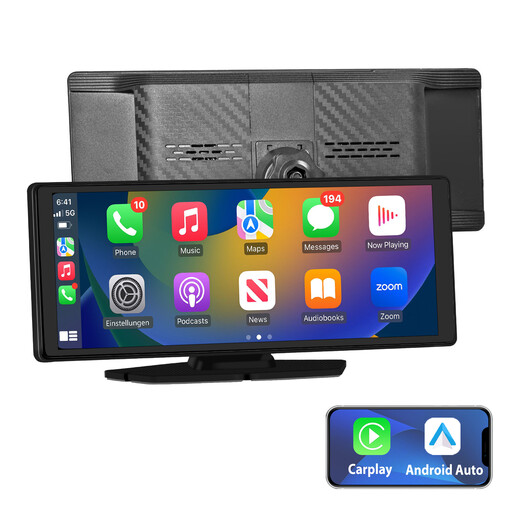
Why it suits this profile: This screen combines a 10.26-inch IPS touchscreen with wireless Apple CarPlay, Android Auto, Bluetooth, AUX and FM audio. According to the product description, installation is plug-and-play with a car charger and mounting bracket.
The specifications list several audio options, so you are not reliant solely on Bluetooth. However, check in advance which connection your car radio supports.
10.26-inch IPS screen, wireless CarPlay and Android Auto, plus Bluetooth, AUX and FM audio.
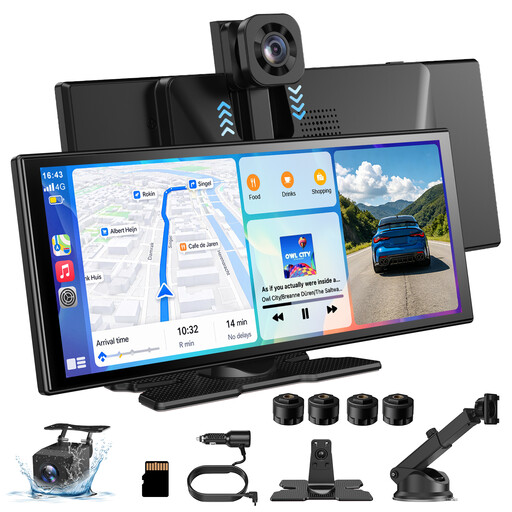
Why it suits this profile: The larger display resolution of 1920 x 720 is ideal for drivers who want plenty of room to view maps and menus. According to the product description, this model has a 360° rotating front camera and a 1080P reversing camera.
The camera information lists the front and rear cameras separately. This allows you to compare the recording functions rather than focusing on just one resolution figure.
11.3-inch screen, 360° rotating front camera, wireless CarPlay and Android Auto, plus several audio outputs.
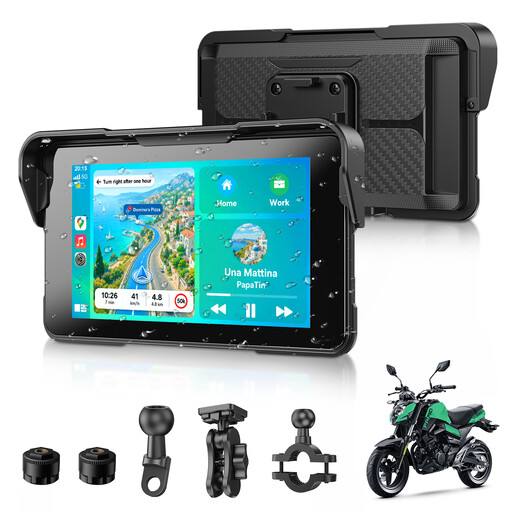
Why it suits this profile: This compact screen is designed for motorcyclists. According to the product description, it supports wireless CarPlay and Android Auto, dual Bluetooth 5.3 and an IP67 water-resistance rating.
According to the product specification, the casing is designed to resist water and dust. Nevertheless, check the mounting and seals carefully before using it in rainy conditions.
Compact 5-inch format, IP67 rating according to the product information, and support for navigation apps and voice assistants.
We have compiled a complete, up-to-date list of products that fully meet these strict selection criteria and the applicable European safety regulations.
A portable car screen is usually easy to install, but follow these steps:
Adjust settings such as the frequency, Bluetooth pairing and screen brightness while the car is parked. An FM transmitter may experience interference if the selected frequency is already being used by a local station. For daily use, it is sensible to check the storage card regularly and copy important video files in good time.
Not literally every model works in the same way. Many portable screens use a 12V or 24V power supply, allowing them to be installed in various vehicles. You must also check that your smartphone has the required iOS or Android version and that your car provides a suitable audio connection.
For wireless Android Auto, a Wi-Fi connection between your phone and the screen is usually required in addition to Bluetooth. The exact method varies by product. So check the manual and connection specifications before ordering.
Most portable screens do not have their own mobile subscription. However, navigation, music and messages may use mobile data from your smartphone. With a model that includes a dashcam, you may also incur extra costs if you want to buy a larger microSD card. An FM transmitter or AUX cable generally does not involve any separate usage costs.
