
Vandaag of morgen in huis

Kwaliteit gegarandeerd

Welkomstaanbiedingen ontgrendelen: GRATIS bezorging | Tot 80% korting | Gratis 30 dagen JoyPlus-proefperiode
Download de app
An older car doesn’t necessarily need a new car stereo to give you modern navigation and hands-free controls. A wireless CarPlay screen for your car adds features such as Apple CarPlay, Android Auto, music streaming and voice control. However, portable car screens can vary considerably in their connections, mounting options and camera features.
Look out for these three common pitfalls:
First, check which phone versions are supported. According to their product information, some models work with iOS 10 or later and Android 11 or later, while others require a newer version of iOS. Wireless Android Auto and wireless Apple CarPlay usually use Bluetooth for the initial pairing and Wi-Fi for the data connection.
Next, check the power supply. A universal car screen for cars, SUVs, vans and lorries may support 12V–24V, but that doesn’t mean every accessory will fit without adjustment. Check the cigarette lighter socket, the space available on your dashboard and the length of the power cable.
A larger screen can make map information easier to read, but it also takes up more space. A 10.26-inch CarPlay screen with a resolution of 1600 × 600 is a popular choice for drivers who want to view navigation and music on one display. Models measuring 11 inches or more offer more screen space, but check that they won’t restrict your view of the road.
Where possible, choose a mount with an adjustable viewing angle and a stable base. A strong magnet or suction cup can be useful, but check that it’s suitable for your dashboard material and the surface you’re mounting it on. Don’t place the screen in front of important instruments, airbags or your direct line of sight.
An Apple CarPlay screen or Android Auto screen can transmit audio via:
According to product information, Bluetooth or AUX often provides a more direct connection than an FM transmitter, but suitability depends on your existing audio system.
If you’re looking for a CarPlay display with dash cam, check the camera resolution, viewing angle, storage and loop recording. Some models come with a 64GB TF card; others require you to buy one separately. A reversing camera can be useful when parking, but installation usually involves extra cabling and secure mounting. Camera footage is no substitute for looking carefully and manoeuvring safely yourself.
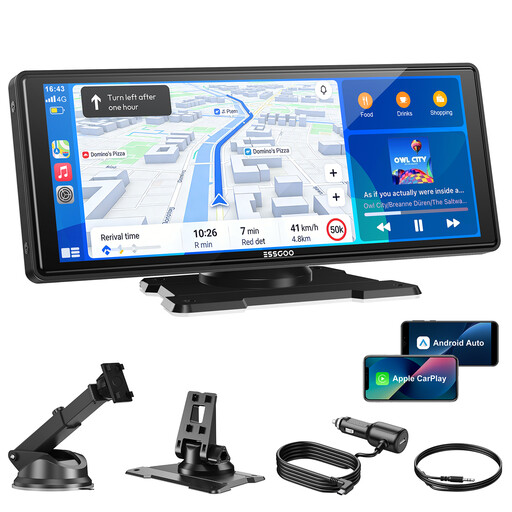
Why it suits this type of user: This plug-and-play CarPlay screen is designed for drivers who want to upgrade an older car without replacing the factory-fitted stereo. It supports wireless CarPlay, Android Auto, AirPlay and Super Link.
The specifications list 12V–24V power, several audio options and an adjustable suction mount. However, check in advance that the mounting position won’t restrict your view.
10.26-inch screen, Bluetooth 5.3, dual-band Wi-Fi, four audio outputs and support for an optional reversing camera.
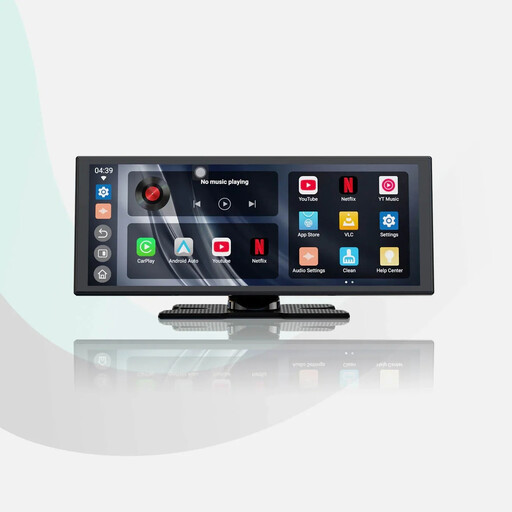
Why it suits this type of user: This portable car screen combines wireless CarPlay and Android Auto with built-in apps. It’s a good fit for users who want entertainment as well as navigation during a break while the car is stationary.
The product description mentions dual Wi-Fi, dual Bluetooth and a 1080P camera. Check that the camera connection and required wiring are suitable for your car.
11.4-inch display with 1920 × 720 resolution, wireless smartphone integration, audio mixing and a reversing camera included, according to the product information.
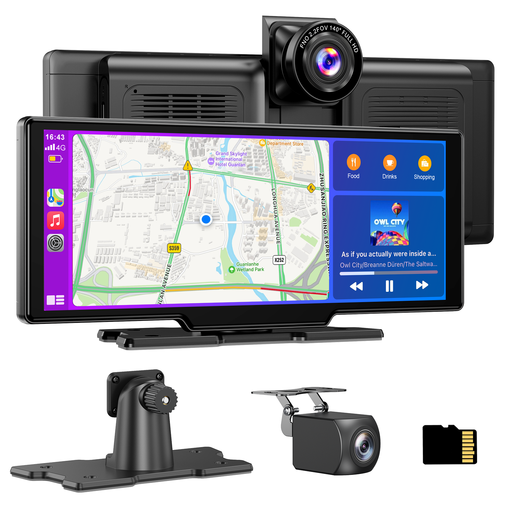
Why it suits this type of user: This model combines a car navigation screen with a front camera and a reversing camera. It’s designed for drivers who want navigation, recording and parking features in one system.
According to the product information, a 64GB TF card is included and the system supports loop recording. Check local rules on dash cam use and data storage.
Front camera with a stated 4K resolution, 1080P waterproof rear camera, 140° viewing angle, 1600 × 600 screen and 12V–24V power supply.
We’ve put together a complete, up-to-date list of products that meet these strict selection criteria and current European safety regulations.
A plug-and-play CarPlay screen is usually quick to install, but be sure to follow these steps:
Only use video and entertainment apps when the car is stationary. If you use a dash cam, also check the privacy rules, data retention periods and visibility of people or number plates.
Not necessarily. Your car will usually need a suitable 12V or 24V socket and enough space for installation. Your smartphone must also run a compatible version of iOS or Android. Check the audio connection and any camera connections too.
Usually, you’ll still need one for power. The smartphone can connect wirelessly via Bluetooth and Wi-Fi, but the exact process varies by model and phone. You’ll often need to pair the devices manually the first time.
Its lifespan depends on heat, direct sunlight, vibration, mounting and everyday use. Don’t leave the screen in direct sunlight for long periods, keep the ventilation openings clear and remove the device if prolonged high temperatures are expected. Check the warranty terms and availability of support before buying.
