
Vandaag of morgen in huis

Kwaliteit gegarandeerd

Welkomstaanbiedingen ontgrendelen: GRATIS bezorging | Tot 80% korting | Gratis 30 dagen JoyPlus-proefperiode
Download de app
A wireless CarPlay screen for your car can add navigation, hands-free calling and music to an older car, campervan, lorry or motorbike without replacing the original car stereo. However, many models look similar, while installation, compatibility and extra features can vary considerably.
If you focus only on screen size or a low price, you may run into practical problems. The wrong connection, a weak audio link or a camera that isn’t suitable for your vehicle can make the system less useful. Below, you’ll find the key things to check, along with product suggestions for different needs.
A wireless connection won’t automatically work with every car. An adapter such as the OTTOCAST Mini usually needs a vehicle that already has wired Apple CarPlay or Android Auto. A car with only a standard USB port and no CarPlay functionality won’t become compatible just by using an adapter.
A portable CarPlay display works differently: it usually has its own screen, power supply and speaker or audio connection. So check first whether you need an Apple CarPlay screen, an Android Auto screen or just a wireless CarPlay adapter.
A 4K front camera may sound appealing, but the final image also depends on lighting, lens angle, installation and storage. When choosing a CarPlay dash cam, look out for:
According to ESSGOO’s product information, several models support loop recording and have a 1080P rear camera. This describes the product specification; it doesn’t guarantee that number plates will be readable in all weather and lighting conditions.
A 10-inch CarPlay screen or larger display can make navigation easier to follow, but it shouldn’t unnecessarily obstruct your view. Check that the dashboard or suction-cup mount is secure and that the power cable can be tucked away neatly. In lorries, campervans and buses, the distance to the 12V or 24V socket is also important.
At a minimum, check:
According to its product description, the OTTOCAST P3 CarPlay AI Box is designed for vehicles with factory-installed wired CarPlay. The same information says it isn’t suitable for Tesla or BMW models, or for non-original aftermarket head units. The box also supports wireless CarPlay and wireless Android Auto, and has an HDMI output for an external screen.
A screen may show navigation without routing the audio properly through your car speakers. Check whether the model has Bluetooth, AUX, an FM transmitter or a built-in speaker. AUX often gives you a direct connection, while FM can be useful if your car stereo doesn’t have Bluetooth or AUX. Just make sure the frequency you choose can be used in your vehicle.
For a car reversing camera, cable length, mounting position and connection are more important than resolution alone. A standard cable may be too short for a campervan, bus or lorry. A screen supplied with a camera and cables can make installation easier.
Also check the viewing angle. A wide-angle lens captures more of the surroundings, but can distort objects at the edges. Use a camera as a parking aid and always check for yourself before reversing.
The recommendations below are based on verifiable product details, such as connections, screen size, camera options and compatibility.
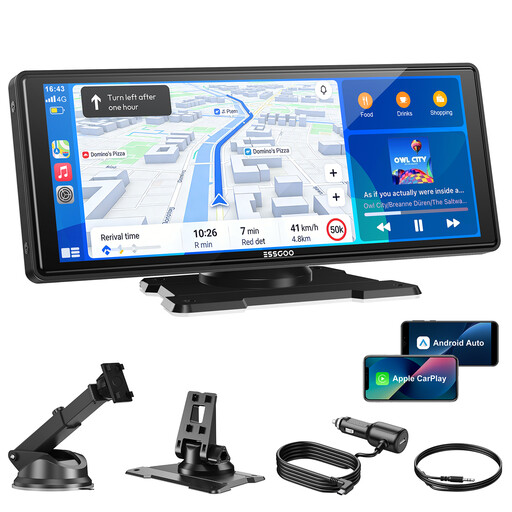
Why it suits this type of user: This standalone screen is for anyone who wants to keep their original car stereo while adding wireless CarPlay and Android Auto. According to the product information, it runs on 12V–24V and comes with a mount and power cable.
Its 12V–24V compatibility and four audio options make it easier to check whether it will suit your setup. A reversing camera isn’t included and must be bought separately.
10.26-inch screen, Bluetooth 5.3, dual-band Wi-Fi, AUX, FM transmitter and support for OTA updates.
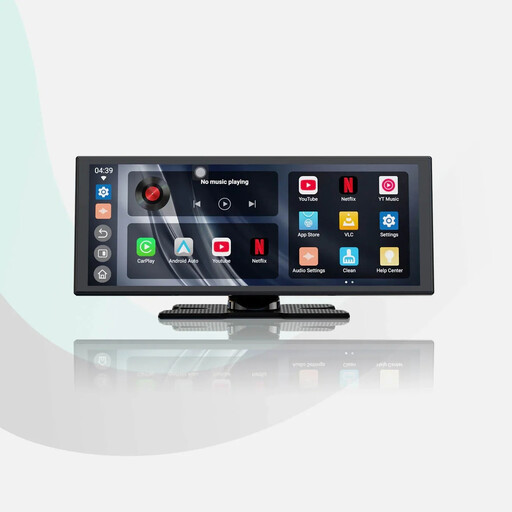
Why it suits this type of user: This model combines a large 11.4-inch screen with built-in apps, wireless CarPlay and wireless Android Auto. It’s a good fit for drivers who want to use navigation and media on one standalone system.
The product specifications list dual-band Wi-Fi and Bluetooth, so you can check the available connection options in advance. Video apps should only be used when the vehicle is stationary.
11.4-inch screen with 1920×720 resolution, supplied 1080P rear camera and support for audio mixing.
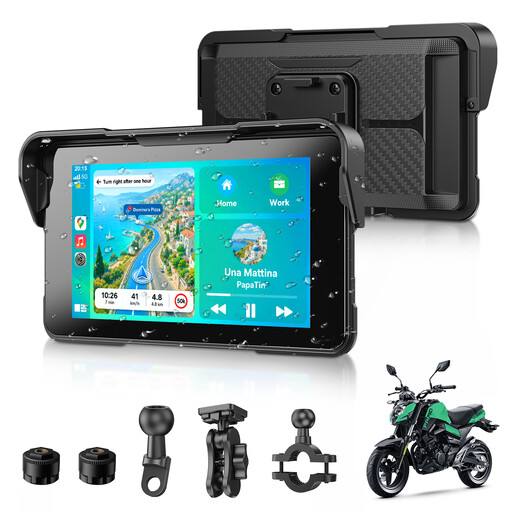
Why it suits this type of user: This CarPlay screen for motorbikes is compact and, according to the product description, IP67 water-resistant. It’s designed for motorcyclists who want to use navigation, music and phone calls on their handlebars without a cable.
It isn’t a large car screen that needs adapting for use on a motorbike. Still, check the handlebar mount, power supply and the conditions you’ll actually use the device in.
We’ve put together a complete, up-to-date list of products that meet these strict selection criteria and the applicable European safety regulations.
No. A standalone screen often runs on 12V or 24V power, but an adapter usually needs factory-installed wired CarPlay or Android Auto. Check for any exceptions relating to the make and model, too.
Some screens allow this. Check whether the product description lists a camera input and whether the supplied cable is long enough. If you use a separate camera, you’ll be responsible for its installation, power supply and cable routing.
According to their product information, many models reconnect automatically after the initial pairing. In practice, connection stability can depend on your phone, Wi-Fi and Bluetooth settings, vehicle type and interference from the surroundings. A model with AUX or Bluetooth also gives you a practical audio option if the FM transmitter isn’t suitable.
