
Vandaag of morgen in huis

Kwaliteit gegarandeerd

Welkomstaanbiedingen ontgrendelen: GRATIS bezorging | Tot 80% korting | Gratis 30 dagen JoyPlus-proefperiode
Download de app
A wireless CarPlay screen for your car can add navigation, hands-free calling and music streaming to an older vehicle without replacing the factory-fitted radio. However, not every system is suitable. Some devices only work if your car already supports wired CarPlay, while a portable screen usually needs its own power connection and audio link.
Look out for these three common pitfalls:
There are two main options.
An adapter such as the OTTOCAST Mini 2-in-1 is designed for vehicles that already support wired Apple CarPlay or Android Auto. The adapter doesn’t replace your car screen; it converts the existing wired connection to wireless Apple CarPlay and wireless Android Auto.
According to the product description, the adapter connects via Bluetooth and 5GHz Wi-Fi. The manufacturer says it works with many vehicles, but also recommends checking the specific compatibility list. BMW and Tesla models are excluded according to the product information. Also check whether your Android phone supports wireless Android Auto.
A portable CarPlay display has its own screen and is usually mounted on the dashboard or windscreen. This type is more practical if your factory-fitted radio doesn’t have CarPlay. It’s usually powered from the 12V socket, while audio is delivered via Bluetooth, AUX, an FM transmitter or the built-in speaker.
A larger car navigation screen, such as a 10.26-inch model, is easy to read but takes up more space. Position the screen so it doesn’t obstruct your view of the road, mirrors or instruments.
Don’t just check your car’s make and model; focus on its existing technology:
An adapter for an existing factory-fitted radio is different from a standalone Android Auto screen. According to the product information, an AI Box such as the OTTOCAST P3 requires factory-fitted wired CarPlay. It isn’t intended for aftermarket radios or vehicles with Android Auto only.
A 10.26-inch CarPlay screen has room for maps, music and notifications, but a large screen can be intrusive in a compact car. Also check:
A securely fitted mount helps prevent vibration. If you’ll be removing the device regularly, for example in a shared car, a compact adapter may be more convenient.
Bluetooth and AUX are usually practical options for audio. An FM transmitter can be useful if your car doesn’t have a suitable input, but available frequencies and possible interference vary by location.
If you want a CarPlay dash cam or car reversing camera, check whether the camera is included. Some models require you to buy it separately. Also look out for:
Claims about image quality or a “safer” driving experience come from the brand’s product information. Treat them as product specifications, not as a guarantee of a particular driving or recording experience.
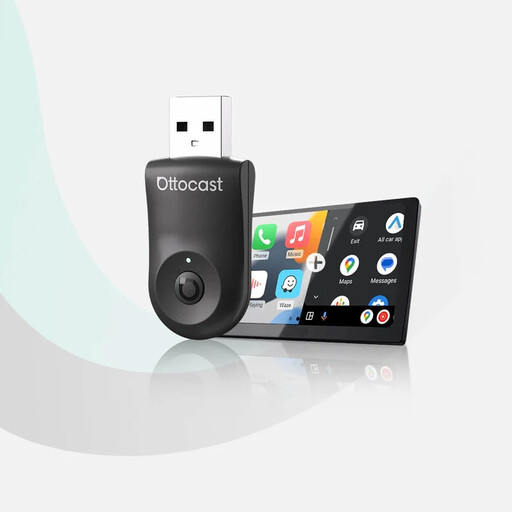
Why it suits this buyer: A compact option if you already have wired CarPlay or Android Auto and mainly want to do away with cables.
The product description clearly states that wired CarPlay or Android Auto is required. So check your car’s compatibility first.
Compact design, USB-A and USB-C adapters, and support for two paired devices.
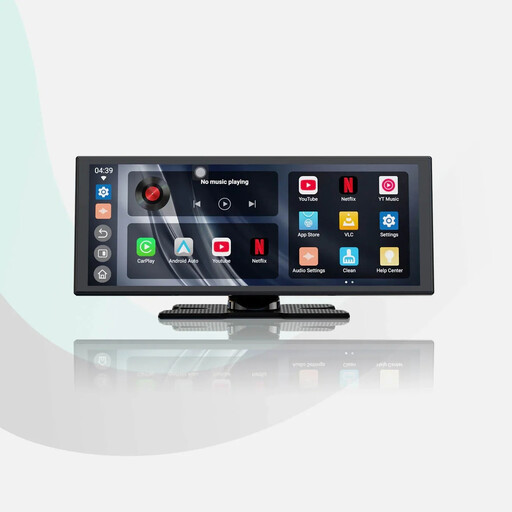
Why it suits this buyer: A good choice for drivers looking for a large screen, built-in apps and a reversing camera in one system.
The audio options and included 1080P reversing camera are clearly described. However, check the mounting and connections before buying.
11.4-inch screen, Android 13, dual Wi-Fi and audio mixing, according to the product description.
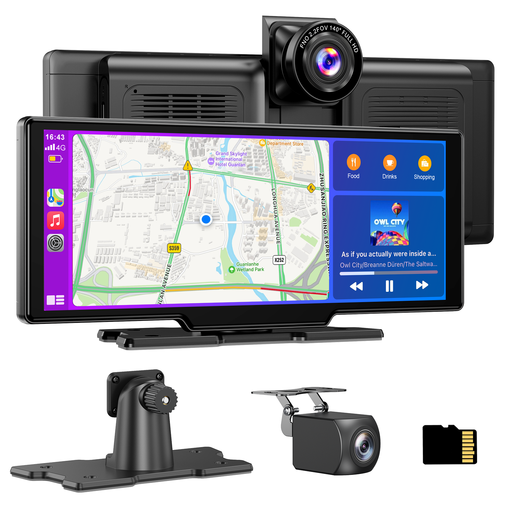
Why it suits this buyer: A practical combination for anyone who wants navigation, recording and a reversing camera in one portable system.
A 64GB card is included according to the product information. The rear camera does require tidy cabling and secure mounting.
4K front camera, 1080P rear camera, 140° viewing angle, and support for Bluetooth, AUX and FM.
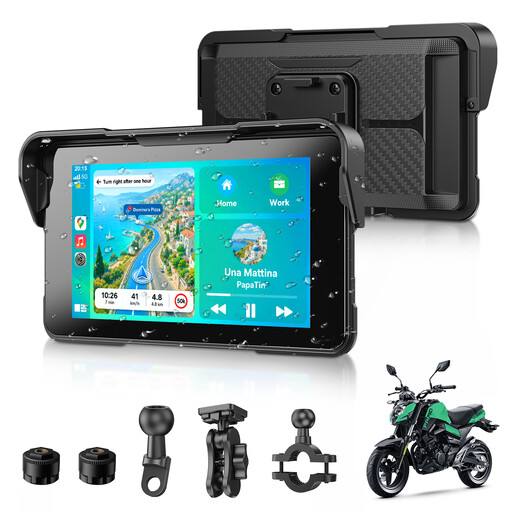
Why it suits this buyer: This CarPlay display for motorcycles is designed for navigation, music and calls on the go.
The product description mentions IP67 protection and a detachable mount. Check that the fitting is suitable for your handlebars and motorcycle.
5-inch screen, wireless Apple CarPlay, wireless Android Auto, Bluetooth 5.3 and TPMS support according to the product information.
We’ve put together a complete, up-to-date list of products that meet these strict selection criteria and the applicable European safety regulations.
No. An adapter often requires wired CarPlay or Android Auto in the original radio. A standalone portable screen can be used in a wider range of cars, but it usually needs a 12V socket and a separate audio connection. Always check compatibility with your vehicle and phone.
Securely mount the screen, connect it to the 12V socket and pair your phone via Bluetooth and Wi-Fi. Then choose Bluetooth, AUX, FM or the built-in speaker as the audio source. A reversing camera will need additional wiring.
Most screens don’t require a subscription for CarPlay or Android Auto. However, you’ll use mobile data for live navigation, music streaming and other online apps. Dash cam storage cards may need replacing over time; also check whether a card is included as standard.
