
Vandaag of morgen in huis

Kwaliteit gegarandeerd

Welkomstaanbiedingen ontgrendelen: GRATIS bezorging | Tot 80% korting | Gratis 30 dagen JoyPlus-proefperiode
Download de app
A wireless CarPlay screen for your car can add navigation, hands-free calling and music to an older vehicle without replacing the original car radio. However, not every portable CarPlay screen is equally easy to use. Some models have a good display but limited audio connections. Others are sold as plug-and-play CarPlay screens, even though installing a reversing camera requires additional wiring.
Pay particular attention to these three common pitfalls:
First, check whether your smartphone is compatible with an Apple CarPlay screen or Android Auto screen. The product information states the minimum iOS or Android version for each model. For example, ESSGOO models in this selection specify support for iOS 10 or later and Android 11 or later; another model specifies iOS 12 or later. Always check the exact product page before ordering.
For your car, the power supply is particularly important. Various portable screens work via a 12V to 24V connection, making them suitable for cars, SUVs, vans and some lorries. The audio must then be matched to your existing system. Options include:
According to the product description, Bluetooth or AUX can generally provide a more direct connection than an FM transmitter, but the final experience also depends on the car radio.
A portable touchscreen for your car must be easy to read without limiting your view of the road. Models measuring 10.26 inches provide plenty of space for maps, music and menus. An 11.4-inch screen can display even more information, but it also takes up more room on the dashboard.
As well as the diagonal measurement, look at:
Position the screen so that it does not obstruct the steering wheel, instruments or your view outside. A securely fixed mount prevents vibrations, particularly on bumpy Dutch roads.
A CarPlay display with reversing camera is worth considering if your car lacks parking sensors or an original camera. Check whether the camera is included. With some models, you need to buy it separately; others come with a 1080p camera in the box.
For a dash cam with CarPlay, the following details are relevant:
According to ESSGOO’s own product information, certain models support 4K front recording, a 1080p rear camera and automatic loop recording. These are product specifications, not a guarantee that every number plate will be readable in all lighting conditions. You should also check privacy rules and local road traffic regulations before using or sharing recordings.
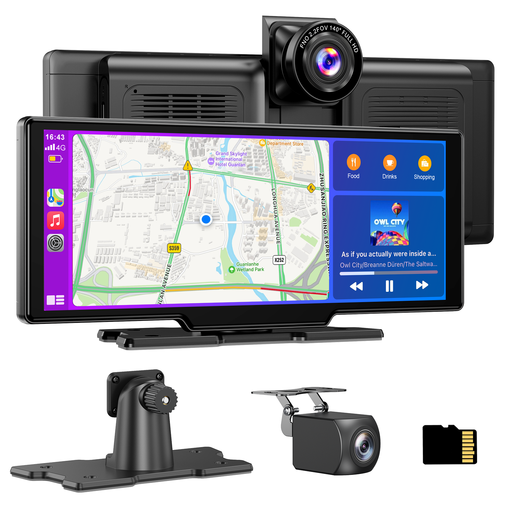
Why it suits this profile: This model combines wireless CarPlay, wireless Android Auto and a dash cam in one screen. The 12V to 24V cigarette lighter connection is designed for quick installation.
A 64GB TF card is included, according to the product information. This means you can use the stated recording function straight away, although the rear camera still needs to be wired up properly.
10.26-inch screen, 4K front camera, 1080p rear camera, loop recording and audio via Bluetooth, AUX, FM or the built-in speaker.
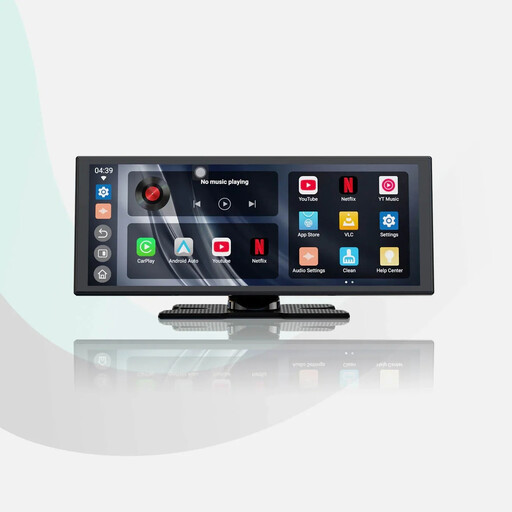
Why it suits this profile: Suitable for drivers who navigate frequently and want a large display without replacing the factory radio. According to the product description, the system also supports built-in apps.
The product information states that it has dual-band Wi-Fi and dual Bluetooth for phone and audio connections. According to the manufacturer, this helps reduce the need to pair again and limits connection interruptions; actual stability may vary depending on the phone and car.
11.4-inch screen with 1920 × 720 pixels, wireless Apple CarPlay and Android Auto, built-in apps and an included 1080p rear camera.
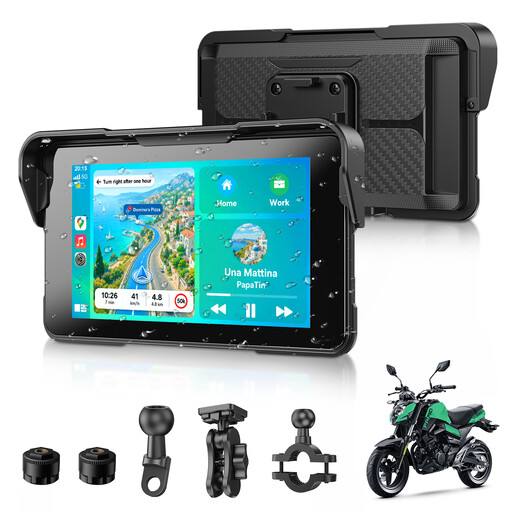
Why it suits this profile: This compact CarPlay screen for motorcycles is aimed at riders who want to use navigation, music and voice control from the handlebars. The product description states that it is IP67 water-resistant and has a removable mount.
The smaller size takes up less space on the handlebars. However, check that the included mounting system and power supply are suitable for your motorcycle, and whether the IP67 specification applies to the entire system or a particular component.
5-inch display, wireless CarPlay and Android Auto, Bluetooth 5.3, GPS navigation, voice assistant and stated operation at temperatures from 0 to 60 °C.
We have put together a complete, up-to-date list of products that fully meet these strict selection criteria and the applicable European safety regulations.
A wireless system will usually not operate entirely independently. You will generally pair your phone once via Bluetooth and Wi-Fi. After that, the connection may be re-established automatically, according to the product information. For stable use:
With models that have a built-in battery, start-up may be faster when the device is charged. However, the initial pairing may take longer than a normal start-up. Also bear in mind that a parked car can become hot, and avoid exposing the screen to direct sunlight for extended periods.
Not without checking first. Most portable models use a 12V or 24V power supply, making them widely compatible. You should also check that your iPhone or Android phone has the stated software version and that the selected audio output is compatible with your car radio.
For CarPlay and Android Auto, your smartphone’s internet connection is used when the navigation or music app needs online data. According to the product information, built-in apps and features such as YouTube or Prime Video may require a Wi-Fi hotspot or another internet connection. Data usage varies by app.
Its lifespan depends on usage, heat, mounting, software, and the quality of the cables and connections. A model with a sturdy mount, clear warranty terms and replaceable or readily available accessories can be a practical choice for long-term use. Always check the warranty, returns policy and information about updates before ordering.
