
Vandaag of morgen in huis

Kwaliteit gegarandeerd

Welkomstaanbiedingen ontgrendelen: GRATIS bezorging | Tot 80% korting | Gratis 30 dagen JoyPlus-proefperiode
Download de app
A wireless CarPlay screen for your car can add navigation, hands-free calling and music streaming to an older car, campervan, lorry or SUV without replacing the original car stereo. However, many models look similar, while the differences in installation, compatibility and sound quality can be significant.
That’s why the product description matters more than standalone marketing claims. In particular, check how the screen is powered, how audio is played through your car speakers and whether your smartphone and vehicle are supported.
With wireless Apple CarPlay and wireless Android Auto, the screen usually connects to your phone via Bluetooth and Wi-Fi. However, the screen itself often still needs a power cable. A plug-and-play CarPlay screen typically uses the 12V socket or cigarette lighter.
Also check how the initial pairing works. Many models require you to set up your phone once. According to the product descriptions for the ESSGOO models mentioned here, the screen can then reconnect automatically, but this may vary depending on your smartphone and vehicle.
A 10.26-inch CarPlay screen or larger display is easy to read, but it can restrict your forward view if you position it incorrectly. Make sure you mount it securely on the dashboard or another permitted location, without blocking your view or access to the controls.
As well as checking the screen size, look at the resolution. A screen with a resolution of 1600 × 600 pixels may be sufficient for navigation, while an 11.4-inch model with 1920 × 720 pixels offers more screen space. Bigger isn’t always better in a small car.
A CarPlay screen with a dash cam can combine several functions, but the rear camera usually needs to be mounted at the back of the vehicle and connected by cable. The cable length may be a consideration in a campervan, bus or lorry.
Also check the difference between a camera that simply displays footage and one that activates automatically when you reverse. See whether the product description mentions a reversing function, parking lines or a connection to the reversing signal.
You’ll need a compatible iPhone for wireless Apple CarPlay. Wireless Android Auto has separate requirements for Android phones. The product information supplied for several screens mentions support for iOS 10 or later and Android 11 or later. Always check the current compatibility of your phone.
A universal CarPlay display with a 12V or 24V power supply is suitable for many cars, SUVs, campervans, lorries and vans. However, that doesn’t mean every model has the same installation requirements or audio connections.
Be aware of the difference between a screen and an AI Box. According to its product description, the OTTOCAST P3 only works with vehicles that already have factory-installed wired CarPlay. It isn’t designed as a standalone portable car screen for vehicles without this feature and, according to the description, isn’t supported by BMW or Tesla models.
A touchscreen for your car can display images without automatically playing sound through the original car speakers. That’s why many models offer several options:
AUX often provides a more reliable connection, while an FM transmitter depends on there being a free radio frequency. Also check whether your car stereo supports Bluetooth audio or only Bluetooth for phone calls.
If you’re looking for a CarPlay screen with a dash cam, it’s worth comparing the camera resolution, viewing angle and storage. According to their product descriptions, the ESSGOO models in this selection offer a 4K front camera, a 1080P rear camera and support for loop recording. Some versions come with a 64GB TF card.
A wide 140-degree viewing angle can capture more of your surroundings, but may distort objects at the edges. A waterproof rear camera is useful if it’s mounted outside the vehicle. Also check whether you can lock video footage manually, so it isn’t immediately overwritten during loop recording.
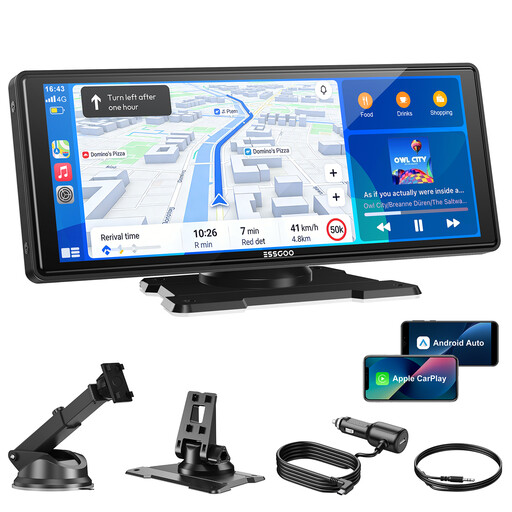
Why it suits this profile: This portable car screen is designed for drivers who want to quickly add wireless CarPlay and Android Auto to their existing car without replacing the car stereo.
The product description specifies a 12V–24V power supply, several audio options and suction-cup mounting. Before buying, check whether AUX, Bluetooth or FM will work with your car stereo.
10.26-inch display, wireless CarPlay and Android Auto, Bluetooth 5.3, dual-band Wi-Fi and four audio outputs, according to the product information.
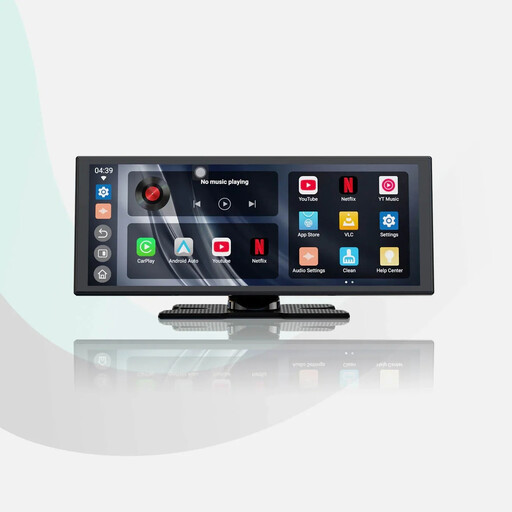
Why it suits this profile: A good choice for drivers who value a larger screen, built-in apps and support for a reversing camera.
The product description lists an 11.4-inch screen with a resolution of 1920 × 720 pixels and an included 1080P rear camera. Check in advance where the camera and cable will be fitted.
Android 13, built-in apps, wireless CarPlay and Android Auto, dual Bluetooth and support for audio mixing, according to the product description.
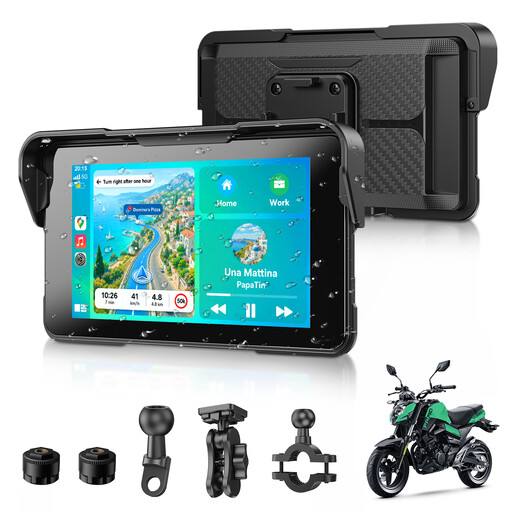
Why it suits this profile: This motorcycle CarPlay screen is designed for riders who want to use navigation, music and phone calls on a compact display.
According to the product description, the screen is IP67 water-resistant and has a detachable mount. Check that the mount fits your handlebars and follow the installation instructions.
5-inch display, wireless CarPlay and Android Auto, IP67 rating, dual Bluetooth and support for navigation apps, according to the product information.
We’ve put together a complete, up-to-date list of products that meet these strict selection criteria and the applicable European safety regulations.
Position the screen so you can read the navigation without operating the device while driving. Connect the power supply to the 12V or 24V socket, then pair your smartphone via Bluetooth and Wi-Fi. Test the audio output somewhere quiet and stationary.
For models with a camera, it’s a good idea to secure the cables neatly so they don’t vibrate or come loose. Make sure the TF card is inserted correctly and check it regularly. If you need important footage for your records, save a copy on another device too.
Not every screen will literally work in every car. A portable model with a 12V or 24V power supply will suit many vehicles, but you’ll still need to check smartphone compatibility, dashboard space and the audio connection. An AI Box usually has stricter requirements, such as factory-installed wired CarPlay.
Many universal models support it. Check that the product information lists both wireless Apple CarPlay and wireless Android Auto. Also check the required Android version and whether your phone supports wireless Android Auto.
Its lifespan depends on heat, direct sunlight, vibration, strain on the cables and everyday use. Avoid leaving the screen behind glass in direct sunlight for long periods, and make sure the connections aren’t under strain. If you have a dash cam, it’s also a good idea to check the memory card regularly.
