
Vandaag of morgen in huis

Kwaliteit gegarandeerd

Welkomstaanbiedingen ontgrendelen: GRATIS bezorging | Tot 80% korting | Gratis 30 dagen JoyPlus-proefperiode
Download de app
A wireless CarPlay screen for your car can add navigation, hands-free calling and music streaming to an older car, campervan, SUV or lorry without replacing the original stereo. However, many models look similar, even though there can be significant practical differences. A large screen, for example, tells you little about the audio connection, installation or compatibility with a reversing camera.
So, keep an eye out for these three common pitfalls:
A wireless Android Auto screen will only work well if it supports your smartphone, software version and connection. Product descriptions often list minimum versions, such as iOS 10 or iOS 12 and Android 11. Check this before you buy.
Also check the power supply. Models with a cigarette lighter plug often work with 12V to 24V, so they may be suitable for cars, campervans, vans and lorries. “Universal CarPlay screen” usually refers to this broad power compatibility, not a guaranteed fit in every dashboard.
A 10.26- or 11.3-inch portable CarPlay display is easy to read for navigation, but it also takes up more dashboard space. Measure up beforehand to make sure the screen won’t obstruct your view. A sturdy suction cup or dashboard mount should be adjustable and stay in place despite heat or vibration.
Check the resolution too. A screen with 1600 × 600 pixels can display maps and menus clearly; an 11.4-inch model with 1920 × 720 pixels has a different aspect ratio. Readability in everyday use also depends on brightness, viewing angle and reflections, not just the number of pixels.
Check how the sound is sent to your car speakers. Many systems offer a built-in speaker, Bluetooth, an FM transmitter and AUX. AUX usually provides a direct wired connection, while FM depends on finding a clear radio frequency.
With a CarPlay screen with a reversing camera, the wiring and installation are just as important as the camera resolution. Check whether the camera is waterproof, whether the cable is long enough and whether the reversing function activates automatically. A camera helps you see what’s behind you, but it doesn’t replace checking your surroundings.
For motorcyclists, a waterproof screen, a suitable handlebar mount and controls that work with gloves are more important than a large display. A CarPlay screen for a motorbike should also be able to withstand vibration and the elements, according to the specifications of the model you choose.
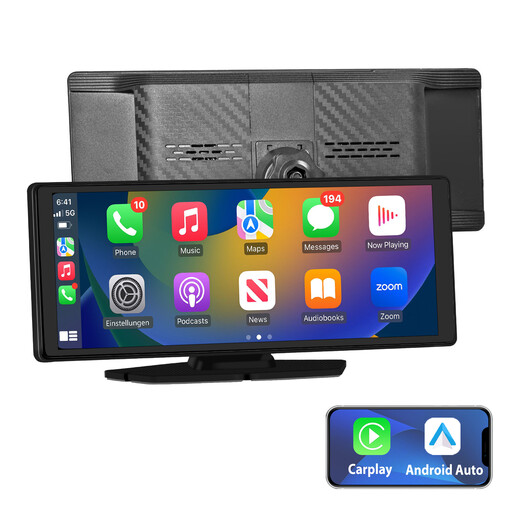
Why it suits this user: According to the product information, this plug-and-play CarPlay screen comes with a mount, car charger and AUX cable. It supports wireless CarPlay, Android Auto, online GPS navigation and several audio output options.
The key accessories for a basic installation are listed. Still, check that the AUX, Bluetooth or FM connection is suitable for your car.
10.26-inch IPS touchscreen, wireless CarPlay and Android Auto, GPS function and several audio options.
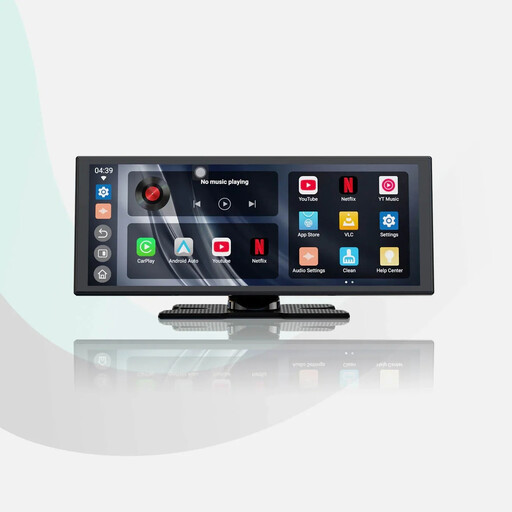
Why it suits this user: The product description lists an 11.4-inch screen with 1920 × 720 pixels, wireless CarPlay and Android Auto, built-in apps and a rear camera included in the box.
The specifications list two Wi-Fi and two Bluetooth connections. That’s easier to verify than a vague claim of a “stable connection”.
Large HD display, reversing camera and support for navigation, music and hands-free calling.
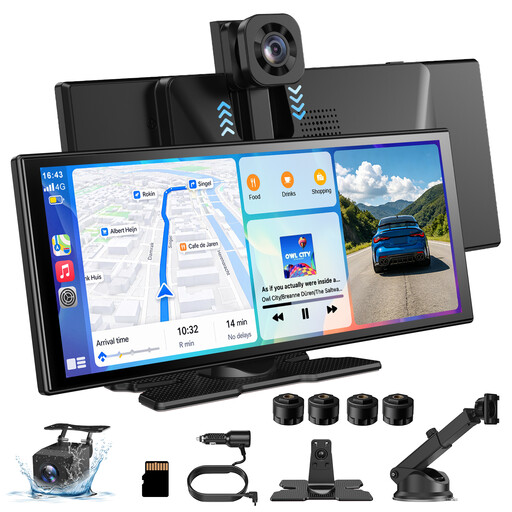
Why it suits this user: According to the product information, this model combines wireless CarPlay and Android Auto with a 360° rotating front camera and a 1080p rear camera.
The cameras, resolutions and functions are described separately. Before installation, check where the cables will need to be routed through the vehicle.
360° rotating front camera, 1080p rear camera, touchscreen and support for AirPlay and Miracast.
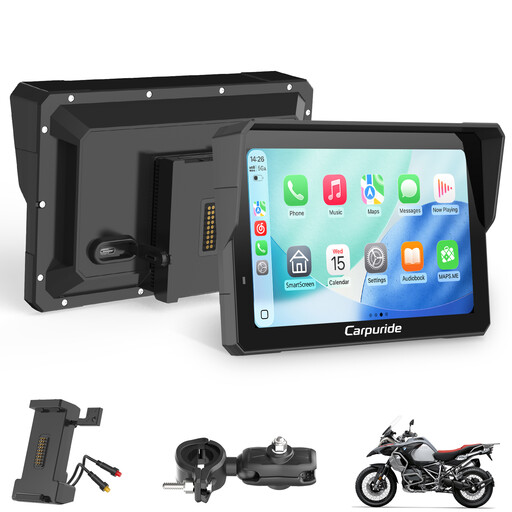
Why it suits this user: The product name lists a waterproof 7-inch touchscreen, wireless CarPlay and Android Auto, a BM05 Plug-and-Play mount, a wired controller and an intercom function.
The screen is specifically described as being for motorcycles. Even so, check the handlebar diameter, power supply and mounting options for your bike.
Waterproof casing according to the product description, 7-inch touchscreen, intercom and wireless smartphone pairing.
We’ve put together a full, up-to-date list of products that meet these strict selection criteria and the applicable European safety regulations.
Position the screen so it doesn’t block your view of the road or important controls. Connect the power supply, pair your smartphone via Bluetooth and Wi-Fi first, then choose your preferred audio method. Test navigation, calls and audio before setting off.
If the screen has a camera, secure the cable properly and keep it clear of the pedals, steering components and moving parts. Only use video apps when the vehicle is stationary, and check local rules on video recording and privacy.
Yes, a portable screen can add CarPlay or Android Auto without replacing the factory-fitted stereo. The car usually just needs a suitable power connection. You may be able to use Bluetooth, AUX, FM or the built-in speaker for sound. Check which options your car supports first.
CarPlay and Android Auto use your smartphone for many navigation and streaming features. These may require mobile data. Some navigation apps support maps downloaded in advance, but the features available vary by app.
Its lifespan depends on heat, direct sunlight, moisture, vibration and the quality of the installation. If practical, take the screen out of direct sunlight when leaving your car parked for a long time. Also check whether the manufacturer provides details of software updates, the warranty and replacement accessories.
