
Vandaag of morgen in huis

Kwaliteit gegarandeerd

Welkomstaanbiedingen ontgrendelen: GRATIS bezorging | Tot 80% korting | Gratis 30 dagen JoyPlus-proefperiode
Download de app
A wireless Bluetooth mouse might seem simple to choose. Yet models differ greatly in connection, battery, shape and compatibility. A low price says little about everyday use, while a long list of features doesn’t automatically mean a mouse will feel comfortable at your desk.
For home workers, students and laptop users, three pitfalls are particularly important:
A wireless mouse with Bluetooth and 2.4 GHz offers two ways to connect. Bluetooth is practical for a laptop, MacBook or tablet without a free USB port. A 2.4GHz connection usually uses a USB receiver and can be handy for desktops or devices where Bluetooth is less straightforward.
Pay attention to the number of devices you can actually pair. “Multi-device” can mean you switch between two or three saved connections, but not that all devices are active at the same time. Also check whether a USB-A or USB-C port is needed.
The Lofree EP115 supports Bluetooth 4.0 and 2.4 GHz. According to the product specifications, this model works with macOS 10.15+, Windows 8+, iPadOS, iOS and Android 8+. The description does note that the mouse is not compatible with the Boot Camp dual-system mode on Mac devices.
DPI indicates how far the cursor moves with a given physical mouse movement. A mouse with adjustable DPI is practical when you switch between word processing, spreadsheets, photo editing and a large screen.
For most office work, settings around 800 to 1600 DPI are sufficient. Higher levels can be comfortable for large screens or specific applications, but focus on:
The EP115 has five settings: 800, 1200, 1600, 2400 and 3600 DPI. That offers more practical choice than a single fixed level. Use the mouse preferably on a matt, non-reflective surface; according to the instructions, strong light or a reflective desk can affect tracking.
An ergonomic wireless mouse must suit your hand size, grip and working posture. A vertical shape isn’t automatically comfortable for everyone, and a large mouse can be awkward in a laptop bag. Pay attention to the width, height, weight and placement of thumb buttons.
Also consider the power source:
The EP115 features a built-in 800mAh lithium battery. The stated charging time is approximately three hours and the product description mentions a usage time of up to around one month. That is a product specification, not a guaranteed duration for every usage scenario.
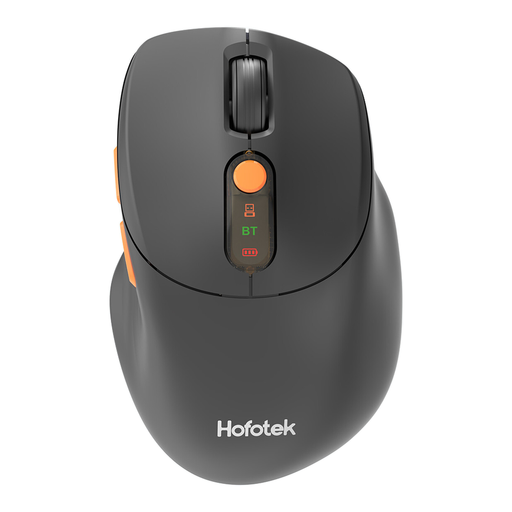
Why this fits the profile: The M311 combines Bluetooth 5.1 with 2.4 GHz and is designed, according to the product information, for Windows, macOS and Android. The compact housing at around 62 grams suits a laptop or student setup.
The connection and DPI choices are clearly stated: 800, 1600, 2400, 3200 and 4000 DPI. The silent click function is described as a product feature.
Dual-mode connection, five DPI levels, low weight and an AA battery included.

Why this fits the profile: This ergonomic wireless mouse features a vertical shape, Bluetooth and a 2.4GHz receiver. The 4000 DPI sensor and rechargeable battery suit long-term office work at a fixed desk.
The shape, hand orientation and connection options are clearly specified. Do check whether the right-handed design suits your use.
Vertical housing, adjustable DPI, Bluetooth, USB receiver and rechargeable battery.
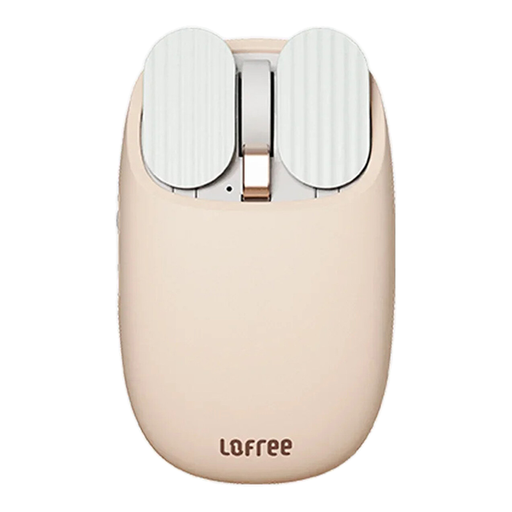
Why this fits the profile: The EP115 is aimed at users who switch between laptop, desktop and tablet and want a stylish, rechargeable mouse for work, travel and daily use.
The product specifications mention both connection modes, five DPI levels and a specific charging time of approximately three hours.
Bluetooth and 2.4 GHz, five DPI choices, Kailh micro switches, thumb wheel and 800mAh battery.
We’ve put together a full, up-to-date list of products that fully meet these strict selection criteria and comply with current European safety regulations.
That depends on the model and system requirements. Check the supported macOS and Windows versions before you buy. A model with Bluetooth and a USB receiver offers more flexibility, but even then you need to check the connection and compatibility.
A rechargeable mouse avoids the need to regularly buy AA or AAA batteries. On the other hand, the built-in battery may lose capacity over time. So compare the battery life, charging time and ability to work while charging. With a mouse that uses loose batteries, the recurring costs are easy to calculate based on your usage.
Turn the mouse on and activate Bluetooth on your laptop, tablet or computer. Open the Bluetooth settings, choose “add new device” and select the mouse. With a 2.4GHz model, insert the USB receiver into a suitable port and follow the manufacturer’s instructions. After pairing, check the cursor movement and set the DPI to a level that suits your work.
