
Vandaag of morgen in huis

Kwaliteit gegarandeerd

Welkomstaanbiedingen ontgrendelen: GRATIS bezorging | Tot 80% korting | Gratis 30 dagen JoyPlus-proefperiode
Download de app
A wireless Bluetooth mouse keeps your desk tidy and often works straight away with a laptop, tablet or smartphone. However, many models look alike, even though there can be significant differences in connectivity, power, shape and controls. A low price does not automatically mean a mouse is unsuitable, and a high DPI figure does not necessarily mean a better user experience.
For home workers, students and office workers, three pitfalls are particularly important: a connection that is not compatible with your device, a shape that becomes uncomfortable over time, and battery information that says little about how you use your mouse. Below, we explain which specifications you should check in practical terms.
Bluetooth works without a USB receiver, but your laptop or tablet must support Bluetooth. A 2.4G mouse usually uses a USB dongle. This can be useful with desktop computers or devices where Bluetooth is less stable, but you will need a free USB port.
A Bluetooth mouse with 2.4G combines both options. This is also known as a dual-mode mouse. However, check how switching works and whether you need to carry a receiver when using the mouse on the go.
DPI determines how quickly the cursor moves in response to a particular hand movement. For word processing, spreadsheets and browsing the internet, settings of around 800 to 1600 DPI are often practical. A mouse with adjustable DPI is useful if you switch between a large monitor, a laptop and more precise tasks.
A very high DPI setting is mainly relevant for specific gaming setups. So also look at the available steps, the sensor and how easily you can adjust the speed.
A comfortable mouse should suit your hand size, grip and length of use. Pay attention to its width, height, weight and the position of the thumb and side buttons. A large right-handed mouse may be comfortable at a permanent desk, but less suitable for a small laptop bag.
A vertical shape, as found on some Logitech models, changes the position of your hand. This may feel comfortable for some users, but it is not a guarantee of comfort for everyone. Try to match the shape to your own working posture and take regular breaks.
For a mouse for multiple devices, the number of Bluetooth channels and the way you switch between them are important. Some models support one Bluetooth device alongside a 2.4G receiver; others can remember several devices. Also check:
According to the product information, the Lofree EP115 supports Bluetooth 4.0 and 2.4G. The manufacturer states that it is compatible with, among others, Windows 8+, macOS 10.15+, iPadOS, iOS and Android 8+. The description does not mention support for Boot Camp dual-system mode on Mac devices.
A rechargeable mouse means you do not need separate AA or AAA batteries. Check the charging time, the stated battery life and whether you can continue using the mouse with the cable connected. With battery-powered models, costs remain low as long as the batteries last a long time, but annual running costs depend on the type of battery and how intensively you use the mouse.
According to the product description, the Lofree Wavy Chips mouse has a built-in 800 mAh lithium battery, a charging time of approximately three hours and a manufacturer-stated battery life of around one month. This is a statement from the brand; actual battery life depends on the connection, usage and settings.
A silent computer mouse is useful in a shared workspace, library or home office. Check whether silent operation applies to all buttons or only the main clicks. An additional horizontal scroll wheel can save time when working with spreadsheets and wide documents.
According to the product information, the Trust Ozaa+ has silent buttons, an additional side wheel for horizontal scrolling and support for up to three paired devices. This model is relatively large and right-handed. It is therefore better suited to a permanent workstation than to users mainly looking for a compact mouse to take with them.
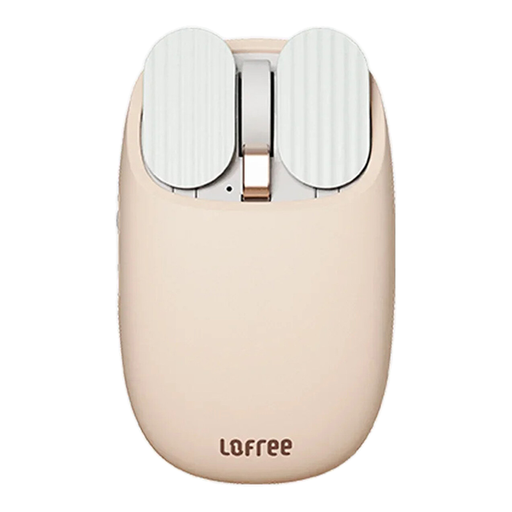
Why it suits this profile: The Lofree EP115 offers Bluetooth and 2.4G in one mouse, making it suitable for laptop users who work with different devices. The milk tea colour and stylish design complement a smart desk.
The five DPI levels let you adjust the cursor speed without relying on an extremely high fixed setting. The dual-mode connection reduces reliance on Bluetooth or a USB receiver alone.
800, 1200, 1600, 2400 and 3600 DPI; built-in 800mAh battery; Kailh microswitches; Bluetooth and 2.4G support.
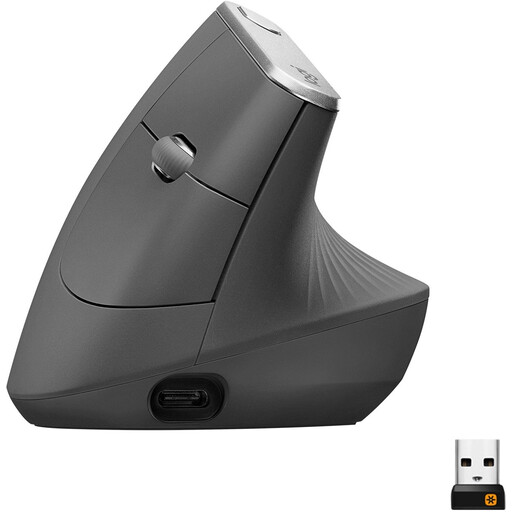
Why it suits this profile: This ergonomic wireless mouse is designed for users looking for a vertical shape and Bluetooth or USB receiver connectivity at a permanent workstation.
The specifications clearly state the shape and right-handed orientation. This lets you assess in advance whether the model suits your hand and workstation, rather than relying solely on the word “ergonomic”.
57-degree vertical angle according to the product information; adjustable sensor up to 4000 DPI; rechargeable battery; Bluetooth and USB receiver.
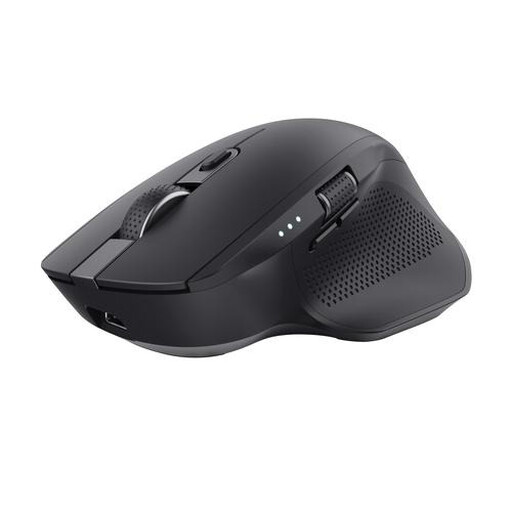
Why it suits this profile: The Ozaa+ is designed for people who switch between a laptop, desktop and tablet, and regularly work with wide spreadsheets or timelines.
The combination of two Bluetooth channels and a 2.4G receiver makes the number of connections clear. The side wheel means horizontal scrolling does not have to be done solely with keys or scroll bars.
Up to three devices; horizontal and vertical scrolling; rechargeable battery; adjustable optical sensor up to 3200 DPI; silent buttons according to the product description.
We have put together a complete, up-to-date list of products that fully meet these strict selection criteria and the applicable European safety regulations.
Yes, provided your computer, tablet or smartphone supports Bluetooth. A Bluetooth-only model does not need a receiver. With a dual-mode mouse, you can use Bluetooth or, with a desktop computer, switch to 2.4G using the supplied dongle.
Battery life per charge or set of batteries varies from model to model. Rechargeable models often state an estimated battery life, while models with AA or AAA batteries can sometimes last for months. Treat these figures as a guide: connection mode, sleep mode, click frequency and the surface you use the mouse on all affect the result.
Yes. Bluetooth is practical for a laptop without a spare USB port. If your laptop only has USB-C, check whether the 2.4G receiver is compatible or whether an adapter is required. For use on the go, a low weight, stowable receiver and compact design are particularly useful.
