
Vandaag of morgen in huis

Kwaliteit gegarandeerd

Welkomstaanbiedingen ontgrendelen: GRATIS bezorging | Tot 80% korting | Gratis 30 dagen JoyPlus-proefperiode
Download de app
A wireless Bluetooth mouse keeps your laptop, desktop or tablet tidy without an extra cable on your desk. However, not every wireless model is suitable for everyday home working, travel or prolonged use. Some mice only work with a USB receiver, while others do not support a dongle at all. Battery life, quietness and ergonomics are also not always measured in the same way.
In this buying guide, you’ll find out what to look for in a Bluetooth mouse and which models suit different situations.
A Bluetooth mouse connects directly to a device that supports Bluetooth. This usually means you won’t need a spare USB port. A 2.4GHz mouse works with a USB receiver. This can be practical for computers without a stable Bluetooth connection, but less convenient for a laptop with USB-C ports only.
A dual-mode mouse combines both options. This is useful if, for example, you switch between a laptop via Bluetooth and a desktop with a USB receiver.
DPI determines how far the cursor moves in response to a particular hand movement. A high setting can be useful for large screens, but a lower setting may feel more comfortable for word processing and spreadsheets. So check whether the mouse has adjustable DPI and which settings are available.
Also consider the surface you use it on. According to the product information for various models, strong reflections or a glass desk can affect optical tracking.
Manufacturers often quote a maximum battery life. This is a product specification based on certain usage conditions, not a fixed guarantee for every user. Bluetooth, lighting, click frequency and automatic sleep mode can all affect power consumption.
So check whether you want:
Before buying, check that the mouse works with your operating system. Look for support for Windows, macOS, ChromeOS, iPadOS, iOS or Android. A Bluetooth version such as Bluetooth 5.1 does not tell you everything about your laptop’s compatibility; the device itself must support Bluetooth.
A USB receiver can provide a stable solution, but check whether your computer has a suitable USB-A port. For mobile use, Bluetooth is often simpler because you don’t have to carry a receiver.
For office work, an optical sensor offering around 1000 to 1600 DPI is often sufficient. A mouse with multiple DPI levels offers greater flexibility for different screen sizes and tasks. Extra buttons can be useful for browser navigation or shortcuts, but check whether they are programmable.
Sensor resolution is only one factor. The shape, weight and grip also determine how much control you feel you have over the cursor.
A compact mouse is easier to fit into a laptop bag, but may provide less support for your palm. A larger or vertical ergonomic mouse takes up more space, but may suit users who find a different hand position more comfortable. This is personal; product claims about reducing strain or improving comfort come from the brand and are not medical advice.
A quiet computer mouse can be useful in a shared workspace. Check whether only the main buttons are quieter, or whether the scroll wheel and other switches are quieter too.
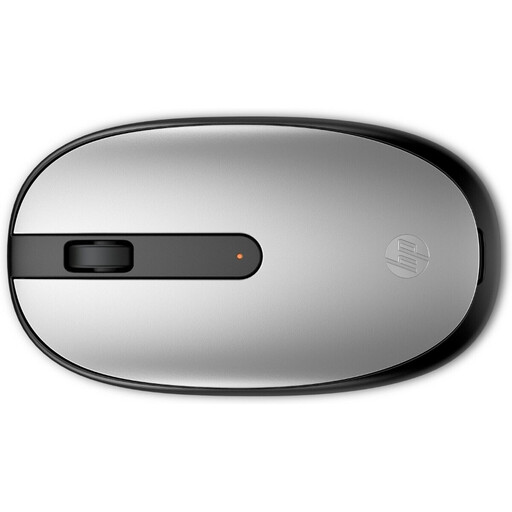
Why it suits this profile: This model uses Bluetooth 5.1 without a dongle and has a simple layout with three buttons and a scroll wheel. That makes it suitable for basic use in the office, at home or with a laptop.
The connection is clearly specified as Bluetooth 5.1, so you won’t accidentally choose a model that only uses a USB receiver.
1600 DPI, ambidextrous design and a weight of 54.2 grams according to the product details.
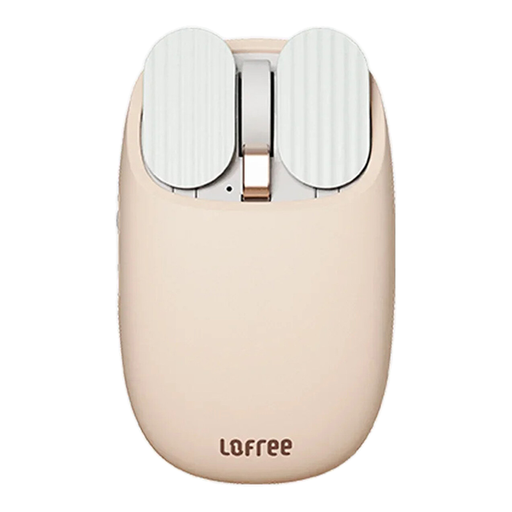
Why it suits this profile: The EP115 combines Bluetooth and 2.4GHz, allowing you to switch between devices. Its Milk Tea colour scheme is well suited to a stylish home office or mobile workstation.
You’re not reliant on a single connection type. However, check that your device supports Bluetooth or has a free USB port for the 2.4GHz receiver.
Five DPI levels from 800 to 3600, a built-in 800mAh battery and a stated usage time of approximately one month.
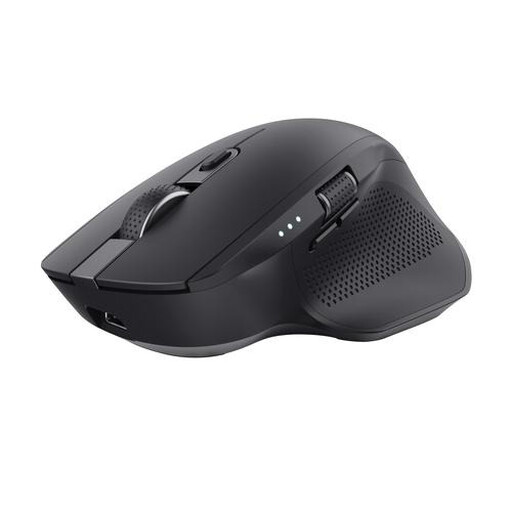
Why it suits this profile: This larger model is designed for users who regularly switch between a laptop, PC and tablet, or who frequently work with wide spreadsheets.
The specifications list both Bluetooth and a 2.4GHz receiver. This means the mouse isn’t limited to one type of workstation.
Up to three paired devices, adjustable DPI up to 3200, a horizontal scroll wheel and a rechargeable battery according to the product description.
For Bluetooth, open your laptop’s Bluetooth settings, switch on the mouse and select the correct model. With a 2.4GHz mouse, insert the USB receiver and switch on the mouse. Charge a rechargeable mouse before using it for the first time, following the instructions.
Use a dry, soft cloth and avoid moisture. Store a separate receiver inside the mouse if there is room for it. For products with batteries, use the correct type and dispose of empty batteries in accordance with local collection rules.
We’ve compiled a complete, up-to-date list of products that fully meet these strict selection criteria and the applicable European safety regulations.
No. The laptop must support Bluetooth, and the operating system must be compatible. Also check the minimum system requirements for the specific model.
That depends on your workspace. Bluetooth saves a USB port and is convenient for laptops. A 2.4GHz connection can be practical for desktops or devices without suitable Bluetooth support. A dual-mode mouse offers both options.
Battery life depends on the battery, usage and sleep mode. A rechargeable mouse will need to be charged again over time; with a model using AA or AAA batteries, replace the batteries when performance starts to decline. Always check the product specifications rather than relying solely on a general marketing claim.
