
Vandaag of morgen in huis

Kwaliteit gegarandeerd

Welkomstaanbiedingen ontgrendelen: GRATIS bezorging | Tot 80% korting | Gratis 30 dagen JoyPlus-proefperiode
Download de app
A wireless Bluetooth mouse makes a laptop, tablet or desktop setup more organised: there is no fixed cable and, with many models, no USB receiver is required either. However, not every wireless computer mouse is suitable for everyday use. A low price, striking design or high DPI value says little by itself about comfort and practical usability.
For homeworkers, students and office workers, three things are particularly important: a stable connection, a shape that suits your hand and a battery solution that matches the way you use it. Below, you can find out what to look for and which popular options suit different situations.
A Bluetooth mouse for a laptop only works when your device supports Bluetooth and the operating system is compatible. Older computers, business desktops or devices with limited Bluetooth functionality may still require a USB receiver.
Therefore, check:
A wireless mouse with Bluetooth and 2.4 GHz offers greater flexibility. Bluetooth is useful for laptops without a spare USB port; 2.4 GHz can be practical for a desktop or computer without Bluetooth.
DPI determines how far the cursor moves with a particular hand movement. A higher value is not automatically more comfortable. For word processing and browsing the internet, a moderate setting is often sufficient. With large screens, image editing or gaming, higher sensitivity can be useful.
It is better to look for a mouse with adjustable DPI. This allows you to adapt the sensitivity to your screen, working position and task. Also check how many steps are available. According to the product information, the Lofree EP115 offers five levels: 800, 1200, 1600, 2400 and 3600 DPI.
A compact mouse can be comfortable when travelling, but less suitable for prolonged use if you have larger hands. A vertical mouse supports a different wrist position from a traditional model. The position of the thumb buttons, the width of the body and the weight also affect how comfortable the mouse feels.
Pay attention to:
A product description may describe a shape as ergonomic, but that does not guarantee that the model will be comfortable for every user. Try to decide in advance whether you prefer a low, symmetrical or vertical shape.
Multi-device functionality is practical for a workspace with a laptop, tablet and desktop. Check how many devices can be paired simultaneously and how you switch between them. This may be done using a physical button on the underside or a dedicated switch button.
A Bluetooth mouse for a laptop without a dongle keeps USB ports free. A model with both Bluetooth and 2.4 GHz also gives you an alternative when pairing fails or when you are working on a desktop computer.
A rechargeable mouse means you do not have to buy AA or AAA batteries regularly. However, check the charging time, the stated battery life and whether you can use the mouse while it is charging. With a model using a replaceable battery, carrying a spare is useful when travelling.
According to the product specifications, the Lofree Wavy Chips mouse, model EP115, has a built-in 800mAh lithium battery, a charging time of approximately three hours and a stated battery life of around one month. Actual battery life depends on usage and settings.
An optical sensor generally works well on a matt, even desk. Highly reflective surfaces or glass can affect tracking. According to the EP115 product information, a reflective desk or bright light may reduce accuracy.
A quiet mouse can be more comfortable in a shared office or library. Check whether “quiet” applies only to the main buttons and whether the click feel suits your preference. A soft click is not always the same as completely silent operation.
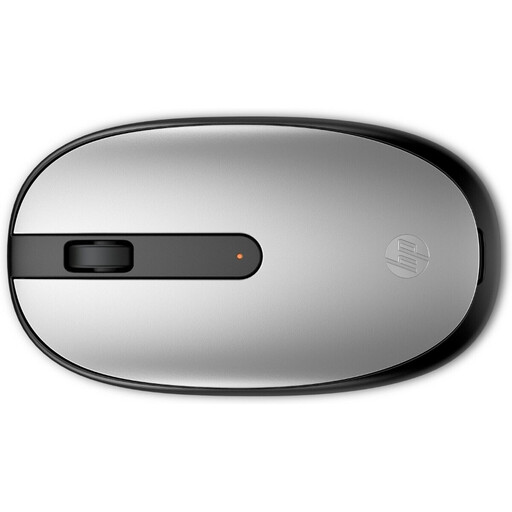
Why it suits this profile: According to the product information, this straightforward Bluetooth mouse uses Bluetooth 5.1, works without a dongle and has a symmetrical shape for everyday laptop and office work.
The specifications clearly state the Bluetooth version, 1600 DPI and three buttons with a scroll wheel, so you do not have to choose based on appearance alone.
Bluetooth 5.1, 1600 DPI, ambidextrous design and a replaceable AA battery.
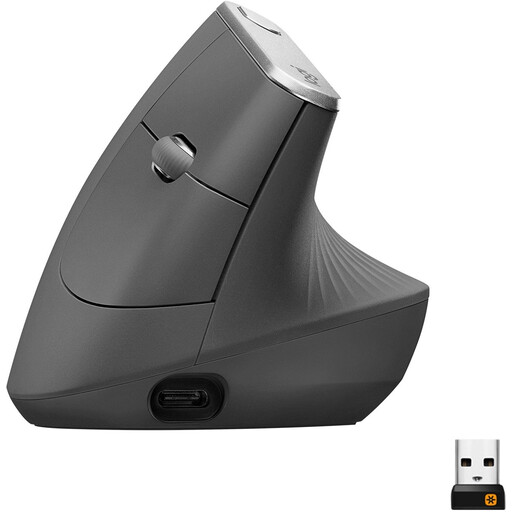
Why it suits this profile: A vertical shape, adjustable DPI up to 4000 and Bluetooth plus 2.4 GHz make this model suitable for users who spend many hours working at a desk.
The shape and connectivity options are clearly stated. However, bear in mind that, according to the specifications, this model is designed for right-handed use.
Vertical shape, rechargeable battery, adjustable DPI and a stated range of 10 metres.
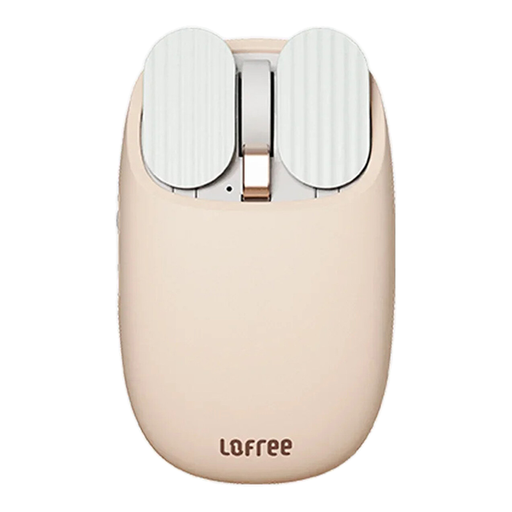
Why it suits this profile: The Lofree EP115 combines Bluetooth 4.0 and 2.4 GHz with five DPI levels, an 800mAh battery and additional controls via a thumb wheel and side buttons.
The product information lists specific connection modes, DPI steps, battery capacity and compatible systems rather than making only general comfort claims.
Dual-mode connectivity, five DPI levels, rechargeable battery and controls for everyday work and travel.
We have compiled a complete, up-to-date list of products that fully meet these strict selection criteria and the applicable European safety regulations.
Yes, when your laptop, tablet or computer supports Bluetooth. Switch on Bluetooth, put the mouse into pairing mode and select the model from the list of available devices. A mouse with 2.4 GHz usually does require a USB receiver.
This varies by model, connection and usage. According to the product information, a rechargeable mouse may last for around one month, while models with AA batteries may have a stated battery life of several months. Manufacturers’ figures are estimates; sleep mode and intensity of use affect real-world performance.
It can be, but the shape must suit your hand. An ergonomic or vertical mouse can offer a different grip from a compact model. Take regular breaks, set up your desk correctly and do not choose a mouse solely because the product title describes it as “ergonomic”.
