
Vandaag of morgen in huis

Kwaliteit gegarandeerd

Welkomstaanbiedingen ontgrendelen: GRATIS bezorging | Tot 80% korting | Gratis 30 dagen JoyPlus-proefperiode
Download de app
Wireless Bluetooth headphones are handy for listening to music, working from home, travelling, making calls and exercising. But it’s not wise to rely solely on phrases such as “powerful bass”, “AI microphone” or “long battery life”. The differences between models often come down to fit, ease of use and what the technical specifications actually mean.
Use these practical checks to find a model that suits your everyday needs, and avoid making a purchase you regret a few weeks later.
The stated playback time might refer to a single earbud, the headphones with noise cancelling switched off, or the total when used with the charging case. For example, the JBL Wave Buds 2 are listed as offering up to 40 hours with ANC switched off. According to the product specifications, the earbuds themselves provide up to 8 hours of playback.
So always compare:
A model with IPX4 is resistant to splashes and sweat, but isn’t designed to be submerged. IPX5 offers protection against water jets according to the relevant classification, but you should still take care around rain, pool water and moisture in the charging port.
Water-resistant earbuds are suitable for everyday exercise or light rain when the manufacturer says they can be used in those conditions. Dry the earbuds after exercising, and only charge them once the contacts are dry.
Noise-cancelling headphones use active noise cancellation to reduce background noise. How well it works varies depending on your surroundings and the fit. Constant low-frequency sounds, such as train engine noise, are generally handled differently from voices or sudden sounds.
Brands sometimes use their own testing methods and marketing claims. For example, Sony lists active noise cancelling and up to 30 hours of battery life with noise cancelling for the ULT WEAR. Treat this as a product specification based on certain conditions, not as a guarantee that all background noise will disappear.
An in-ear headset is compact, and its silicone ear tips partially seal the ear canal. Check whether the box includes multiple sizes of ear tips. The Soundcore Liberty 4 Pro, for example, comes with extra ear tips.
Over-ear headphones fit around your ears and can be comfortable for travelling or long listening sessions. Bear in mind, though, the weight, warmth around your ears and how much space they take up in a bag. An ear-hook model such as the Soundcore AeroFit Pro stays securely in place thanks to its ear hook, without sitting fully inside the ear canal.
If you often take calls or join meetings, don’t just look at the number of microphones. Their positioning, wind reduction, multipoint support and compatibility with your phone or laptop are also important.
According to the product specifications, the Anker P30i has four built-in microphones. The Soundcore Liberty 4 Pro lists six microphones. The number alone doesn’t tell you how clear calls will sound in every situation. So also check user reviews, app support and the available connectivity features.
Bluetooth 5.3 or 5.4 can provide a recent wireless connection, but a higher version number doesn’t automatically mean better sound quality. Your phone and headphones need to support the same features.
Also look for:
USB-C headphones can be handy if you use the same cable for your phone, tablet and laptop. Just check whether USB-C is for charging only or supports an audio signal too.
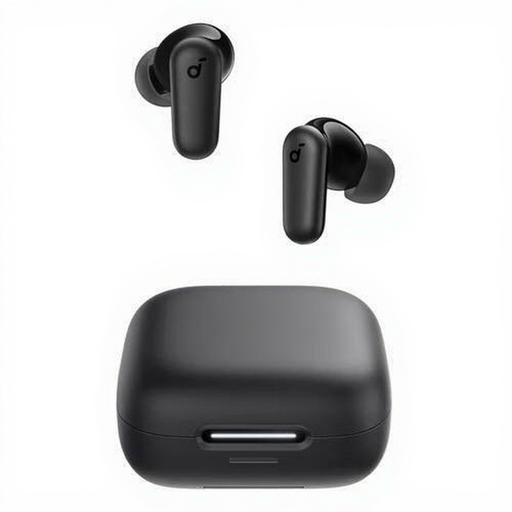
Why it suits this profile: This compact model is designed for calls and music, and features touch controls, Bluetooth 5.4 and a charging case. It’s a practical choice for everyday use if you don’t want a bulky over-ear design.
The stated battery life is 10 hours per charge, and the model has IP54 protection against dust and splashes. The charging case and USB-C cable are included.
Bluetooth 5.4, four microphones, USB-C and up to 10 hours of playback according to the product specifications.
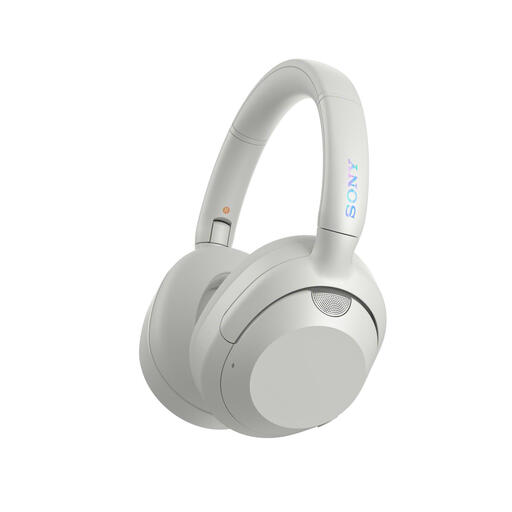
Why it suits this profile: These over-ear headphones are aimed at listeners who want active noise cancelling, a closed-back design and powerful bass modes for commuting or travelling.
You can switch ANC off or use Ambient Sound mode. According to the specifications, battery life is up to 30 hours with ANC on.
Over-ear fit, USB-C, multipoint connectivity, a microphone and a foldable design.
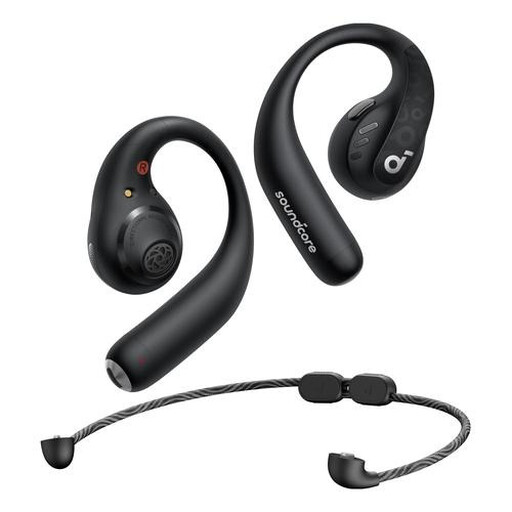
Why it suits this profile: The ear hook is designed for running, fitness and everyday movement. Its more open design lets you stay more aware of your surroundings than a fully sealing in-ear headset.
According to the product information, the IPX5 rating makes it suitable for sweat and splashes, but not submersion. The ear hook helps keep the headphones in place as you move.
Bluetooth 5.3, support for AAC, LDAC and SBC, buttons and up to 14 hours of continuous playback.
We’ve put together a complete, up-to-date list of products that meet these strict selection criteria and the applicable European safety regulations.
First, charge the headphones and switch on Bluetooth on your smartphone. Put the product into pairing mode, then select its model name from the Bluetooth list. A pop-up or confirmation may appear the first time you connect. If it doesn’t work, remove the old pairing and try again.
Their lifespan depends on the battery, how you charge them and how you store the product. Look out for signs such as a battery that drains quickly, damaged ear cushions or a charging case that no longer closes properly. Use the supplied or a suitable USB-C charger, and avoid heat and prolonged exposure to moisture.
That depends on the fit and the IP rating. Sports earbuds with ear hooks often stay in place better during movement. A model with IPX4 or IPX5 may offer protection against sweat and splashes according to its product specifications, but always check the instructions. Keep the volume low enough, and don’t use noise cancelling in situations where you need to hear traffic or other warnings.
