
Vandaag of morgen in huis

Kwaliteit gegarandeerd

Welkomstaanbiedingen ontgrendelen: GRATIS bezorging | Tot 80% korting | Gratis 30 dagen JoyPlus-proefperiode
Download de app
A wireless Bluetooth headset may seem simple to choose at first glance. However, small differences in fit, battery life and connectivity can quickly become noticeable after purchase. A pair of headphones with plenty of features on paper will not always suit the way you use them on the train, in the office or during a long gaming session.
Focus on verifiable specifications rather than terms such as “premium sound” or “smart noise cancellation”. Below, you’ll find out which features matter, which pitfalls commonly arise and which models suit different user profiles.
Manufacturers usually state battery life under specific conditions. With headphones featuring noise cancellation, for example, playback time may be lower than when ANC is switched off. Volume, codec and microphone use also affect power consumption.
So check:
On product pages, look out for differences between the general description and the specifications table. Some Sony WH-CH520 listings, for example, state up to 50 hours in the description, while the technical specifications mention 40 hours. Treat the lowest clear figure as a cautious guideline and check the current product information before buying.
Noise-cancelling headphones use microphones and electronic processing to reduce certain background sounds. The effect varies depending on the situation. Constant low-frequency sounds, such as the noise of a train engine, are generally different from voices or sudden noises.
An ANC model is therefore not automatically suitable for everyone. Active noise cancellation can be useful when working from home, while transparency mode is handy when you still need to hear traffic, colleagues or announcements. Brands’ claims about the degree of noise reduction are specific to each brand, so treat them as product information rather than a guaranteed result in every environment.
Lightweight on-ear headphones are easy to carry, but the ear cushions rest on your ears. Over-ear headphones generally enclose your ears more effectively, but may feel warmer and take up more space in your bag.
As well as the weight, check:
Bluetooth 5.0, 5.2 or 5.4 mainly indicates the Bluetooth generation being used. Your experience also depends on the phone, laptop or tablet you connect to. Check that your devices are compatible and which audio codecs are supported, such as SBC, AAC or LDAC.
A multipoint Bluetooth headset can be connected to two devices at the same time. This is useful when listening to music on your laptop while taking phone calls on your smartphone. Multipoint does not necessarily mean that two audio sources can be played simultaneously; the headphones usually switch between devices.
A frequency range, such as 20 Hz to 20 kHz, indicates the range that the speakers can reproduce according to the specification. It does not fully describe how the music will sound. The driver, housing, digital processing and your personal preferences also play a part.
If you mainly listen to streaming services, you will not necessarily benefit from the most expensive codec. SBC and AAC offer broad compatibility. LDAC may be useful for devices that support it, but check that both the source and the headphones are compatible with the codec.
Headphones with a microphone are suitable for calls and online meetings, but microphone quality can vary depending on the surroundings. For gaming, a detachable microphone is often more practical than a built-in one.
A wireless gaming headset with a 2.4GHz dongle may offer a different connection from Bluetooth. This type of dongle is particularly relevant when low latency is important. Always check that the headset works with your platform, such as PC, PlayStation, Xbox, Nintendo Switch or smartphone.
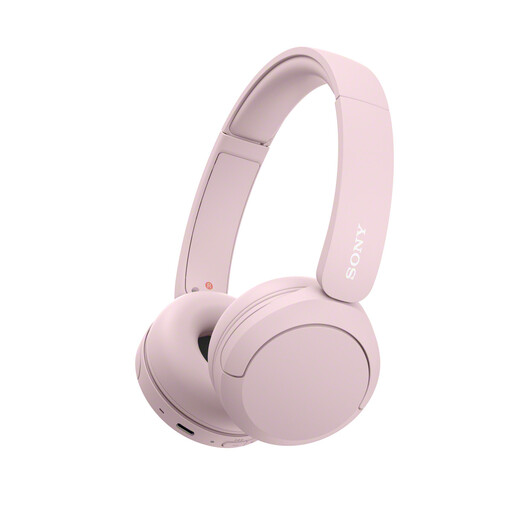
Why it suits this profile: This compact on-ear model weighs 147 grams and has an adjustable headband, microphone and multipoint connectivity. It is well suited to everyday listening, travelling and making calls without having to carry a large over-ear model.
The specifications state the weight, Bluetooth, multipoint and USB-C connectivity. There is no active noise cancellation, so you are not paying for a feature you may not need.
147 grams, AAC/SBC codecs, USB-C and multipoint connectivity. Available in several colours, including pink, yellow, blue and beige.
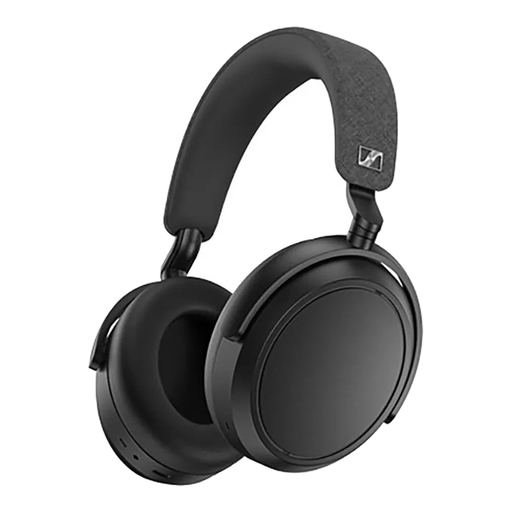
Why it suits this profile: According to the product information, this over-ear model combines adaptive noise cancellation, transparency mode, four microphones and battery life of up to 60 hours.
Battery life is listed as a specific specification, and there is a wired 3.5mm option. This makes you less dependent on Bluetooth and the remaining battery charge.
Up to 60 hours of playback according to the product description, adaptive ANC, transparency mode, 42mm transducers and app settings.
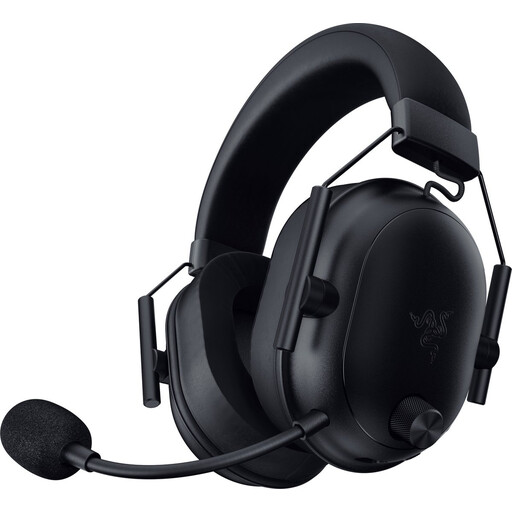
Why it suits this profile: This wireless gaming headset supports both Bluetooth and a 2.4GHz connection via a USB-C dongle. The detachable microphone and compatibility with several gaming platforms make it suitable for gaming and online communication.
Connectivity is not limited to Bluetooth. The dongle is designed for low-latency gaming, while the microphone can be removed when you are out and about.
50mm drivers, stated battery life of up to 70 hours, Bluetooth 5.2, USB-C dongle and support for PC, PlayStation, Xbox, Switch and mobile devices.
We have put together a complete, up-to-date list of products that fully meet these strict selection criteria and the applicable European safety regulations.
Use this quick checklist before placing your order:
Switch on Bluetooth on your phone, put the headphones into pairing mode and select the product name from the list of available devices. With some models, Google Fast Pair, Microsoft Swift Pair or a companion app can help with the initial connection.
Playback time per charge varies by model and function. The battery itself gradually ages through charging and discharging. Keep the headphones dry, avoid extreme heat and use a suitable USB-C charger. Replacing the internal battery is not a straightforward DIY task on many models.
Power consumption is generally limited during use. Active noise cancellation, high volume levels and additional features can drain the battery more quickly. Charging via USB-C uses little energy per charge, but the exact cost depends on the battery capacity and your local electricity tariff.
