
Vandaag of morgen in huis

Kwaliteit gegarandeerd

Welkomstaanbiedingen ontgrendelen: GRATIS bezorging | Tot 80% korting | Gratis 30 dagen JoyPlus-proefperiode
Download de app
A wireless Bluetooth headset may seem easy to choose: connect it to your smartphone and listen to music, podcasts or conversations. Yet the differences often lie in details that only become noticeable after a few weeks. Think ear cushions that become hot, battery life that only applies under ideal conditions, or a connection that drops out as soon as you switch devices.
By checking a few verifiable features in advance, you can avoid paying mainly for marketing terms. Below, we explain what to look out for and which models suit different uses.
Long battery life sounds appealing, but always check the conditions under which it was measured. Noise cancelling, high volume and phone calls use more power. Some models state their maximum playback time with ANC switched off.
For example, the Sony WH-CH730N is advertised with battery life of up to 75 hours when noise cancelling is switched off. The Sony WH-CH520 is listed with up to 50 hours, while other specification fields mention a lower figure. So check the current product page and manual before ordering.
A noise-cancelling headset or ANC headset uses microphones and electronics to reduce ambient noise. The result varies depending on the type of sound. Low, consistent sounds such as the noise of a train are generally easier to suppress than voices or sudden noises.
Also pay attention to the difference between active noise cancellation and passive sound isolation. A good fit remains important for both in-ear earbuds and over-ear headphones. Claims such as “up to -50 dB” come from the brand’s or seller’s product information and do not guarantee the same experience in every environment.
An IPX rating indicates the level of water exposure against which a product is protected under the relevant test conditions. IPX5 does not automatically mean that earbuds are suitable for submersion or swimming.
The MINISO MS106 is listed with IPX5 and is therefore intended, according to the product description, for rain, sweat and everyday use. For swimming, you need a product whose manufacturer explicitly states that it has a swimming mode and is suitable for underwater use. Also always check that the charging port is completely dry before charging.
Choose the style based on how you plan to use it:
Do not use a model while driving or in situations where you need to hear surrounding sounds clearly. Keep the volume moderate and take regular breaks.
Bluetooth is widely supported, but features are not available on every device. Check:
The Sony PlayStation Pulse Explore uses PlayStation Link to connect to devices including the PS5, and also supports Bluetooth for mobile devices and PCs. For the PS5, the included or required PlayStation Link adapter is an important point to consider.
For working from home and phone calls, the number and positioning of microphones, as well as call noise cancellation, are relevant. A brand’s claim about “AI noise cancellation” should be viewed as a stated feature, not a guaranteed result in every busy environment.
Also check whether the controls are easy to reach without picking up your phone. Physical buttons may be more convenient than touch controls on headphones, especially when walking or exercising.
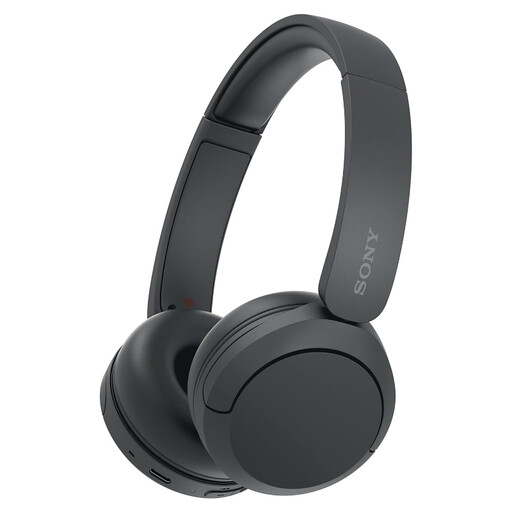
Why it suits this profile: These on-ear Sony headphones are compact and lightweight, and are designed for everyday listening to music, podcasts and conversations.
The product information mentions a reliable Bluetooth connection, buttons and multipoint. Please note: this model is not water-resistant and has no stated active noise cancellation.
On-ear design, microphone, USB-C and multipoint connection. According to the product description, battery life of up to 50 hours is possible.
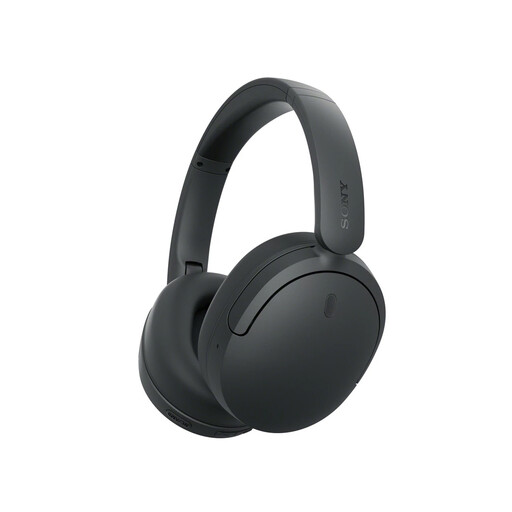
Why it suits this profile: The over-ear design, noise cancelling and app support are well suited to commuting, working from home and long listening sessions.
The battery claim is linked to use without noise cancelling. This makes it clear in advance why actual playback time may vary.
According to Sony: dual noise sensor technology, multipoint connection, foldable design and up to 75 hours of battery life with ANC switched off.
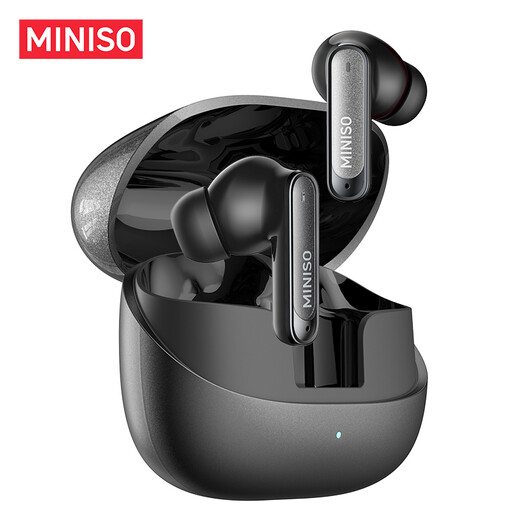
Why it suits this profile: These wireless earbuds are designed for sport, commuting, studying and calls where a compact design is important.
The IPX5 rating makes it clearer what this model is designed for: sweat and splashes, not swimming or submersion.
According to the product description: 10mm driver, six microphones for calls, fast charging and up to 55 hours of total battery life.
We have put together a complete, up-to-date list of products that fully meet these strict selection criteria and the applicable European safety regulations.
Check the following points before completing your purchase:
First charge the headphones, open your phone’s Bluetooth settings and put the device into pairing mode. Then select the name of the headphones. With wireless earbuds, this often happens automatically as soon as you open the charging case. Check the manual if the model is already connected to another device.
Battery life per charge ranges from a few hours for compact earbuds to dozens of hours for an over-ear model. Overall lifespan also depends on charging cycles, storage, temperature and maintenance. Keep earbuds in their case, keep charging ports dry and avoid prolonged exposure to heat.
Power consumption while listening is limited. However, you will need to charge the headphones or case regularly. A fast-charging function can be useful if you are often on the go. Use a suitable USB-C cable and do not charge in a damp environment.
