
Vandaag of morgen in huis

Kwaliteit gegarandeerd

Welkomstaanbiedingen ontgrendelen: GRATIS bezorging | Tot 80% korting | Gratis 30 dagen JoyPlus-proefperiode
Download de app
A wireless Bluetooth headset may seem straightforward to choose at first glance. However, appealing product claims can still lead to a disappointing purchase. For example, a long battery life does not always indicate how long the headphones will play with noise cancelling switched on. Nor is a model that feels comfortable on a train necessarily suitable for running or cycling.
Joybuy Product Recommendation Officer helps you cut through marketing language and focus on verifiable features. Pay particular attention to the following pitfalls before placing an order.
Brands often state a maximum playback time. This figure can vary depending on volume, codec, phone calls and features such as active noise cancellation. Check whether the battery life is clearly specified and whether fast charging is mentioned.
A long battery life is particularly useful for travelling, office work and everyday use. For short exercise sessions, compact Bluetooth earbuds with a charging case may be more practical.
With noise-cancelling headphones, surrounding sounds are reduced electronically. The result depends on the fit, the type of sound and the technology used. Low, constant sounds such as train or aeroplane noise are generally a different use case from voices in an office.
A brand’s own research may mention specific decibel values, but such claims do not guarantee the same experience for every user. As well as checking the ANC specification, look at the design: over-ear headphones usually provide a different seal from open-ear Bluetooth earbuds.
IP ratings indicate the conditions against which a product is protected according to the stated testing standard. IPX4, for example, indicates protection against splashing water, while a higher rating may provide greater protection. This does not automatically mean you can use every model in a swimming pool.
For swimming, you should also check whether Bluetooth works underwater. Bluetooth signals have a limited range in water. A model with internal storage or a dedicated swimming mode may therefore be more suitable than ordinary wireless earbuds. Always follow the manufacturer’s warnings and only charge a device once the charging port is completely dry.
Choose the design based on how you use it every day:
Do not just compare the stated number of hours. Also check:
According to the product information, the Marshall Major IV offers more than 80 hours of wireless playback, wireless charging and a fast-charging function. The Sony WH-CH520 is described as having up to 50 hours of battery life, while the technical specifications also state 40 hours. This difference shows why it is sensible to check both the product specifications and the usage conditions.
Bluetooth 5.2, 5.3, 5.4 or 6.0 describes the connection standard, but it does not by itself indicate how stable the experience will be at home. Your phone, laptop and the codec used also play a part.
Multipoint Bluetooth is useful when you want to stay connected to a smartphone and laptop at the same time. For example, you can pause music when a work call comes in. For gaming, a low-latency mode is also relevant. Check whether this function is actually listed for the model and whether it is available on all devices.
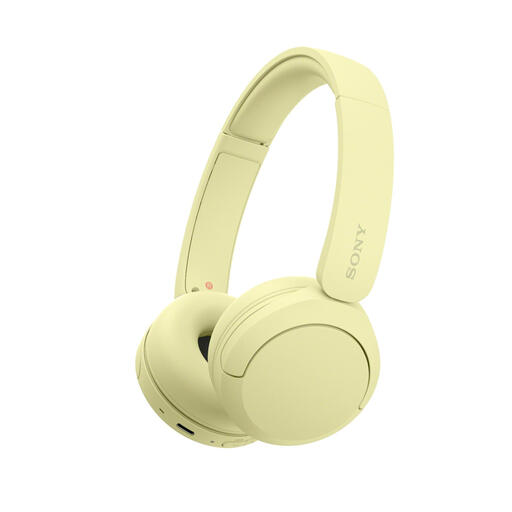
Why it suits this profile: Lightweight on-ear headphones for everyday listening, commuting and simple operation.
The technical data lists the weight, Bluetooth codecs and multipoint. This allows you to check the key features instead of relying solely on a battery-life claim.
147 grams, USB-C, microphone, multipoint and up to 50 hours of battery life according to the product information.
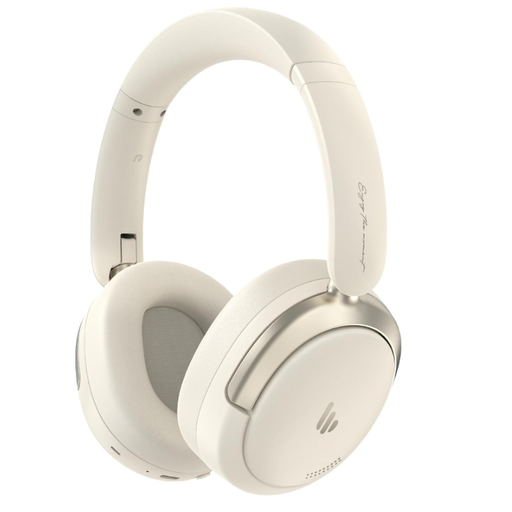
Why it suits this profile: Over-ear headphones for users who value audio features, comfort and connections to multiple devices.
The product information lists hybrid active noise cancellation, a foldable design and dual-device connectivity. However, check that the fit suits your ears.
40mm drivers, Bluetooth 5.4, a stated battery life of 45 hours and connection to two devices.
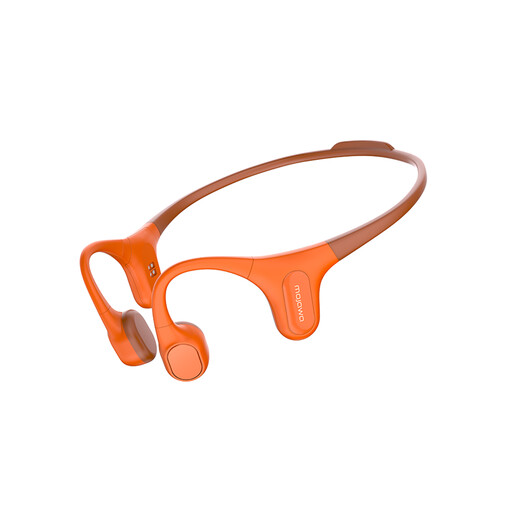
Why it suits this profile: Designed for running, cycling, swimming and workouts where an open design may be preferable.
The product name states IP68 and built-in storage. Only use the device according to the instructions, rinse it after exposure to salt or chlorinated water, and dry it completely before charging.
Bone-conduction design, 32 GB of storage according to the product title, and a use case that mentions swimming and outdoor sports.
We have put together a complete, up-to-date list of products that fully meet these strict selection criteria and the applicable European safety regulations.
First charge the headphones, switch on Bluetooth on your phone and put the device into pairing mode. Then select the product name from the Bluetooth list. If the headphones have been connected before, they will often reconnect automatically. If that does not work, remove the old pairing and try again.
The lifespan depends on battery wear, charging frequency, storage and exposure to moisture or heat. Store the model in a dry place, charge it according to the manual and avoid using it at maximum volume for extended periods. For sports models, regular cleaning according to the instructions is particularly important.
After purchase, the direct running costs are limited to the electricity needed for charging. A USB-C pair of headphones generally uses little energy per charge. Models with a charging case, dedicated app or replaceable accessories may incur additional costs over time. You should therefore also check the cable supplied, warranty terms and availability of spare parts.
