
Vandaag of morgen in huis

Kwaliteit gegarandeerd

Welkomstaanbiedingen ontgrendelen: GRATIS bezorging | Tot 80% korting | Gratis 30 dagen JoyPlus-proefperiode
Download de app
Wireless Bluetooth headphones come in many forms: from compact wireless earbuds for commuting to open-ear models for running and bone conduction headphones for swimming. The differences are not limited to sound or price. Fit, water resistance, battery life and call quality also determine whether a model remains comfortable in everyday use.
Marketing copy can sometimes make it difficult to compare specifications properly. Pay particular attention to these common pitfalls.
Bluetooth 5.3, 5.4 or 6.0 may sound appealing, but the version does not automatically determine sound quality. Also check the range, supported audio codecs and compatibility with your smartphone or tablet. A model with AAC, SBC or LDAC may perform differently depending on the device being used.
A range of 10 metres is a common product specification under ideal conditions. Walls, busy wireless environments and other devices can reduce the actual range.
Look at the IP rating rather than relying solely on terms such as water-resistant or sports-ready.
Do not charge a wet product immediately. For swimming models, you should also check whether Bluetooth works while swimming or whether music must first be copied to the internal memory.
A manufacturer may state the battery life of one earbud, the total usage time with the charging case or the usage time at a particular volume. These figures are therefore not always directly comparable. Check:
For calls, the number of microphones is also relevant, as is where you use the product. Wind, traffic and background noise can affect speech clarity.
Bluetooth earbuds with silicone tips partially seal the ear. This can help with sound isolation, but choosing the right size is important. A poor fit is more likely to cause pressure, looseness or less consistent bass reproduction.
A sports headset with ear-hooks generally stays more secure during running or fitness sessions. Open-ear and ear-clip models rest on or around the ear. They allow more ambient sound through, which can be useful when cycling or running on busy streets. They do not replace the need to stay alert in traffic.
A bone conduction headset works with transducers near the cheekbones instead of speakers inside the ear canal. The listening experience therefore differs from that of traditional in-ear headphones. For each model, check how the manufacturer describes its operation and intended use.
Noise cancelling earbuds use electronics to reduce ambient sound. According to brands’ own information, active noise cancellation can reduce distracting sounds in certain situations, but performance depends on fit, frequency and surroundings. Do not expect every sound to disappear completely.
An open-ear headset is specifically designed to keep ambient sound audible. Choose based on how you plan to use it: a sealed design for train journeys or studying, and an open design for sport and situations where you want to remain aware of what is happening around you.
For everyday use, physical buttons or reliable touch controls are useful. Check whether you can use them to pause playback, adjust the volume and answer calls. A wireless headset with a microphone is useful for working from home and making calls, but the product specification does not mean that calls will sound clear in all conditions.
AI features, such as support for a voice assistant or translation apps, also require some nuance. For the HTC NE40, the product description states that, after pairing via Bluetooth, you can use a translation app for real-time translation. This is a possible use of the combination of earbuds, phone and app, not an independent guarantee of translation results.
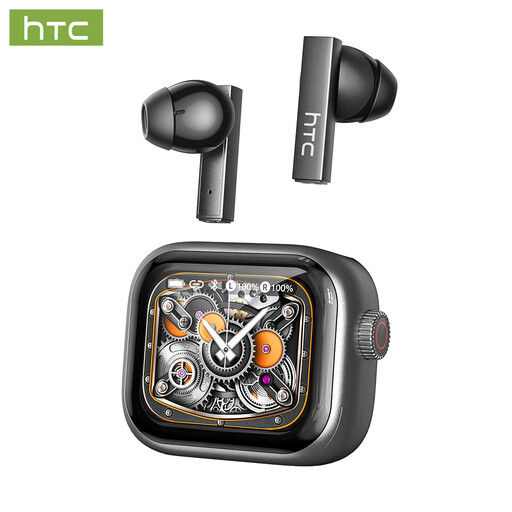
Why this suits the profile: A compact TWS option for the office, studying, calls and everyday use. The earbuds support Bluetooth 6.0 and feature touch controls.
The product specifications list approximately 3.5 hours of playback per earbud and up to 24 hours with the charging case separately. This makes it clear what you can expect from each charge.
13mm drivers, built-in microphone, LED display and a stated Bluetooth range of 10 metres.
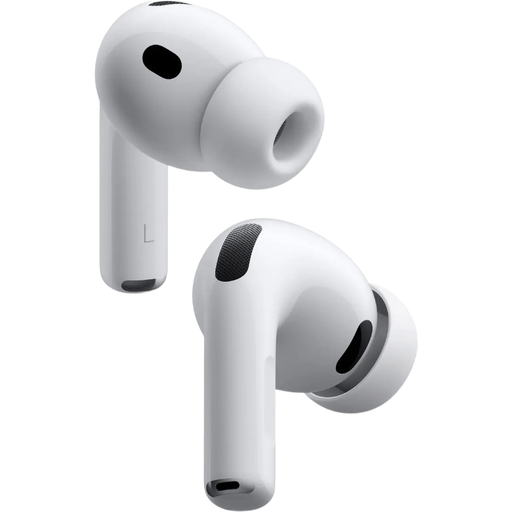
Why this suits the profile: Designed for Apple users looking for active noise cancellation, spatial audio and a wide choice of fit options.
The product information lists five sizes of silicone ear tips. This gives you more flexibility to find the right fit, rather than relying solely on marketing claims about comfort.
According to the product description, up to 8 hours of use with noise cancelling and an IP57 rating.
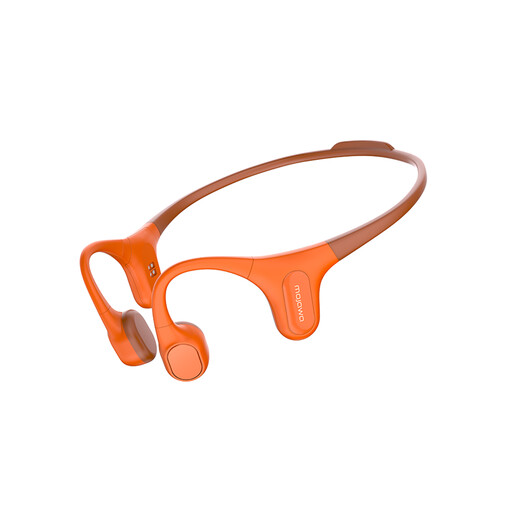
Why this suits the profile: Designed for running, cycling, fitness and use when you do not want to wear earbuds inside the ear canal.
The stated IP68 rating and built-in 32GB memory make the intended use clearer than a general claim such as “for every sport”. Follow the manual when using it for swimming and dry the product before charging.
Open-ear bone conduction design, 32GB internal memory and explicit positioning for swimming and outdoor sports.
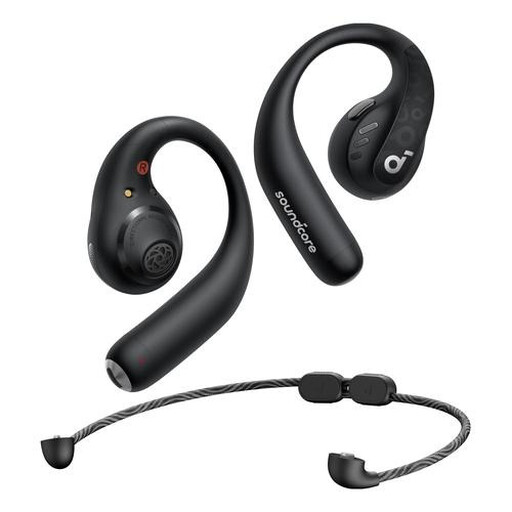
Why this suits the profile: The ear-hook fit is designed to stay securely in place during sport, walking and everyday travel.
The product information specifically lists IPX5, buttons and 14 hours of continuous playback. This allows you to assess fit, controls and battery life separately.
Bluetooth 5.3, support for AAC, LDAC and SBC, plus controls for music, volume and calls.
We have put together a complete, up-to-date list of products that fully meet these strict selection criteria and the applicable European safety regulations.
Charge the headphones first. Then open the Bluetooth settings on your phone, put the product into pairing mode and select its name from the list. With some TWS earbuds, this happens automatically when you open the charging case. Remove an old pairing if the product does not appear, and check that the device is not already connected to another phone.
Usage time per charge varies considerably. The product details for the models mentioned range from approximately 3.5 hours per earbud to 14 hours for the Soundcore AeroFit Pro. A charging case can extend the total usage time. The lifespan of the built-in battery depends on charging cycles, temperature, storage and use. Keep the headphones dry and charge them using the recommended cable or charger.
After purchase, the direct costs are usually limited to the electricity needed for charging. Charging costs are generally small, but remember to factor in the possible replacement of earbuds, a charging case or accessories. Before buying, also check the warranty, returns policy and availability of a manual. This way, you compare not only the price but the product’s overall practical value.
