
Vandaag of morgen in huis

Kwaliteit gegarandeerd

Welkomstaanbiedingen ontgrendelen: GRATIS bezorging | Tot 80% korting | Gratis 30 dagen JoyPlus-proefperiode
Download de app
Wireless Bluetooth headphones may seem easy to choose at first. However, marketing jargon, unclear battery-life claims and a poor fit can leave you regretting your purchase after just a few weeks. If you’re looking to buy Bluetooth headphones, it’s worth first thinking about where and how often you’ll use them.
Manufacturers sometimes quote a long battery life, but this often applies only under specific conditions. Noise cancelling, high volume, phone calls and an active equaliser can all reduce playtime. So check whether the stated battery life applies with ANC switched on or off.
Look out for conflicting information, too. The Sony WH-CH520 product description quotes up to 50 hours of battery life, while the product specifications state 40 hours. Treat this as a reason to check the current product page and manual, rather than as a guarantee of a set number of hours.
Noise-cancelling headphones use microphones and electronics to reduce certain sounds around you. Low, constant sounds such as train or plane noise are usually better suited to this technology than voices or sudden sounds. Brands also state that performance varies depending on your surroundings, fit and selected mode.
Transparency mode can be useful on public transport or in the office. For road safety, it’s still important to be able to hear enough of what’s going on around you. Don’t use headphones while cycling, driving or in other situations where you need to stay aware of your surroundings.
On-ear headphones rest on your ears and are often lighter and more compact. Over-ear headphones surround your ears and may offer better passive sound isolation, but they’re generally larger and heavier. Check the pressure from the headband, the thickness of the ear cushions and how adjustable the headphones are.
A pair that feels comfortable for a few minutes in a shop may start to pinch during a long train journey or working day. Check the weight, too: a difference of a few dozen grams can be noticeable over extended periods.
Bluetooth versions such as 5.2, 5.3 or 6.0 don’t tell you everything about the connection. Your experience also depends on the device you use, the codec and the software. For everyday use, these are the main things to consider:
As well as maximum playtime, look at fast charging and the charging port. Some models provide extra listening time after just a few minutes of charging. USB-C works with many modern devices, but always check whether the right cable is included.
Wireless headphones with long battery life are especially handy for travelling and the daily commute. Don’t expect the stated battery life to remain the same in all conditions.
For a Bluetooth headset with a microphone, the number and placement of the microphones, as well as software-based noise reduction, are relevant details. According to the manufacturer, a model with multiple microphones may help reduce background noise, but call quality also depends on wind, how far you are from your phone and the calling app you use.
If you mainly use your headphones for meetings, don’t just look at music features. Check whether they have buttons for muting, answering calls and switching between devices.
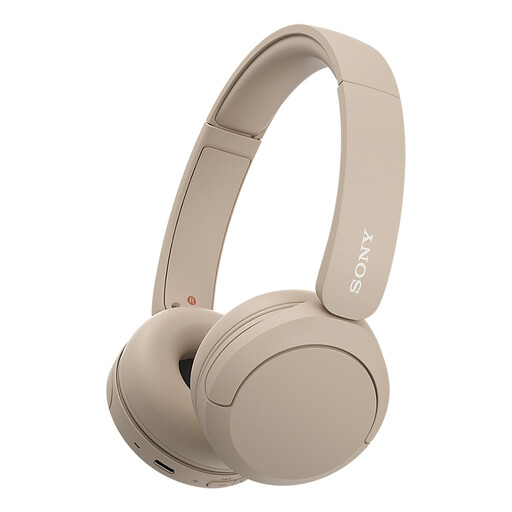
Why it suits this profile: These lightweight on-ear headphones are well suited to music, podcasts and calls, without lots of extra features to make them complicated to use.
The specifications list an adjustable headband, soft ear cushions and multipoint. Be sure to check the current battery-life information, as the stated figures differ.
147 grams, microphone, multipoint, Bluetooth and USB-C, according to the product details.
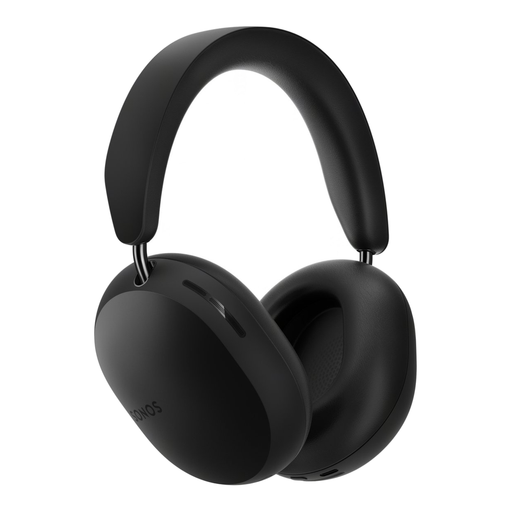
Why it suits this profile: The over-ear design, active noise cancellation and spatial audio support make these headphones a good choice for listening to music and watching films.
The product information distinguishes between active noise cancellation and Aware mode. Battery life is stated as up to 30 hours.
Multipoint, microphone, USB-C audio and active noise cancelling, according to the product specifications.
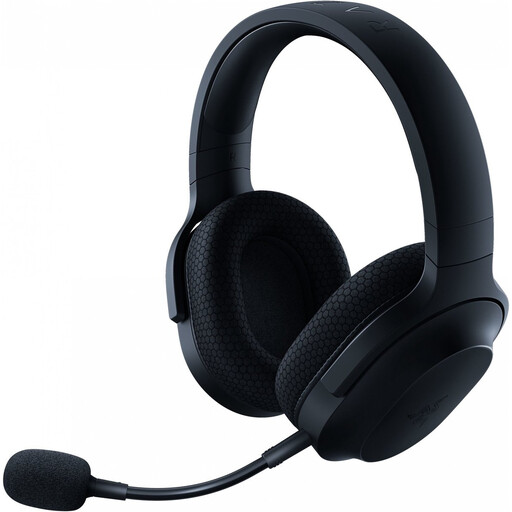
Why it suits this profile: This wireless gaming headset is designed for users who game, make calls and play media across multiple platforms.
As well as Bluetooth 5.2, this model has a 2.4GHz dongle and a 3.5mm connection. That means you’re less reliant on a single connection type.
Detachable cardioid microphone, around 50 hours of battery life and support for PC, PlayStation, Nintendo Switch and Android.
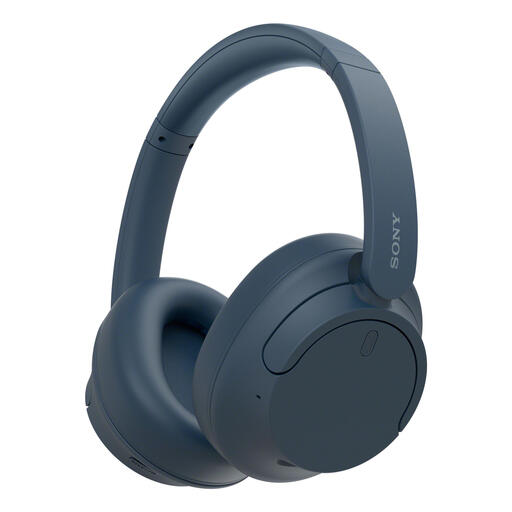
Why it suits this profile: The over-ear fit, ANC and multipoint feature make these headphones a good choice for commuting, working from home and switching between calls on your laptop and smartphone.
Battery life is listed separately for ANC on and off: up to 35 and 50 hours, according to the product information. This makes it clear which setting affects the comparison.
Active noise cancellation, multipoint, USB-C and a weight of 192 grams, according to the product specifications.
We’ve put together a complete, up-to-date list of products that meet these strict selection criteria and current European safety regulations.
Put your headphones into pairing mode and open the Bluetooth settings on your smartphone. Select the product name from the list and confirm the connection. On some models, Fast Pair, Swift Pair or a brand app can help with the initial setup. Then check that the microphone and audio volume are working as you’d like.
Their lifespan depends on the battery, hinges, ear cushions and how you use them. Keep your headphones dry, charge them with a suitable cable and avoid exposing them to heat for long periods. A model with replaceable ear cushions or a wired backup option can be useful if you want to use the device for a long time.
The headphones use a small built-in battery while you’re listening. Your smartphone’s power consumption may increase slightly when Bluetooth is on, but this is generally limited during everyday use. Features such as active noise cancellation, high volume and a continuous multipoint connection can drain the battery faster.
