
Vandaag of morgen in huis

Kwaliteit gegarandeerd

Welkomstaanbiedingen ontgrendelen: GRATIS bezorging | Tot 80% korting | Gratis 30 dagen JoyPlus-proefperiode
Download de app
A pair of wireless Bluetooth headphones may seem simple to choose at first glance. However, models vary considerably in comfort, connectivity, microphone quality and battery life. A low price can be tempting, but an unsuitable fit or missing connection is often something you only notice after buying.
Pay particular attention to these common pitfalls:
On-ear headphones such as the Sony WH-CH520 are compact and relatively light at 147 grams. That makes them practical for commuting and everyday use. However, the ear cushions sit on your ears, which may be less comfortable for some users when worn for long periods.
Over-ear headphones surround your ears. This can provide better isolation from background noise and a roomier fit, but these models are generally larger and heavier. According to the product specifications, the Sony ULT WEAR weighs 255 grams, while the Soundcore Space One weighs 259 grams.
When choosing an over-ear model, pay attention to:
Headphones with long battery life are useful when travelling, working or listening every day. Do not just look at the maximum number of hours. Also check the fast-charging function and charging port.
The Sony WH-CH520 product information states up to 50 hours of use and 1.5 hours of listening after 3 minutes of charging. However, the technical specifications also state 40 hours of battery life. This difference shows why you should check the full product specifications before buying.
The Marshall Major V is described as offering more than 100 hours of wireless playback and 15 hours of use after 15 minutes of charging. The Razer Barracuda X states up to 50 hours. These are quoted figures; actual battery life depends on volume, connection and the functions in use.
Bluetooth 5.2 or 5.3 indicates which Bluetooth version is supported, but it does not tell you everything about sound quality. Also check:
A Bluetooth headset with multipoint is useful if you want to switch between a laptop and smartphone while working. For gaming, a 2.4GHz connection via a USB-C dongle can be a practical addition to Bluetooth.
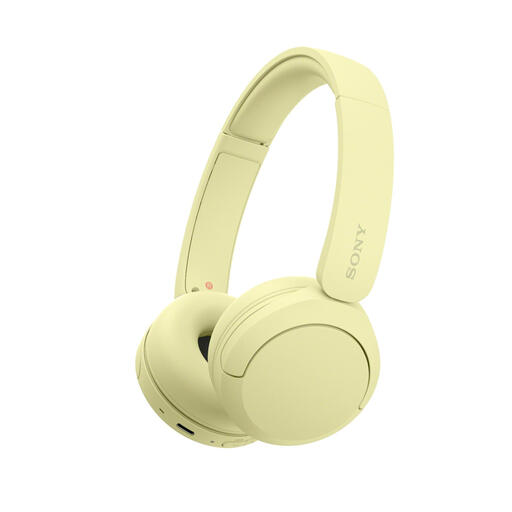
Why it suits this type of user: These lightweight on-ear headphones are suitable for music, podcasts, calls and everyday travel. The adjustable headband and buttons on the ear cup keep operation simple.
The specifications clearly state the weight, Bluetooth 5.2, microphone and multipoint support. However, check the stated difference between 40 and a maximum of 50 hours of battery life.
147 grams, USB-C, AAC/SBC codecs and multipoint connectivity.
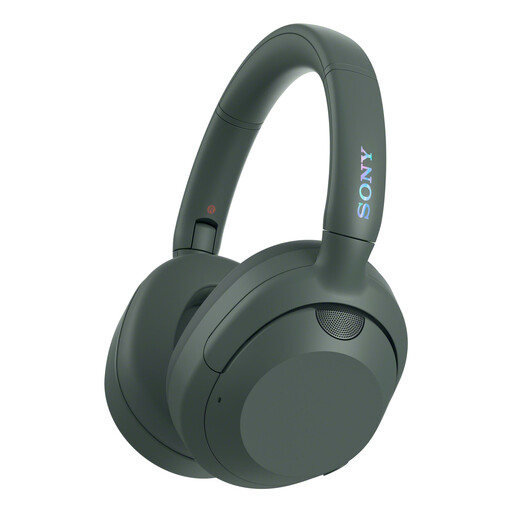
Why it suits this type of user: An over-ear model for travellers and music lovers looking for active noise cancellation, an ambient mode and powerful bass.
The product description mentions both active noise cancellation and Ambient Sound. This makes it clearer which listening modes are available than a vague claim about “noise-free” listening.
Over-ear design, multipoint, 3.5mm cable and up to 30 hours with noise cancelling according to the product specifications.
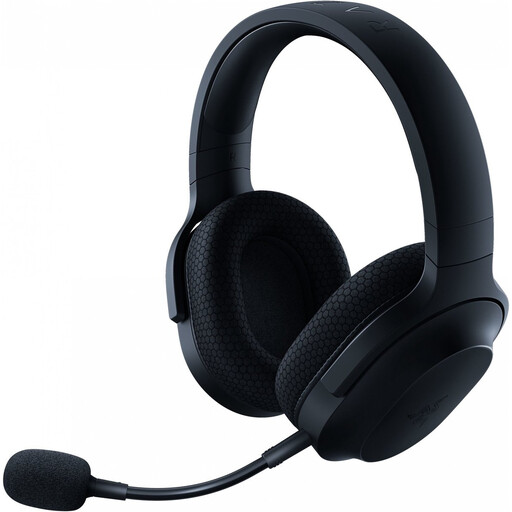
Why it suits this type of user: This gaming headset is designed for users who play on PC, PlayStation, Nintendo Switch or Android and also want to listen wirelessly while travelling.
As well as Bluetooth 5.2, this model uses a 2.4GHz USB-C dongle and a 3.5mm connection. The detachable microphone means you do not have to rely on a small built-in microphone for voice chat.
40mm drivers, detachable cardioid microphone and up to 50 hours of battery life according to the product information.
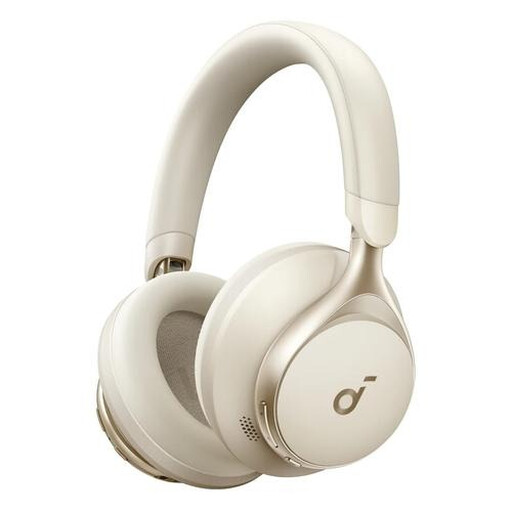
Why it suits this type of user: The combination of Bluetooth, a 3.5mm connection, three microphones and a foldable design is well suited to working, making calls and travelling.
The wired option provides an alternative when the battery is flat or when you do not want to use Bluetooth. The product specifications also state the number of microphones.
55 hours of battery life according to the product information, 40mm drivers, USB-C and AUX cable.
We have put together a complete, up-to-date list of products that fully meet these strict selection criteria and the applicable European safety regulations.
Use this quick checklist before placing your order:
Put the headphones into pairing mode, open the Bluetooth settings on your phone and select the product name. On some models, Fast Pair or a companion app can help with the initial connection. After pairing, check that the microphone has been selected correctly for phone calls.
Battery capacity decreases over time. Battery life varies by model and depends on factors including volume, active noise cancellation and call use. A model with USB-C, fast charging and, where available, a 3.5mm cable remains practical when the battery is not fully charged.
Bluetooth is designed for wireless communication with relatively low energy consumption. Most of the power is used by the headphones themselves, particularly at high volumes and when features such as noise cancelling are active. Switch the headphones off when you are not using them and charge them with a suitable USB-C cable.
